Electronics / Vaping Devices
Innokin GO Z Pen Kit User Manual
Quick guide for the Innokin GO Z Pen Kit. Learn how to fill the tank, replace the Z-coil, understand LED battery indicators, and troubleshoot common device protections.
Table of contents
Manual images
Click an image to enlargeQuick guide from the manual
The Innokin GO Z is a pen-style vaping device featuring a 1500mAh battery and a 2ml tank. To ensure optimal performance, always keep the tank at least 1/3 full and wait 5 minutes after filling a new coil to allow it to prime. The device uses a simple 5-click power on/off mechanism and features LED indicators to show battery status and safety alerts.
Components
The device consists of the following main parts:
- Top fill cap
- 2ml Tank
- Z-coil
- Air flow control ring
- 510 connection
- Battery with LED power level indicator
- Micro-USB charge port
How to use
Filling the tank:
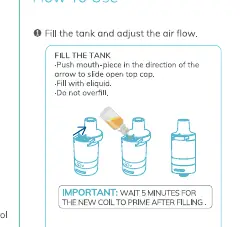
- Push the mouthpiece in the direction of the arrow to slide the top cap open.
- Fill with e-liquid. Do not overfill.
- Wait 5 minutes for the new coil to prime after filling.
- Adjust the air flow by turning the base to your preferred setting.
Powering on/off:
- Click the power button 5 times to turn the device on or off.
Coil replacement
Ensure the tank is empty before changing the coil:
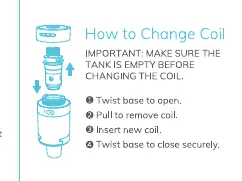
- Twist the base to open the tank.
- Pull to remove the old coil.
- Insert the new coil.
- Twist the base to close securely.
Battery and LED indicators
The LED light indicates the current battery level:
- Green: 70% - 100%
- Red & Green: 20% - 70%
- Red: Below 20%
When fully charged, the LED will show green. Use a high-quality 5V wall charger and the included micro-USB cable.
Protections
The device includes safety features indicated by flashing LED lights:
- Low voltage protection: Red LED flashes 4 times. Charge the battery.
- Short circuit protection: Red & Green LED flash 4 times. Check the tank/coil and replace the coil if necessary.
- Time out protection: Red & Green LED flash 3 times. Press the button again.
- High temperature protection: If the PCB temperature exceeds 115°C, the device will reduce power until it returns to a safe operating temperature.
Specifications
- Device Dimensions: 20x129mm
- Tank Capacity: 2ml
- Coil Resistance: 1.6 ohm (13W)
- Battery Capacity: 1500mAh
- Output Wattage: 13W - 16W
- Charging Current: 800mA/3.7V
Important notes
- Keep the 510 connection clean of debris and e-liquid.
- Do not vape if the tank is empty.
- Replace the coil if you notice a burnt taste or a reduction in flavour/vapour.
- Do not leave the device charging unattended.
Manufacturer information
Innokin
Practical help
Common problems
Red LED flashes 4 times
Low voltage protection. Charge the battery.
Red & Green LED flash 4 times
Short circuit protection. Check the tank/coil and replace the coil.
Red & Green LED flash 3 times
Time out protection. Press the button again.
Device gets too hot
High temperature protection (PCB > 115°C). The device will reduce power automatically until it cools down.
Before use
- Ensure the tank is at least 1/3 full for best longevity.
- Wait 5 minutes after filling a new coil to prime it.
- Ensure the 510 connection is clean.
- Use a high-quality 5V wall charger.
- Do not vape if the tank is empty.
Specs in practice
- Battery Capacity
- 1500mAh provides the power for the device.
- Tank Capacity
- 2ml of e-liquid storage.
- Coil Resistance
- 1.6 ohm coil designed for 13W output.
Images and diagrams
- Top fill mechanism: Slide the top cap in the direction of the arrow to open.
- Coil replacement: Twist the base to open, pull out the old coil, insert the new one, and twist the base to close.
Model compatibility
- Compatible with Z-coils.
- Requires 5V wall charger.

Manual page author
David Miller
Documentation analyst
Organizes user manual content into clear summaries, with attention to model details, product context, and everyday usability.