Electronics / Vaping Devices
Vaporesso XROS Pod System User Manual
Quick start guide and user manual for the Vaporesso XROS pod system. Learn how to fill the pod, adjust airflow, charge the device, and understand LED indicators and safety protections.
Quick answers from the manual
Quick answer
- The Vaporesso XROS is a pod system. To turn it on/off, click the power button 5 times within 2 seconds. To vape, inhale directly or press the power button. p. 3, 5
Key actions
- Filling the pod p. 4
- Adjusting airflow p. 5
First start
- Charge the device, fill the pod, wait 5 minutes, then click the power button 5 times to turn on. p. 4, 5
Problems and fixes
LED flashes 5 times
Check for short-circuit, low/high resistance, or no atomizer detected.
p. 5Maintenance and reset
- Replace the pod when flavor or vapor production decreases. p. 4
Technical specifications
| Parameter | Value | Meaning | Pages |
|---|---|---|---|
| Battery Capacity | 800mAh | Internal battery capacity | p. 3 |
| Charging Current | DC 5V/1A | Charging requirements | p. 3 |
Where to find it in the PDF
- Device Overview p. 3
- Use Instructions p. 4
- Protections p. 5
Table of contents
Manual images
Click an image to enlargeQuick guide from the manual
The Vaporesso XROS is a compact pod system. To power the device on or off, click the power button 5 times within 2 seconds. You can vape by inhaling directly or by pressing the power button. Always wait 5 minutes after filling a new pod to allow the e-liquid to soak into the coil.
Device Overview
The device consists of a battery unit and a replaceable pod. Key components include:
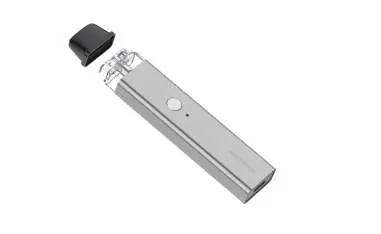
- Drip Tip: The mouthpiece, which snaps off for filling.
- Filling Hole: Located under the drip tip.
- Airflow Toggle: Located on the back of the device to adjust airflow.
- LED Indicator: Shows battery level and protection status.
- Power Button: Used for turning the device on/off and firing.
- Type-C USB Port: Located at the bottom for charging.
Getting Started
Replacing the Pod: Pull the used pod out of the device and firmly insert a new one.
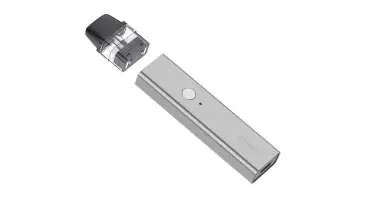
Filling the E-liquid:
- Snap off the drip tip from the pod.
- Insert the e-liquid bottle tip into the filling slot.
- Press down and squeeze the e-liquid into the slot.
- Reinstall the drip tip and ensure it is securely closed.
- Wait 5 minutes before vaping to ensure the coil is fully saturated.
Airflow Adjustment
Use the airflow control toggle on the back of the device to adjust the airflow according to your vaping preference.
Charging and Battery Status
Connect the Type-C cable to the device. The LED indicator will breathe in red while charging and turn green when fully charged.
Battery Levels:
- High (70%-100%): Green LED
- Medium (30%-70%): Blue LED
- Low (0%-30%): Red LED
Protections
The device includes several safety features. If the LED flashes, it indicates a protection trigger:
- Low/High Resistance, Short-circuit, No Load: LED flashes 5 times, output stops.
- Low Voltage, Auto-Shut off (vaping > 8s): LED flashes 3 times, output stops.
- Over Charge: Charging stops automatically.
Safety Warnings
This device is intended for use with compatible e-liquids. It is not suitable for non-smokers, pregnant or breastfeeding women, or individuals under the legal smoking age. Do not use if you have heart disease, stomach/duodenal ulcers, liver or kidney problems, or are taking specific medications like Theophylline, Ropinirole, or Clozapine. Consult a healthcare professional if you experience adverse effects like nausea, dizziness, or chest pain.
Practical help
Common problems
Device not firing
Ensure the pod is firmly inserted. If the LED flashes 5 times, check for short-circuit or no atomizer detected.
LED flashes 5 times
The device has detected a short-circuit, low/high resistance, or no atomizer. Check the pod connection.
LED flashes 3 times
Battery voltage is too low or the device has auto-shut off after 8 seconds of continuous vaping.
Before use
- Charge the device fully using a standard USB charger.
- Ensure the pod is firmly inserted into the battery.
- Fill the pod with e-liquid.
- Wait 5 minutes for the coil to soak before first use.
Specs in practice
- POD Capacity
- 2ml e-liquid volume.
- Battery Capacity
- 800mAh internal battery.
Images and diagrams
- The exploded view identifies the drip tip, filling hole, airflow toggle, LED indicator, power button, replaceable pod, and Type-C USB port.
Model compatibility
- Compatible with Vaporesso XROS pods (0.8Ω and 1.2Ω mesh).

Manual page author
Michael Turner
Technical manual editor
Reviews PDF manuals for structure, safety notes, and practical product details so readers can find the right information quickly.