Electronics / Remote Controls
User Manual for Inventor Wall Mounted Air Conditioner
Quick guide and user manual for Inventor wall-mounted air conditioning systems. Includes operation, maintenance, troubleshooting, and safety instructions.
Table of contents
Manual images
Click an image to enlargeQuick guide from the manual
This manual provides essential information for operating and maintaining your Inventor wall-mounted air conditioner. Always read the safety precautions before installation or operation. If you encounter an abnormal situation, such as a burning smell, turn off the unit immediately and disconnect the power.
Unit parts and display
The indoor unit features a front panel, louver, and a display window. Note that different models may have different display windows. The display shows temperature, operation features, and error codes. Common indicators include:
- fresh: When Fresh and UV-C lamp features are activated.
- defrost: When the defrost feature is active.
- run: When the unit is on.
- timer: When the timer is set.
- CL: Indicates the Active Clean function is running.
- EC: Indicates a refrigerant leak detection.
Manual operation
If the remote control is lost or fails, you can operate the unit manually using the MANUAL CONTROL button located on the right-hand side of the indoor unit:
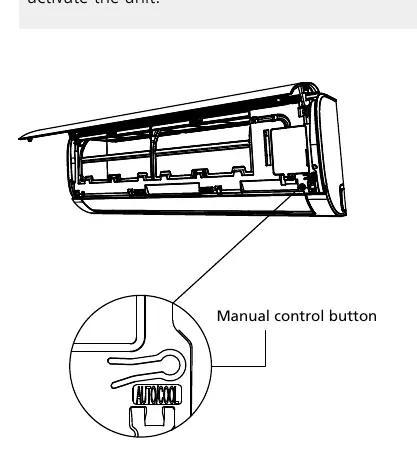
- Open the front panel.
- Press the button once for FORCED AUTO mode.
- Press again for FORCED COOLING mode.
- Press a third time to turn the unit off.
Care and maintenance
Regular maintenance is crucial for efficiency and health. Clean the air filters every two weeks:
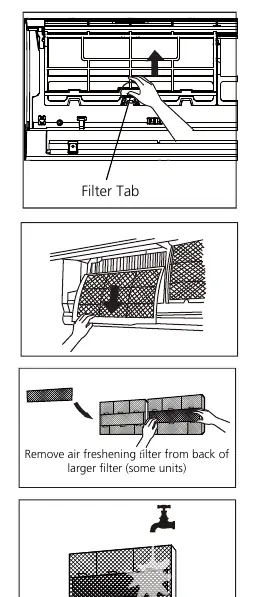
- Lift the front panel and press the tab on the filter to release it.
- Pull the filter out.
- Clean the large air filter with warm, soapy water and a mild detergent.
- If equipped with a small air freshening filter, clean it with a hand-held vacuum.
- Dry filters in a cool, dry place away from direct sunlight before reinstalling.
Troubleshooting
Before contacting a service center, check these common issues:
- Unit does not turn on: Check if the 3-minute protection feature is active. Wait 3 minutes.
- Unit changes to FAN mode: This may happen to prevent frost or when the set temperature is reached.
- White mist emitted: Normal in humid regions or during defrosting.
- Poor cooling/heating: Ensure filters are clean, doors and windows are closed, and air inlets/outlets are not blocked.
Disposal guidelines
This appliance contains refrigerant and hazardous materials. Do not dispose of it as household waste. Use designated municipal electronic waste collection facilities or return it to the retailer or manufacturer when purchasing a new unit.
Practical help
Common problems
Unit does not turn on
Check if the 3-minute protection feature is active. Wait 3 minutes after turning off before restarting.
Unit changes to FAN mode
The unit may be preventing frost formation or has reached the set temperature.
White mist emitted
This is normal in humid regions or during the defrosting process in HEAT mode.
Poor cooling or heating performance
Check if air filters are dirty, doors/windows are open, air inlets/outlets are blocked, or if there are too many heat sources in the room.
Before use
- Ensure air filters are clean.
- Check that air inlets and outlets are not blocked.
- Verify that the power cord is not damaged.
- Ensure doors and windows are closed for optimal performance.
- Check that the unit is properly plugged in.
Specs in practice
- COOL mode temperature range
- 16°C - 32°C (60°F - 90°F)
- HEAT mode temperature range
- 0°C - 30°C (32°F - 86°F)
- DRY mode temperature range
- 10°C - 32°C (50°F - 90°F)
Images and diagrams
- Manual Control Button: Located on the right side of the indoor unit, used for emergency operation when the remote is unavailable.
- Filter Removal: Lift the front panel, press the tab on the filter to release the buckle, and pull the filter out.
Model compatibility
- Not all display codes are available on all models.
- SLEEP function is not available in FAN or DRY mode.

Manual page author
David Miller
Documentation analyst
Organizes user manual content into clear summaries, with attention to model details, product context, and everyday usability.