Electronics / Headphones Earbuds
JBL Tune 125BT Bluetooth Headphones User Guide
Quick start guide for JBL Tune 125BT Bluetooth headphones, covering pairing, multi-point connection, button controls, LED status indicators, and technical specifications.
Table of contents
Quick guide from the manual
This guide provides essential instructions for setting up and using your JBL Tune 125BT headphones. Key features include automatic pairing, multi-point connectivity for up to two devices, and integrated voice assistant support.
Power on and connect
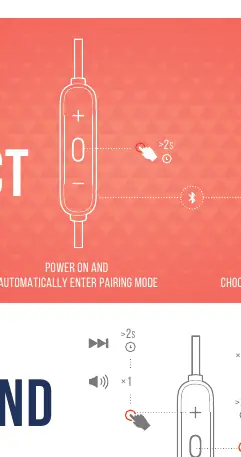
To power on the headphones and enter pairing mode automatically, press and hold the power button. On your Bluetooth device, select JBL TUNE 125BT from the list of available devices to establish a connection.
Button commands
The inline remote allows for various controls:
- Play/Pause: Single press the center button.
- Volume Control: Use the + and - buttons to adjust volume.
- Track Navigation: Long press the + button for next track, or the - button for previous track.
- Calls: Single press to answer/end a call.
- Voice Assistant: Double press the center button to activate your device's voice assistant (Siri, Google Assistant, or Bixby).
Multi-point connection
You can connect to two devices simultaneously:
- To switch music sources, pause the music on the current device and select play on the second device.
- Phone calls will always take priority.
- If one device goes out of Bluetooth range or powers off, you may need to manually reconnect the remaining device.
- To disconnect multi-point, select Forget this device on your Bluetooth settings.
Charging and LED behaviors
Charge the headphones using the provided cable. A full charge takes less than 2 hours. LED indicators show the status:
- Flashing White: BT connecting.
- Solid White: BT connected.
- Solid Red: Charging.
- LED Off: Fully charged or powered off.
- Flashing Red: Low battery.
Technical specifications
- Driver Size: 8.6 mm dynamic driver
- Battery Type: Lithium-ion (3.7V / 130 mAh)
- Music Playtime: Up to 16 hours with BT on
- Charging Time:< 2 hours
- Bluetooth Version: 5.0
- Weight: 18.3 g
- Maximum Operation Temperature: 45°C
Manufacturer information
JBL
Practical help
Common problems
Device disconnected or out of range
If a device goes out of range or powers off, you may need to manually reconnect the remaining device via your Bluetooth settings.
Need to disconnect multi-point connection
Select 'Forget this device' in your Bluetooth settings on the connected device to break the multi-point link.
Before use
- Ensure the headphones are charged (less than 2 hours for full charge).
- Verify Bluetooth is enabled on your source device.
- Check that the headphones are in pairing mode (indicated by flashing light).
- Select 'JBL TUNE 125BT' in your device's Bluetooth menu.
Specs in practice
- Music Playtime
- Up to 16 hours of continuous playback with Bluetooth enabled.
- Charging Time
- Less than 2 hours to reach full battery capacity.
- Bluetooth Version
- Version 5.0 ensures stable connectivity and power efficiency.
- Max Operation Temp
- Do not expose the device to temperatures exceeding 45°C.
Images and diagrams
- The remote control features a + button, a center multi-function button, and a - button.
- LED indicator is located on the remote control unit.
- The headphones use a magnetic design to stay together when not in use.
Model compatibility
- Supports multi-point connection for up to 2 devices simultaneously.
- Compatible with Siri, Google Assistant, and Bixby voice assistants.

Manual page author
Michael Turner
Technical manual editor
Reviews PDF manuals for structure, safety notes, and practical product details so readers can find the right information quickly.