Electronics / Headphones Earbuds
User Guide for JBL TUNE 215BT Bluetooth Earphones
A comprehensive user guide for the JBL TUNE 215BT Bluetooth earphones. This manual covers pairing, multi-point connection, button controls, charging, LED indicators, and technical specifications.
PDF source: DA · summary: English
Quick answers from the manual
Quick answer
- To connect the JBL TUNE 215BT, power on the device to automatically enter pairing mode, then select 'JBL TUNE215BT' in your device's Bluetooth settings. p. 1
Key actions
- Multi-point connection p. 1
- Charging p. 1
First start
- Power on the device; it will automatically enter pairing mode. p. 1
Show 4 more answers Show less
Problems and fixes
Device out of range or powers off
Manually reconnect the remaining device.
p. 1
Disconnect multi-point
Select 'Forget this device' on your Bluetooth settings.
p. 1Maintenance and reset
- Fully charge at least once every 3 months to prolong battery lifespan. p. 2
Technical specifications
| Parameter | Value | Meaning | Pages |
|---|---|---|---|
| Driver Size | 12.5 mm | Dynamic driver | p. 1 |
| Charging time | < 2 hrs | Time to full charge | p. 1 |
| Music playtime | up to 16 hrs | With BT on | p. 1 |
Where to find it in the PDF
- Quick Start Guide p. 1
- Multi-language instructions p. 2
Table of contents
Manual images
Click an image to enlargeQuick guide from the manual
The JBL TUNE 215BT are wireless Bluetooth earphones. This guide provides instructions on how to pair, connect, and operate your device. For optimal battery life, charge the device fully at least once every 3 months.
Power on and connect
To connect your earphones:
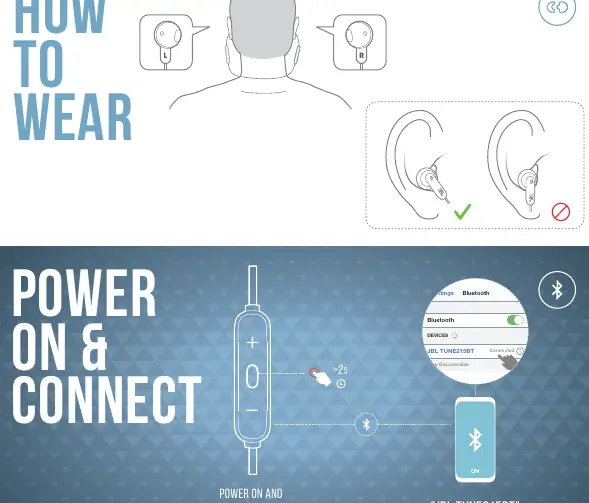
- Power on the device. It will automatically enter pairing mode.
- Open the Bluetooth settings on your device.
- Select "JBL TUNE215BT" from the list of available devices to connect.
Button commands
The earphones feature integrated controls for music and calls:
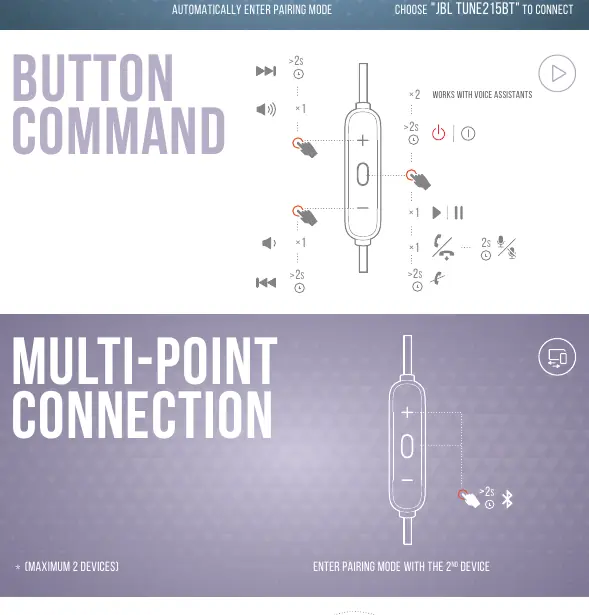
- Volume/Playback: Use the buttons to adjust volume, play/pause music, and skip tracks.
- Voice Assistant: The controls are compatible with voice assistants.
- Calls: Phone calls take priority over music playback.
Multi-point connection
You can connect up to 2 devices simultaneously:
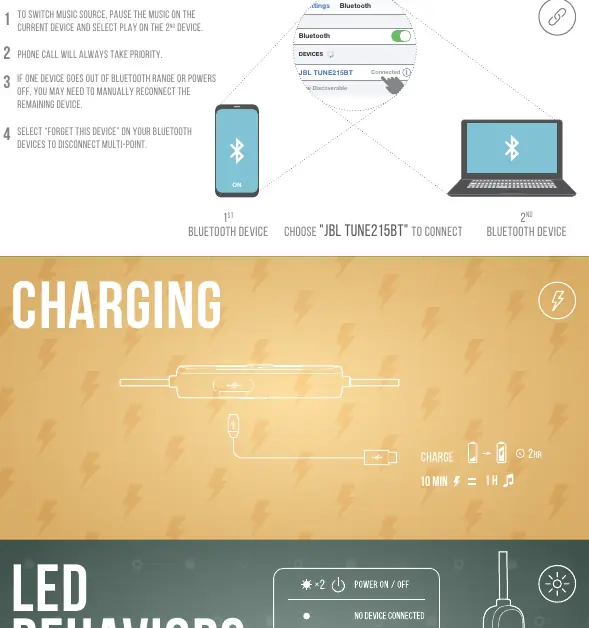
- Enter pairing mode with the second device.
- To switch music sources, pause music on the current device and select play on the second device.
- If a device goes out of range or powers off, you may need to manually reconnect the remaining device.
- To disconnect multi-point, select "Forget this device" in your Bluetooth settings.
Charging
The earphones support fast charging:
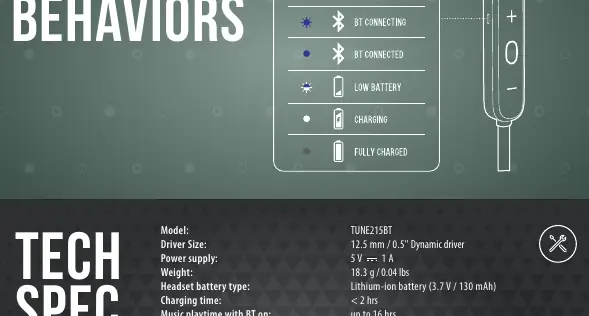
- Charging time: Less than 2 hours for a full charge.
- Fast charge: 10 minutes of charging provides 1 hour of playback.
- Battery maintenance: Fully charge at least once every 3 months to prolong battery lifespan.
LED behaviors
The LED indicator provides status updates:
- BT Connecting: Flashing light.
- BT Connected: Solid light.
- Low Battery: Flashing light.
- Charging: Solid light.
- Fully Charged: Light turns off.
Technical specifications
- Driver Size: 12.5 mm dynamic driver
- Bluetooth Version: 5.0
- Frequency Response: 20 Hz – 20 kHz
- Impedance: 20 ohm
- Music Playtime: Up to 16 hours
- Maximum Operation Temperature: 45 °C
Manufacturer information
JBL
Practical help
Common problems
Device not connecting
Ensure the earphones are in pairing mode (automatically triggered on power on) and select 'JBL TUNE215BT' in your device's Bluetooth settings.
Multi-point connection issues
Select 'Forget this device' on your Bluetooth settings to reset the connection and try pairing again.
Audio source switching
Pause music on the currently active device, then select play on the second device.
Before use
- Charge the device fully before the first use.
- Ensure Bluetooth is enabled on your smartphone or computer.
- Verify the earphones are powered on and in pairing mode.
Show more Show less
Specs in practice
- Charging Time
- Less than 2 hours for a full charge.
- Music Playtime
- Up to 16 hours with Bluetooth enabled.
- Bluetooth Version
- 5.0 for stable wireless connectivity.
Images and diagrams
- The manual includes diagrams for wearing the earphones, button controls, and LED status indicators.
Model compatibility
- Compatible with voice assistants.
- Supports multi-point connection for up to 2 devices.

Manual page author
Emily Carter
User documentation editor