Electronics / Headphones Earbuds
User Guide for JBL TUNE 225TWS Earbuds
Quick start guide for JBL TUNE 225TWS earbuds. Learn how to pair, control playback, charge, and understand LED indicators.
Quick answers from the manual
Quick answer
- To pair your JBL TUNE 225TWS, turn on Bluetooth on your device and select 'JBL TUNE225TWS' from the available devices list. Android 6.0+ users can use Google Fast Pair. p. 1
Key actions
- Power On/Off p. 1
- Charging p. 1
First start
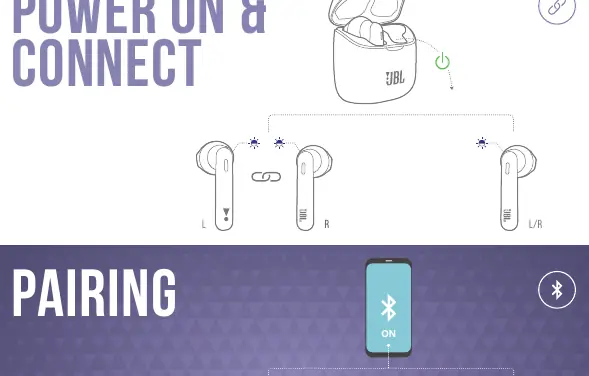
- Remove earbuds from the case to power on and enter pairing mode automatically. p. 1
Show 4 more answers Show less
Problems and fixes
Reconnecting Left & Right
Use the manual control sequence to re-sync the earbuds.
p. 1Maintenance and reset
- Fully charge at least once every 3 months to prolong battery lifespan. p. 2
Technical specifications
| Parameter | Value | Meaning | Pages |
|---|---|---|---|
| Driver Size | 12 mm | Dynamic driver | p. 1 |
| Music Playtime | Up to 5 hrs (earbuds) / 25 hrs (total) | Battery life with BT on | p. 1 |
Where to find it in the PDF
- Quick Start Guide p. 1
Table of contents
Manual images
Click an image to enlargeQuick guide
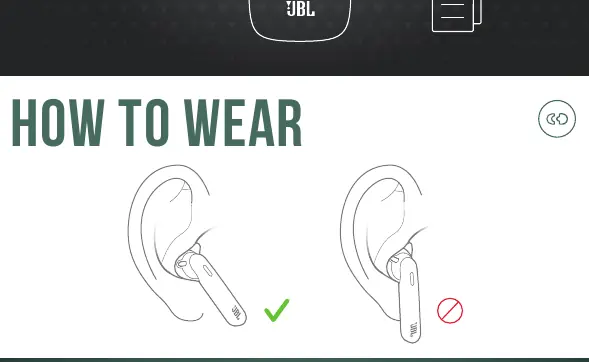
The JBL TUNE 225TWS earbuds come with a charging case and USB charging cable. Before first use, ensure the earbuds are charged. To wear them, insert them into your ears as shown in the guide to ensure a proper fit.
Power and Connection
To power on and connect, remove the earbuds from the case. They will automatically enter pairing mode. On your device, go to Bluetooth settings and select "JBL TUNE 225TWS" to connect. For Android 6.0+ devices, the earbuds support Google Fast Pair for an easier connection process.
Controls
The earbuds feature manual controls for power and playback:
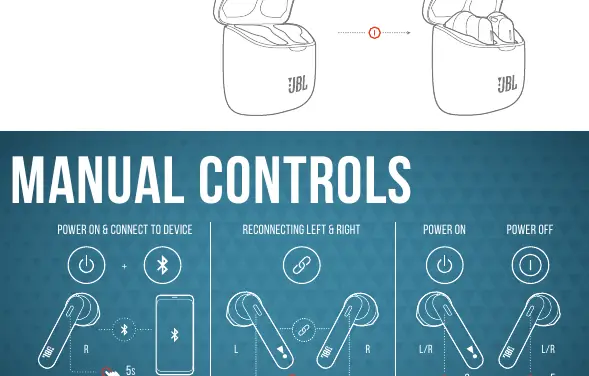
- Power On/Off: Use the button controls on the earbuds to power them on or off manually.
- Reconnecting: If the left and right earbuds lose connection, follow the manual reconnection sequence.
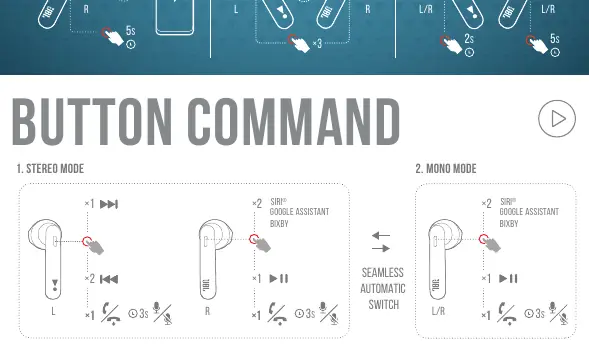
- Button Commands: Use the buttons to control playback. In Stereo mode, single press for play/pause, double press for next track, and triple press for previous track. You can also trigger voice assistants like Siri, Google Assistant, or Bixby.
- Mono Mode: You can use either earbud independently.
Charging and LED
To charge, place the earbuds into the charging case. The LED indicators on the case and earbuds provide status updates:
- Low Battery: Indicated by specific LED patterns.
- Charging: LED lights up to show the charging process.
- Fully Charged: LED indicates when the battery is full.
Battery Maintenance: To prolong battery lifespan, fully charge the earbuds at least once every 3 months.
Technical Specifications
Key specifications for the JBL TUNE 225TWS include:
- Driver Size: 12 mm Dynamic driver
- Frequency Response: 20 Hz – 20 kHz
- Bluetooth Version: 5.0
- Music Playtime: Up to 5 hours (earbuds), up to 25 hours total with charging case
- Charging Time: Less than 2 hours from empty
- Weight: 57 g
Manufacturer information
JBL
Practical help
Common problems
Earbuds not connecting
Ensure Bluetooth is enabled on your device and select 'JBL TUNE225TWS' from the list. If using Android 6.0+, use Fast Pair.
Battery life seems short
Fully charge the earbuds at least once every 3 months to maintain battery health.
Left and right earbuds not synced
Follow the 'Reconnecting Left & Right' procedure outlined in the manual controls section.
Before use
- Charge the earbuds fully before the first use.
- Ensure your smartphone or device has Bluetooth turned on.
- Check that the charging case has sufficient charge.
Show more Show less
Specs in practice
- Bluetooth 5.0
- Ensures a stable and efficient wireless connection.
- Total Playtime
- Up to 25 hours of music playback when using the charging case.
Images and diagrams
- The manual includes visual guides for proper earbud insertion.
- LED behavior charts help identify battery and connection status.
Model compatibility
- Compatible with Android 6.0+ for Google Fast Pair.
- Supports voice assistants: Siri, Google Assistant, and Bixby.

Manual page author
Michael Turner
Technical manual editor