Home Appliances / Food Processing Equipment
Lauben Hand Vacuum 2in1 120BC User Manual
Quick guide for the Lauben Hand Vacuum 2in1 120BC. Includes assembly, cleaning, charging instructions, and troubleshooting tips.
Table of contents
Manual images
Click an image to enlargeQuick guide from the manual
The Lauben Hand Vacuum 2in1 120BC is a household appliance designed for dry vacuuming. Before first use, ensure the battery is fully charged. Always switch off the device and unplug the charging adapter before performing any maintenance or changing attachments. The device is not intended for commercial use or for vacuuming liquids and burning materials.
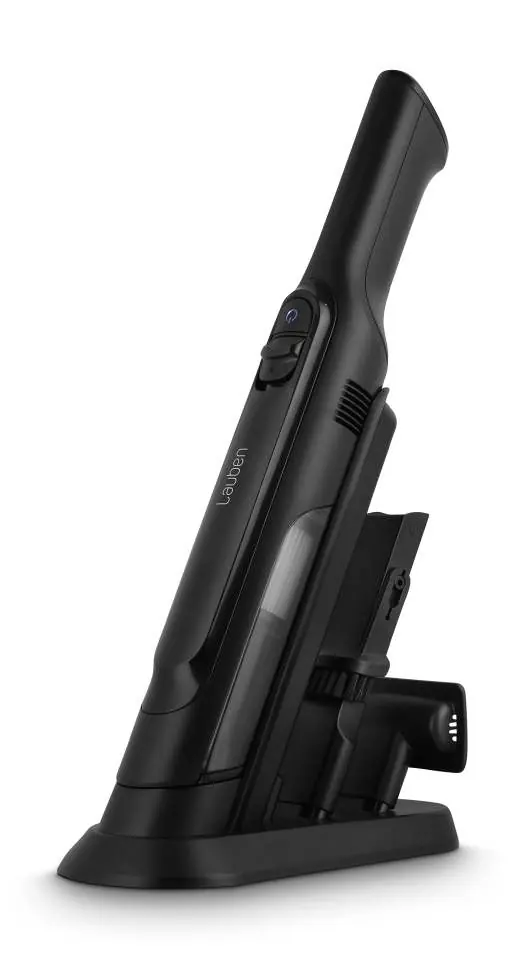
Device description
The device consists of the following main components:
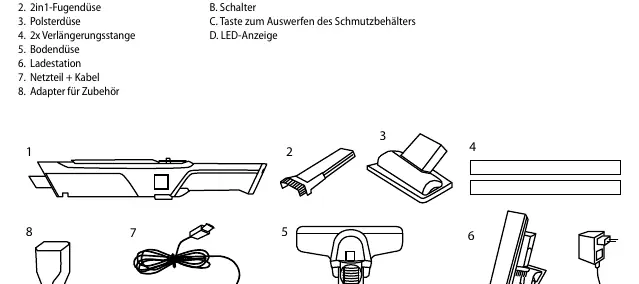
- Main unit
- 2-in-1 crevice tool
- Upholstery attachment
- 2x extension rod
- Vacuum head
- Charging stand
- Adapter and cable
- Adapter for accessories
Assembling the vacuum cleaner
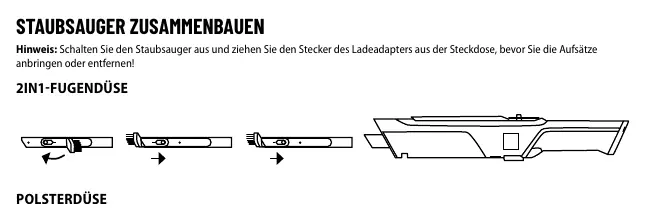
Ensure the vacuum is switched off and unplugged before attaching or removing accessories. Attach the desired tool (crevice tool, upholstery attachment, or vacuum head with extension rod) to the main unit until it clicks into place.
Use and maintenance
Press the switch (B) to turn the vacuum cleaner on or off. To empty the dirt container, press the button (A) and empty the contents into a waste bin.
Cleaning
For optimal performance, clean the device after each use:
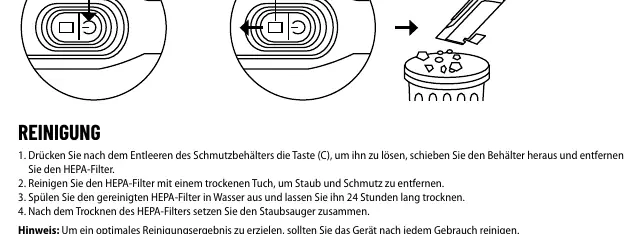
- Press button (C) to release the dust container, slide it out, and remove the HEPA filter.
- Clean the HEPA filter with a dry cloth to remove dust.
- Rinse the filter in water and let it dry for 24 hours before reassembling.
- The HEPA filter should be cleaned no more than once a month.
Charging
Follow these steps to charge the device:
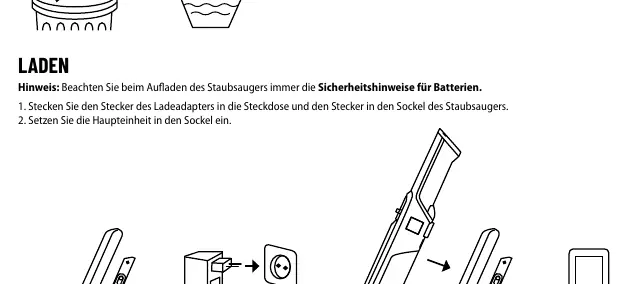
- Plug the charging adapter into the mains and the connector into the base of the vacuum cleaner.
- Insert the main unit into the base.
- The LED indicator will show the charging status: flashing red (weak battery/error), white light (on/fully charged), gradually turning off and on (charging), or off (switched off/needs charging).
Troubleshooting
If the vacuum does not pick up dirt, check if filters are clogged, the vacuum is clogged, or the dust container is not fitted correctly. If dust leaks, empty the container and check filter installation. If the vacuum does not charge, ensure the correct charger is used and that all connections to the vacuum and charging base are secure.
Safety instructions
Do not use the device if the charging adapter or power cord is damaged. Keep the device away from heat sources, direct sunlight, and damp areas. Do not vacuum burning materials like cigarettes or hot ashes. Keep the device and its cord out of reach of children under 8 years old. Do not attempt to repair the device yourself; contact an authorized service center.
Manufacturer information
Lauben
Practical help
Common problems
Vacuum does not pick up dirt
Check if filters are clogged, the vacuum is clogged, or the dust container is not fitted correctly.
Dust is leaking from the vacuum
Empty the dust container and ensure filters are correctly installed and clean.
Vacuum does not charge
Use the supplied charger and ensure it is properly connected to both the vacuum and the charging base.
Before use
- Charge the battery fully before first use.
- Ensure filters are installed correctly.
- Remove large or sharp objects from the surface before vacuuming.
- Ensure the charging base is assembled correctly.
Specs in practice
- Dust container capacity
- 80 ml
- Vacuum power
- Up to 14 kPa
Images and diagrams
- The parts diagram shows the main unit, attachments, and charging stand.
- Assembly diagrams illustrate how to attach the crevice tool, upholstery tool, and extension rods.
- Cleaning diagrams show the release button (C) and filter removal process.
- Charging diagrams show the connection of the adapter to the base and the main unit placement.
Model compatibility
- For household use only.
- Not designed for commercial use.
- Do not vacuum liquids or flammable substances.

Manual page author
Emily Carter
User documentation editor
Prepares concise manual descriptions and highlights the most useful setup, operation, and maintenance information for readers.