Home Appliances / Air Purifiers
User Manual for Levoit Vital 100S-P Smart Air Purifier
Quick guide for the Levoit Vital 100S-P Smart Air Purifier. Learn how to set up, connect to the VeSync app, maintain filters, and troubleshoot common issues.
Table of contents
Manual images
Click an image to enlargeQuick Start Guide
To begin using your Levoit Vital 100S-P Smart Air Purifier, ensure you remove all plastic packaging from the filters before operation. Place the unit on a flat, stable surface with at least 15 inches (38 cm) of clearance from the front to ensure proper airflow. Connect the power adapter to the back of the unit and plug it into an outlet.
Getting Started
Follow these steps to prepare your air purifier:
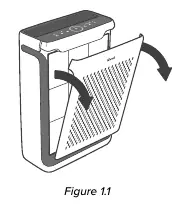
- Remove Front Cover: Pull both sides of the front cover to remove it.
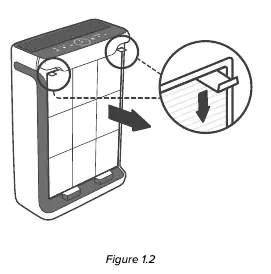
- Remove Pre-Filter: Push the pre-filter tabs inward and pull to remove.
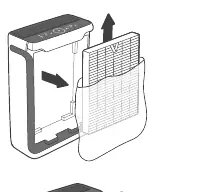
- Unpack Main Filter: Remove the Main/Activated Carbon Filter from the unit and remove all plastic packaging.
- Reassemble: Place the filters back into the unit, ensuring the ribbon handle on the Main Filter faces outward. Reattach the front cover by aligning the tabs with the slots on the bottom.
Using Your Smart Air Purifier
The air purifier features several modes to suit your needs:
- Auto Mode: Uses the AirSight infrared dust sensor to automatically adjust fan speed based on air quality.
- Sleep Mode: Operates quietly using a fan speed lower than low. The display turns off after 6 seconds if no buttons are tapped.
- Timer: Manually set the timer for 2, 4, or 8 hours using the timer button.
- Display Lock: Press and hold the lock button for 3 seconds to prevent settings from being changed.
- Light Detection: Automatically adjusts settings based on room brightness. Can be toggled by pressing and holding the display button for 3 seconds.
VeSync App Connectivity
To access smart features, download the VeSync app from the Apple App Store or Google Play Store. Follow the in-app instructions to connect your air purifier to a 2.4GHz Wi-Fi network. The app allows for remote control, scheduling, and monitoring filter life.
Care & Maintenance
Regular maintenance ensures optimal performance:
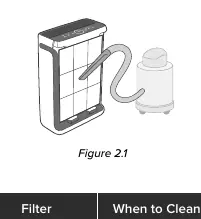
- Cleaning the Pre-Filter: Clean every 2–4 weeks using a soft brush or vacuum hose. Optionally, wash with water and mild detergent. Allow to air-dry completely before reinstalling.
- Replacing the Main Filter: Replace approximately every 9 months, or sooner if airflow decreases, unusual odors occur, or the filter is visibly dusty.
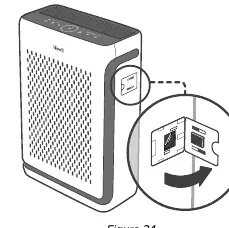
- Cleaning the Dust Sensor: Clean the AirSight Infrared Dust Sensor lens at least every 2 months using a cotton swab dipped in water, then wipe dry with a dry cotton swab.
Troubleshooting
If you encounter issues:
- Unit won't turn on: Check power connection and try a different outlet.
- Reduced airflow: Ensure filter packaging is removed, clean the pre-filter, or replace the main filter.
- Unusual noise: Ensure the filter is properly installed without plastic and the unit is on a level surface.
- App connection issues: Ensure your phone has Bluetooth enabled, you are on a 2.4GHz Wi-Fi network, and the router is close to the unit.
Practical help
Common problems
Air purifier will not turn on or respond to buttons
Check if the power cord is damaged, try a different outlet, or contact customer support.
Airflow is significantly reduced
Ensure filter plastic packaging is removed, clean the pre-filter, or replace the main filter.
Unusual noise during operation
Verify the filter is installed correctly without plastic packaging and the unit is on a flat, level surface.
App connection failure
Ensure you are using a 2.4GHz Wi-Fi network, Bluetooth is on, and the router is not obstructed.
Before use
- Remove all plastic packaging from the filters
- Place on a flat, stable surface
- Ensure 15 inches (38 cm) of clearance from the front
- Download the VeSync app
- Connect to a 2.4GHz Wi-Fi network
Specs in practice
- Operating Temperature
- 14°–104°F / -10°–40°C
Images and diagrams
- Figure 1.1: Removing the front cover
- Figure 1.2: Removing the pre-filter
- Figure 1.3: Removing the main filter
- Figure 2.1: Cleaning the pre-filter with a vacuum
- Figure 3.1: Opening the dust sensor cover
Model compatibility
- Requires 2.4GHz Wi-Fi network for smart features
- Compatible with Amazon Alexa and Google Assistant via VeSync app

Manual page author
Emily Carter
User documentation editor
Prepares concise manual descriptions and highlights the most useful setup, operation, and maintenance information for readers.