Electronics / Monitors
10ft SEG Backlit Trade Show Display Assembly Instructions
Comprehensive assembly and maintenance guide for the 10ft SEG Backlit Trade Show display system, covering frame construction, lighting setup, and graphic installation.
Table of contents
Manual images
Jump to the sectionProduct Overview
The 10ft SEG Backlit Trade Show display is a professional-grade modular system designed for high-impact visual presentations. This display utilizes Silicone Edge Graphics (SEG) technology, which allows for a seamless, taut fabric graphic that slides directly into the frame channels. The integrated LED lighting system ensures your branding stands out with even, vibrant illumination, making it an ideal choice for trade shows, exhibitions, and retail environments.
Frame Assembly
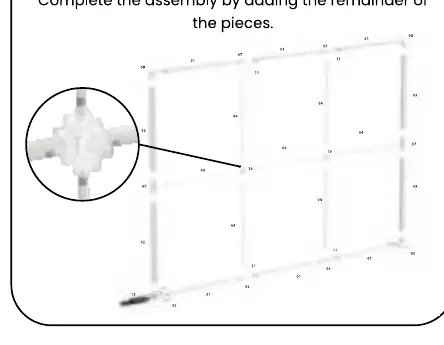
The assembly process is designed to be intuitive and efficient. Begin by laying out all components, including the profile bars with LED strips, profile bars with cables, inner struts, base plates, and various connectors. Start by constructing the base of the frame using the bottom connector bars and base plates. Once the foundation is secure, proceed to build the vertical structure by attaching the profile bars. It is essential to integrate the inner struts during this phase to provide the necessary horizontal support and structural integrity for the 10ft span. Ensure all connectors are fully seated and locked into place to prevent instability.
Power and Lighting
Once the frame is fully assembled, connect the power supply units to the designated ports on the bottom profile bars. The system is designed for quick connection, allowing for rapid deployment. Ensure that all cables are routed neatly to avoid tripping hazards and to maintain a clean, professional appearance. Before installing the graphics, verify that all LED strips are functioning correctly by powering on the unit briefly to check for any dark spots or connection issues.
Graphic Installation
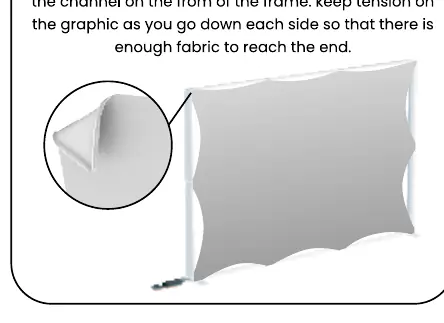
The final step is the installation of the SEG fabric graphic. Start by inserting the silicone edge of the fabric into the frame channel at the corners. Once the corners are secured, work your way along the edges, pressing the silicone strip firmly into the channel. It is important to maintain consistent tension on the fabric as you move down each side to ensure a smooth, wrinkle-free finish. If the fabric appears loose, re-adjust the tension by pulling the material slightly before pressing it back into the channel.
Storage and Maintenance
To ensure the longevity of your display, proper care is essential. Always store the hardware in a cool, dry location when not in use. Clean the metal frame components using a soft, damp cloth. The fabric graphics are machine washable; use cold water on a gentle cycle and allow them to air dry completely. If the graphics become wrinkled, use a steamer to gently remove creases. Never dry-clean the graphics, as this can damage the fabric and the silicone edge.
Manufacturer information
LookOurWay, LLC
Practical help
Common problems
Graphic appears loose or wrinkled
Ensure the silicone edge is fully seated in the channel and maintain consistent tension while installing.
LED lights not illuminating
Check all power supply connections at the base of the profile bars and ensure the power source is active.
Before use
- Verify all 13 components are present according to the parts list
- Ensure the assembly area is flat and clear of debris
- Check that all LED strips are properly aligned in the profile bars
- Confirm power supply units are compatible with local voltage
- Inspect fabric graphic for any pre-existing damage or stains
Specs in practice
- SEG Technology
- Silicone Edge Graphics system for a seamless, taut fabric display.
- Profile Bars
- Modular aluminum frame components that house the LED lighting and graphic channels.
Images and diagrams
- Page 1 shows the step-by-step frame assembly sequence from base to full structure.
- Page 1 includes a detailed view of the corner connector assembly.
- Page 2 illustrates the power supply connection point at the base.
- Page 2 demonstrates the technique for inserting the silicone edge into the frame channel.
Model compatibility
- Designed specifically for 10ft SEG fabric graphics.
- Requires standard electrical outlet for power supply units.

Manual page author
David Miller
Documentation analyst
Organizes user manual content into clear summaries, with attention to model details, product context, and everyday usability.