Wearables / Watch Parts
Miyota Caliber 0S20 Watch Movement Instructions
Quick guide for the Miyota Caliber 0S20 watch movement. Learn how to set the time, adjust the date, operate the chronograph, and perform a reset after battery replacement.
Table of contents
Quick Guide to Miyota 0S20
This guide provides essential operating instructions for the Miyota Caliber 0S20 watch movement. It covers basic time and date adjustments, chronograph operation, and the necessary reset procedure required after battery replacement or if the chronograph hands do not return to zero.
Displays and Buttons
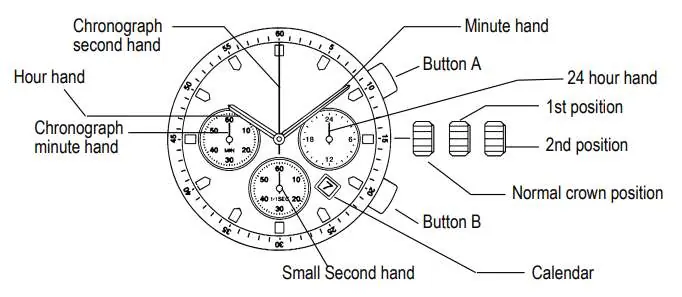
The movement features a crown with three positions (Normal, 1st, and 2nd) and two buttons (A and B) to control the chronograph functions. The watch face includes a 24-hour hand, small second hand, and chronograph indicators.
Setting the Time
- Pull the crown out to the 2nd position.
- Turn the crown to set the hour and minute hands.
- Push the crown back to the normal position to start the small second hand.
Setting the Date
- Pull the crown out to the 1st position.
- Turn the crown counter-clockwise to set the date.
- Push the crown back to the normal position.
Note: If the date is set between approximately 9:00 PM and 1:00 AM, the date may not change correctly on the following day.
Using the Chronograph
The chronograph can measure time up to 59 minutes and 59 seconds in 1/1 second increments.
- Start/Stop: Press button A to start or stop the chronograph.
- Reset: Press button B to reset the chronograph hands to the zero position.
Chronograph Reset Procedure
Perform this procedure if the chronograph second hand does not return to the zero position after a reset or after replacing the battery.
- Pull the crown out to the 2nd position.
- Press button A repeatedly to advance the chronograph second hand until it reaches the zero position. Holding button A will advance the hand rapidly.
- Once the hand is at zero, push the crown back to the normal position.
Important: Do not push the crown back to the normal position while the chronograph second hand is still moving to the zero position.
Manufacturer information
Miyota
Practical help
Common problems
Chronograph second hand does not return to zero
Perform the Chronograph Reset procedure: pull the crown to the 2nd position and use button A to adjust the hand to zero.
Date does not change on the following day
Ensure the date was not set between 9:00 PM and 1:00 AM, as this can interfere with the automatic date change mechanism.
Before use
- Verify the crown is in the correct position (Normal, 1st, or 2nd) before attempting adjustments.
- Perform a chronograph reset immediately after replacing the battery.
- Turn the crown counter-clockwise when setting the date.
- Ensure the chronograph is stopped before pressing button B to reset.
Specs in practice
- Chronograph Capacity
- Measures up to 59 minutes and 59 seconds.
- Chronograph Precision
- Measures time in 1/1 second increments.
Images and diagrams
- The crown has three positions: Normal (pushed in), 1st position (first click), and 2nd position (second click).
- Button A is typically used for Start/Stop and adjusting the chronograph hand during reset.
- Button B is used for resetting the chronograph.
Model compatibility
- This manual applies specifically to the Miyota Caliber 0S20 movement.

Manual page author
Emily Carter
User documentation editor
Prepares concise manual descriptions and highlights the most useful setup, operation, and maintenance information for readers.