Wearables / Watch Parts
User Manual for Miyota Cal. 0S80 Watch Movement
Quick guide for the Miyota Cal. 0S80 chronograph watch movement. Learn how to set the time, adjust the date, use the alarm, operate the chronograph, and reset the hands.
Table of contents
Manual images
Click an image to enlargeQuick guide from the manual
This document provides instructions for the Miyota Cal. 0S80 chronograph watch movement. Key functions include time and date setting, alarm operation, and chronograph measurement up to 11 hours, 59 minutes, 59 seconds, and 95/100ths. If the chronograph hands do not return to zero, a specific reset procedure is required.
Displays and Buttons
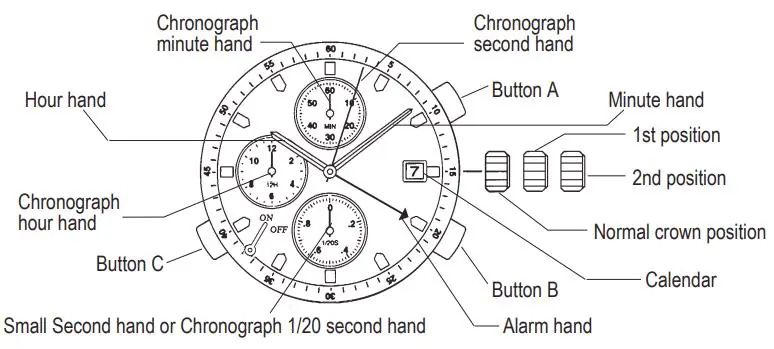
The watch features a crown with three positions (Normal, 1st click, 2nd click) and three buttons (A, B, and C). The face includes hands for hours, minutes, alarm time, and chronograph functions (seconds, minutes, and 1/20 seconds).
Setting the Time
- Pull the crown out to the 2nd position.
- Turn the crown to set the hour and minute hands.
- Push the crown back to the normal position to start the small second hand.
Setting the Date
- Pull the crown out to the 1st position.
- Turn the crown counter-clockwise to set the date.
- Push the crown back to the normal position.
Note: Do not set the date between 9:00 PM and 1:00 AM, as the date may not change correctly on the following day.
Using the Alarm
Setting the alarm time:
- Pull the crown out to the 1st position.
- Turn the crown clockwise to set the alarm time indicator to the desired time.
- Return the crown to the normal position.
- Pull out button C to turn the alarm on.
Operation:
- Alarm ON: Button C pulled out to the 1st position.
- Alarm OFF: Button C returned to the normal position.
- Turning off while sounding: Press button C to return it to the normal position.
The alarm sounds for 15 seconds, stops for 2 minutes and 45 seconds, and repeats this cycle several times.
Using the Chronograph

- Press button B to enter chronograph mode. The small second hand will stop and switch to the 1/20 second hand.
- Press button A to start or stop the chronograph.
- Press button B to reset the chronograph and return all hands to the zero position.
Chronograph Reset
Perform this procedure if the chronograph hands do not return to zero, or after replacing the battery:
- Pull the crown out to the 2nd position.
- Press button A to set the chronograph second hand to zero.
- Press button B to set the chronograph 1/20 second hand to zero. (Hold button A or B to advance hands rapidly).
- Return the crown to the normal position.
- Press button B to verify the hands are reset.
Manufacturer information
Miyota
Practical help
Common problems
Chronograph hands do not return to zero
Perform the Chronograph Reset procedure (pull crown to 2nd position, use buttons A and B to zero hands).
Date does not change on the following day
Ensure the date was not set between 9:00 PM and 1:00 AM.
Alarm does not sound
Ensure button C is pulled out to the 1st position to activate the alarm.
Before use
- Identify the three crown positions (Normal, 1st click, 2nd click).
- Locate buttons A, B, and C on the watch case.
- Verify the battery is functional if the watch does not run.
- Understand the difference between the small second hand and the chronograph 1/20 second hand.
Specs in practice
- Chronograph Capacity
- Measures up to 11 hours, 59 minutes, 59 seconds, and 95/100ths.
- 1/20 Second Hand
- Displays fractions of a second during chronograph operation; acts as a small second hand in normal mode.
Images and diagrams
- The watch face diagram identifies the crown positions, buttons A, B, and C, and the various hands (hour, minute, alarm, chronograph).

Manual page author
David Miller
Documentation analyst
Organizes user manual content into clear summaries, with attention to model details, product context, and everyday usability.