Wearables / Watch Parts
Miyota 0T45 Solar Quartz Movement User Manual
Quick guide for the Miyota 0T45 solar quartz movement. Learn how to set the time and date, and understand the crown positions for this watch movement.
Table of contents
Quick guide from the manual
This manual provides instructions for operating the Miyota 0T45 solar quartz movement. The primary control for this movement is the crown, which features three distinct positions to manage time and date settings.
Display
The watch face includes an hour hand, minute hand, small second hand, and a date indicator. The crown positions are defined as follows:
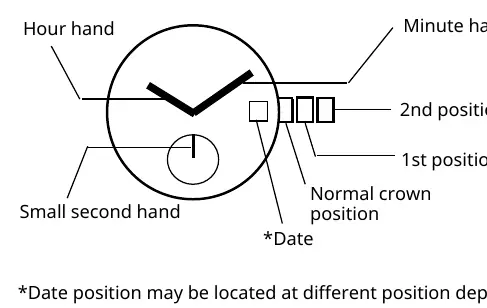
- Normal position: Standard operating position.
- 1st position: Used for setting the date.
- 2nd position: Used for setting the time.
Note: The date position may vary depending on the specific watch model.
Setting the time
- Pull the crown out to the 2nd position.
- Turn the crown to adjust the hour and minute hands to the desired time.
- Push the crown back to the normal position to start the small second hand.
Setting the date
- Pull the crown out to the 1st position.
- Turn the crown counter-clockwise to set the date.
- After the date is set, push the crown back to the normal position.
Important: Do not set the date between approximately 9:00 PM and 1:00 AM. Setting the date during this timeframe may cause the date to not change correctly on the following day.
Manufacturer information
Miyota
Practical help
Common problems
Date does not change the next day
Avoid setting the date between 9:00 PM and 1:00 AM, as this interferes with the automatic date change mechanism.
Small second hand is not moving
Ensure the crown is pushed all the way back into the normal position.
Before use
- Ensure the crown is in the normal position for standard operation.
- Check the current time before setting the date to avoid the 9:00 PM - 1:00 AM window.
Specs in practice
- Crown 1st position
- Used for setting the date.
- Crown 2nd position
- Used for setting the time.
Images and diagrams
- The diagram illustrates the crown positions (Normal, 1st, 2nd) and the location of the hour, minute, and small second hands.

Manual page author
Michael Turner
Technical manual editor
Reviews PDF manuals for structure, safety notes, and practical product details so readers can find the right information quickly.