Power / Batteries Chargers
myCharge 10000mAh Power and Go Power Bank User Guide
Comprehensive user guide for the myCharge 10000mAh Power and Go power bank, covering recharging, device charging, LED indicators, and safety instructions.
Table of contents
Recharging Your Power and Go
To recharge your myCharge 10000mAh Power and Go, connect the included recharging cable to any standard USB power source. The device offers three convenient ways to recharge: via a wall outlet, a car charger, or a computer USB port. When the unit is fully charged, the four LED indicators will remain solid and non-blinking.
LED Indicators and Battery Level
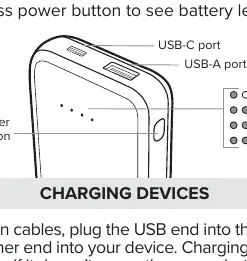
The power bank features an integrated LED display to help you monitor the remaining battery capacity. To check the current charge level, simply press the power button. The number of illuminated LEDs corresponds to the remaining power, with four lights indicating a full charge. The device is equipped with both a USB-C port and a USB-A port for versatile connectivity.
Charging Your Devices
Charging your mobile devices is straightforward. Using your own compatible cables, plug the USB end into the Power and Go and the other end into your device. Charging should initiate automatically upon connection. If charging does not start, press the power button to manually activate the output. The power bank is capable of charging two devices simultaneously, utilizing both the built-in USB-A port and the USB-C port.
Safety and Maintenance
Proper care is essential for the longevity and safety of your power bank. Do not expose the unit to extreme heat, direct sunlight, or low-temperature environments. Avoid dropping the device or subjecting it to physical impact. Never attempt to disassemble, repair, or modify the housing or internal components. Only use the provided cables and connectors for charging. If the device is damaged, discontinue use immediately. When the unit reaches the end of its service life, do not dispose of it in regular household waste. Follow local environmental regulations and take the unit to a certified battery-recycling center to ensure safe and responsible disposal.
Compliance and Warranty
This product is backed by a one-year limited warranty from the date of purchase. It is recommended to keep your receipt as proof of purchase and register your product online to receive the latest updates. The device complies with FCC Part 15 rules for Class B digital devices, ensuring protection against harmful interference in residential installations. Please note that unauthorized modifications may void your authority to operate the equipment.
Manufacturer information
myCharge
Practical help
Common problems
Charging does not start automatically
Press the power button to manually activate the charging process.
Before use
- Ensure you have the included recharging cable.
- Identify a suitable USB power source (wall, car, or computer).
- Check the battery level by pressing the power button.
- Ensure your device's charging cable is compatible with the USB-A or USB-C ports.
Images and diagrams
- The power button is located on the side of the unit.
- LED indicators show battery status in four increments.
- USB-A and USB-C ports are located on the top edge for device charging.
- The unit supports simultaneous charging of two devices.
Model compatibility
- Compatible with devices requiring USB-A or USB-C charging cables.
- Can be recharged via any standard USB power source.

Manual page author
Michael Turner
Technical manual editor
Reviews PDF manuals for structure, safety notes, and practical product details so readers can find the right information quickly.