Home / Security
Netvox Wireless 1-Gang Ceiling Type Ultrasonic Material Level Detection Sensor
A high-precision LoRaWAN Class A ultrasonic sensor designed for liquid level, material level, and parking space detection, featuring a digital output for local alarm linkage.
Table of contents
Product Overview
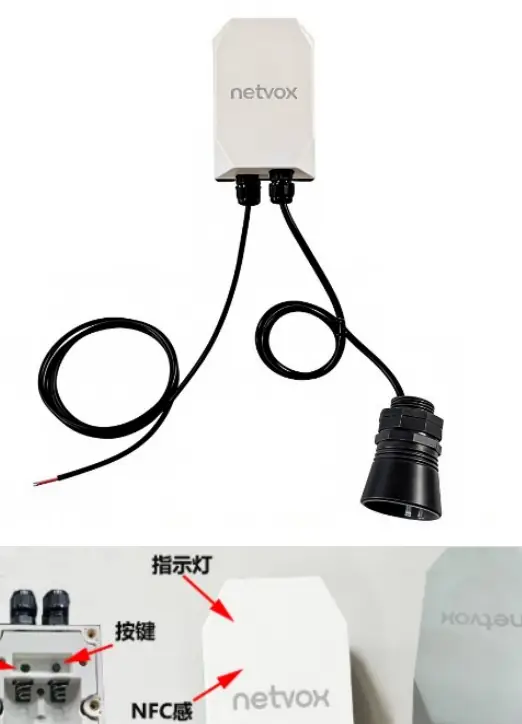
The Netvox R900PB06AO1 is a wireless Class A LoRaWAN device designed for accurate liquid level, material level, and parking space detection. It utilizes ultrasonic technology with a 20-degree detection angle, making it ideal for monitoring materials like grain or sand. The device includes a built-in vibration sensor for tamper detection and a digital output (DO) that can trigger local alarms or control third-party devices when thresholds are exceeded.
Key Features
- LoRaWAN Class A compatible for long-range, low-power communication.
- Versatile detection: liquid, material, and parking space monitoring.
- Integrated vibration sensor for anti-tamper alerts.
- Local digital output (DO) for alarm linkage.
- NFC support for easy configuration and firmware updates.
- IP65 rated enclosure for durability.
- Data storage capacity of up to 10,000 records.
Installation and Setup
The sensor should be installed vertically above the target surface. For liquid level monitoring, avoid areas with turbulence, inlets, or outlets. Ensure the sensor is at least 30cm above the ground or surface to maintain measurement accuracy. The device supports various mounting methods, including magnetic adsorption, screw mounting, and cable tie fixation for columns. Before initial use, ensure the ER14505/ER18505 lithium batteries are activated using a 67-ohm resistor for 8 minutes to eliminate passivation.
Operation and Configuration
The device can be configured via NFC using the Netvox NFC App. Users can adjust reporting intervals, distance thresholds, and alarm settings. The sensor supports both Min/Max interval reporting and threshold-based reporting. When the device is disconnected from the network, it continues to record data, which is then uploaded once the connection is restored. The digital output can be configured to trigger based on specific alarm sources, such as high or low distance thresholds.
Maintenance
To ensure long-term reliability, keep the sensor probe clean using a soft, damp cloth. Avoid harsh chemicals or abrasive cleaners. Protect the device from extreme temperatures, strong electromagnetic interference, and mechanical impacts. Regularly check the battery status and replace it promptly when the voltage drops to 3.2V to prevent unstable data reporting.
Manufacturer information
Netvox Technology Co., Ltd.
Practical help
Common problems
Device fails to join the network
Check the gateway registration information or consult your platform server provider.
Unstable sensor data
Ensure the battery voltage is above 3.2V and the probe is installed vertically, free from obstructions or strong electromagnetic interference.
NFC communication failure
Ensure the phone has NFC enabled, the app is installed, and the phone's NFC area is correctly aligned with the device. Move the phone away and try again.
Before use
- Activate lithium batteries with a 67-ohm resistor for 8 minutes.
- Ensure the device is powered on.
- Install the Netvox NFC App on your smartphone.
- Verify the mounting surface is clean and dry.
- Ensure the probe is installed vertically to the target surface.
Specs in practice
- Min Interval
- The minimum time interval for data reporting.
- Max Interval
- The maximum time interval for data reporting.
- Reportable Change
- The threshold of change in data that triggers an immediate report.
- DeadZoneDistance
- The distance range near the sensor where detection is not possible.
Images and diagrams
- H: Total depth from sensor to the bottom of the tank/silo.
- D: Current distance from sensor to the material surface.
- L: Calculated material depth (L = H - D).
- d: Dead zone distance where the sensor cannot detect objects.
Model compatibility
- Compatible with LoRaWAN Class A protocol.
- Supports third-party platforms like Actility/ThingPark, TTN, and MyDevices/Cayenne.

Manual page author
Michael Turner
Technical manual editor
Reviews PDF manuals for structure, safety notes, and practical product details so readers can find the right information quickly.