Home Appliances / Vacuum Cleaners
Instruction Manual for Ozito 18V Cordless Surface Brush
Quick guide for the Ozito 18V Cordless Surface Brush, covering assembly, brush installation, operation, and maintenance. Includes safety warnings and battery charging instructions.
Table of contents
Quick guide from the manual
This document provides instructions for the Ozito 18V Cordless Surface Brush (PXSBS-018). It covers assembly, brush selection for different surfaces, operation, and maintenance. Always ensure the battery is disconnected before performing any assembly or maintenance tasks.
Assembly
Fitting the Additional Handle: Unscrew the two knobs, separate the handle from the bracket, place the top half in position, secure with the bracket on the underside, and tighten the knobs.
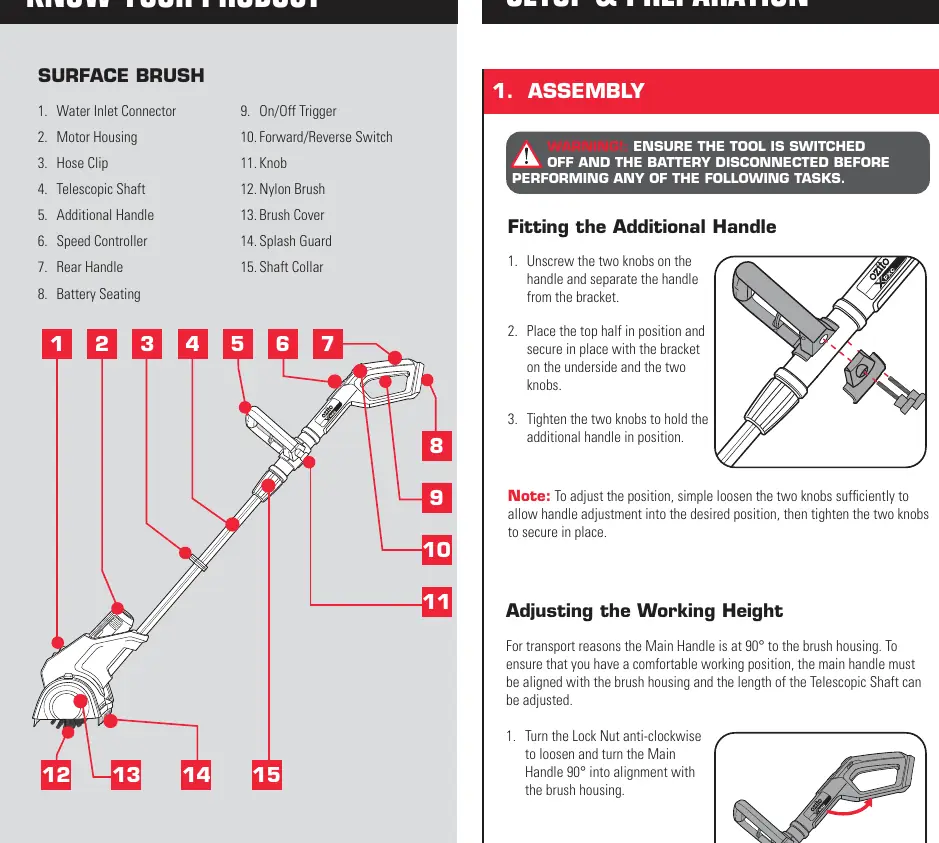
Adjusting the Working Height: Turn the Lock Nut anti-clockwise to loosen, adjust the Telescopic Shaft to the desired height, and retighten the Lock Nut by turning it clockwise. The main handle can also be rotated 90 degrees to align with the brush housing.
Cleaning Brushes
Use only the brush intended for the specific surface. Test on an inconspicuous area first. Replace brushes when the diameter is less than 95mm.
- Medium Nylon Brush (Black): For unsealed paver and stone surfaces.
- Soft Nylon Brush (Yellow/Green): For wood, composite materials (BPC/WPC), and artificial turf.
- Ultra Metal Brush (Accessory): For robust surfaces like paving stones or concrete.
Fitting/Removing Brushes: Remove brush covers from each end. Press the middle of the rubber caps to release and pull the brush to remove. Slot the new brush onto the mount and reattach covers.
Preparation
For best results, use wet cleaning. Connect a reinforced garden hose (min 12mm diameter) to the Water Inlet Connector and secure it to the Telescopic Shaft with the provided Hose Clip. A Water Control Valve can be fitted to the inlet to manage water flow.
Operation
Controls: Use the Direction Lever to select forward (standard) or reverse rotation. The Variable Speed Dial (1-5) adjusts the brush speed. Squeeze the On/Off Trigger to start; release to stop.
Using the Surface Brush: Lift the brush 1-2cm off the ground before switching on. Once at full speed, place it on the surface and guide it slowly in lines. For artificial turf, brush against the direction of the fibers to raise them.
Maintenance
Keep air vents and the motor housing free of dirt. Clean with a damp cloth; do not use solvents. Store in a dark, dry place (5-30°C). Do not bend the splash guard rubber lips.
Safety
Always wear protective clothing, including eye and ear protection, gloves, and closed footwear. Do not use on sensitive, polished, or scratch-sensitive surfaces. Keep hands and feet away from the rotating brush.
Manufacturer information
Ozito
Practical help
Common problems
Tool switches off automatically
The tool is overloaded. Release the trigger, remove the cause of the overload, and switch on again.
Battery fails to charge
Check if there is voltage at the socket outlet and ensure the battery and charger are properly connected.
Brush diameter is too small
Replace the brush if the diameter is less than 95mm to avoid damage.
Before use
- Ensure the correct brush is fitted for the surface type.
- Check that brush covers are securely fitted.
- Ensure the surface is free of stones, twigs, or debris.
- Wear adequate protective clothing (eyes, face, hands, feet, hearing).
- Ensure the battery is fully charged.
- Check that the water hose is securely connected (if wet cleaning).
Specs in practice
- No Load Speed
- 800-1,400/min, adjustable via the variable speed dial.
- Max. Inlet Pressure
- 87 psi (6 bar) for water supply.
- Max. Water Inlet Temp.
- 35°C.
Images and diagrams
- The manual includes a 'Know Your Product' diagram identifying 15 components, including the water inlet, speed controller, and trigger.
- Assembly diagrams show the handle fitting and height adjustment process.
- Brush removal diagrams illustrate pressing the rubber caps to release the brush.
- Charger LED indicator table explains status lights (e.g., flashing red for charging, solid green for ready).
Model compatibility
- Compatible with all batteries and chargers from the Ozito Power X Change range.
- Not suitable for polished, ground, or sealed natural/artificial stone surfaces.
- Do not use with a bucket and siphon; requires a pressurized water source.

Manual page author
David Miller
Documentation analyst
Organizes user manual content into clear summaries, with attention to model details, product context, and everyday usability.