Home Appliances / Ovens
Presto Precise 17-Quart Digital Pressure Canner
Comprehensive instruction manual for the Presto Precise 17-Quart Digital Pressure Canner, covering setup, pressure and boiling water canning methods, safety guidelines, maintenance, and troubleshooting.
Table of contents
Product Overview
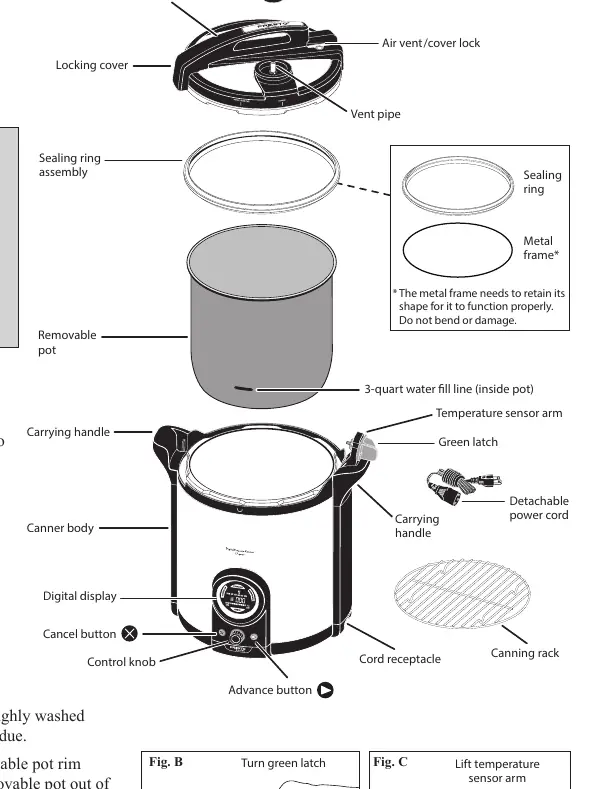
The Presto Precise Digital Pressure Canner is a versatile appliance designed for both pressure canning and boiling water canning. It features an intuitive LED display and control knob to guide users through each step of the canning process. This unit is intended exclusively for canning purposes and should not be used for general food preparation or cooking.
Safety Precautions
- Always inspect the vent pipe and vent filter for blockages before every use.
- Do not immerse the canner body, cord, or plug in water.
- Ensure the canner is placed on a dry, level, heat-resistant surface.
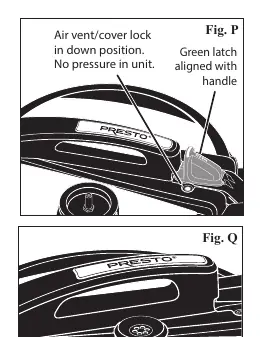
- Never force the canner open; wait until all internal pressure is released and the air vent/cover lock has dropped.
- Use only genuine Presto replacement parts for the sealing ring, gaskets, and other components to ensure safe operation.
Getting Started
Before first use, perform the water test to familiarize yourself with the operation. Always ensure the removable pot is clean and dry before placing it into the canner body. The unit requires 3 quarts of hot tap water for both pressure and boiling water canning methods.
Canning Operation
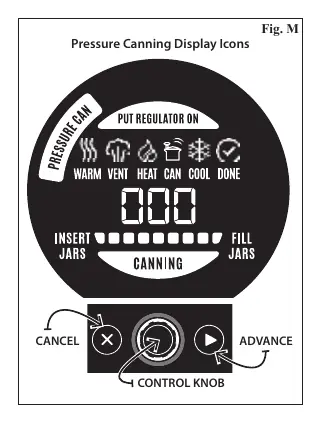
The appliance offers two distinct modes: Pressure Canning and Boiling Water Canning. Users must select the appropriate program using the control knob. The LED display provides real-time status updates, including jar warming, filling, venting, processing, and cooling phases. For pressure canning, the regulator must be placed on the vent pipe at the appropriate time as indicated by the display.
Maintenance and Cleaning
After each use, allow the unit to cool completely. Detach the sealing ring and wash it along with the canning rack and removable pot in warm, soapy water. The canner cover should be wiped clean with a damp cloth and never immersed in water or placed in a dishwasher. Periodically check the air vent/cover lock gasket and sensor gasket for signs of wear, such as cracking or deformation, and replace them as necessary.
Troubleshooting
The canner is equipped with an error code system to alert users to malfunctions or procedural errors. Common issues such as E3 (overheating due to low water) or E10/E20/E30 (pressure buildup due to incorrect regulator placement) have specific remedies outlined in the manual. If an error occurs, note the code before unplugging the unit.
Disposal
When the appliance reaches the end of its service life, follow local regulations for the disposal of electrical appliances.
Related manuals
Related manuals from the same brand or category.
Home Appliances / Ovens
Presto 12-inch Electric Skillet with Glass Cover
PrestoHome Appliances / Kitchen Appliances
Presto 12-Cup Stainless Steel Cordless-Serve Coffee Maker
Presto
Manual page author
Emily Carter
User documentation editor
Prepares concise manual descriptions and highlights the most useful setup, operation, and maintenance information for readers.