Electronics / Amplifiers Receivers
User manual for QTX PartyPod Bluetooth Speaker 100.619UK
Quick guide for the QTX PartyPod Bluetooth Speaker (100.619UK). Learn how to pair via Bluetooth, use TWS mode, play music from USB/TF cards, manage LED light shows, and troubleshoot common connection issues.
Table of contents
Manual images
Click an image to enlargeQuick guide from the manual
The QTX PartyPod is a portable Bluetooth speaker with LED light effects. To get started, ensure the device is fully charged using the provided USB cable. To pair with your smartphone or tablet, long press the power button to turn the unit on, activate Bluetooth on your device, and select QTX - PartyPod from the list. Once paired, the LED indicator will light solid blue.
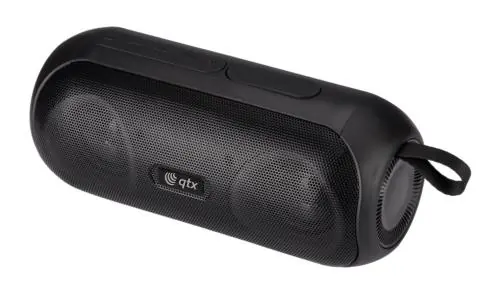
To connect two speakers for True Wireless Stereo (TWS) sound, turn both speakers on and connect one to your Bluetooth device. On the connected unit, press and hold the Play/pause button for approximately 3 seconds until a tone is heard.
Controls overview
The speaker features a control panel for managing playback and modes:
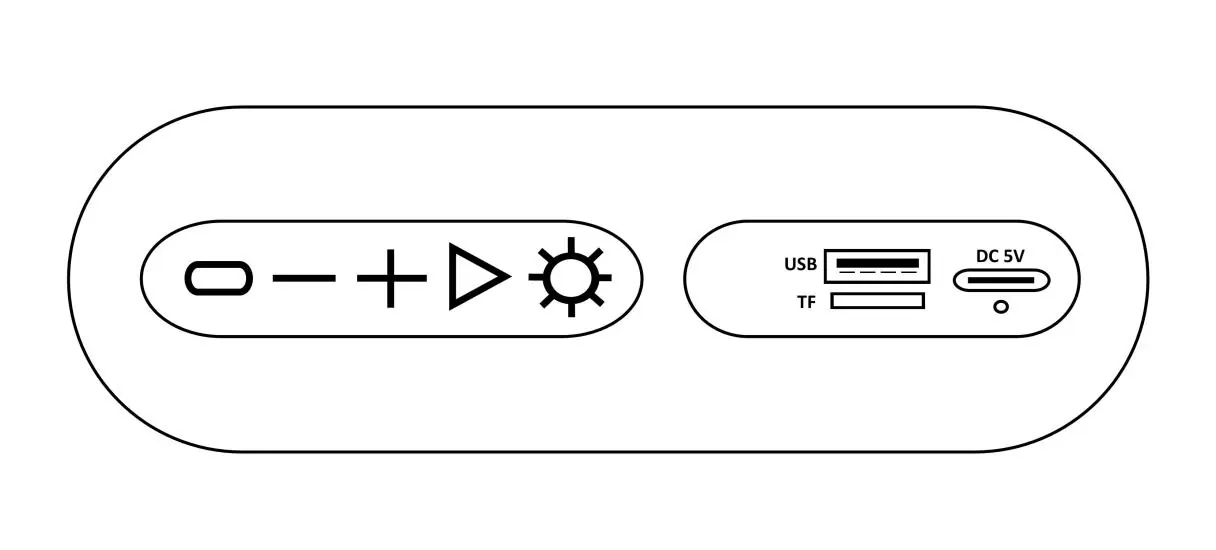
- Power button: Long press to turn on/off; short press to switch between Bluetooth and FM tuner modes.
- Previous track/lower volume: Short press to lower volume; long press for previous track.
- Next track/increase volume: Short press to increase volume; long press for next track.
- Play/pause button: Short press to play/pause or answer calls; double press to redial; long press to reject calls or initiate TWS pairing.
- LED lightshow button: Press repeatedly to cycle through 7 light modes or turn off.
Playback modes
The speaker supports multiple audio sources:
- Bluetooth: Standard wireless connection.
- USB/TF Card: Insert a compatible USB drive or TF/MicroSD card (up to 64GB) into the respective slots. The unit will automatically switch to the mode and begin playback of MP3 files.
- FM Radio: Accessible via the power button mode switch.
Charging and LED indicator
Use the provided USB cable to connect the speaker to a 5V/2A power source. A full charge takes up to 4 hours. The LED indicator displays the following status:
- Solid red: Charging (goes out when fully charged).
- Flashing blue: Bluetooth pairing mode.
- Solid blue: Paired to a device.
- Rapid flashing blue: USB or TF mode active.
Technical specifications
- Audio output: 2x 8W
- Speaker drivers: 2 x 52mm
- Bluetooth version: 5.0
- Battery: 3.7V 2400mA internal rechargeable lithium ion
- Battery life: Up to 6 hours
- Charging time: Up to 4 hours
- IP Rating: IPX4 (splash resistance)
- Input connections: Bluetooth, USB, Micro SD (TF Card), USB Type-C (charge only)
Safety and maintenance
Do not attempt to service the product yourself, as opening covers may result in electric shock or equipment damage and will invalidate the warranty. Dispose of the unit according to local council guidelines for electrical and electronic equipment.
Practical help
Common problems
Bluetooth device will not connect
Ensure the speaker is in pairing mode and your device is set to 'discoverable'.
Speaker disconnects within 10m range
Remove metallic objects or other radio-transmitting devices that may interfere with the signal. Ensure a clear line of sight.
Speaker will not switch on
The battery may be depleted. Connect the speaker to a USB power source using the provided cable to recharge.
Media files will not play
Ensure the USB drive or TF card is formatted in FAT32 and that the music files are in MP3 format.
Before use
- Charge the speaker fully using the provided USB cable (up to 4 hours).
- Ensure your Bluetooth device is set to 'discoverable'.
- Format USB drives or TF cards to FAT32.
- Verify that music files are in MP3 format.
Specs in practice
- Audio output
- 2x 8W provides stereo sound output.
Images and diagrams
- Buttons 1-5 control power, volume, tracks, play/pause, and light modes.
- Ports 6-8 allow for USB, TF card, and USB-C charging connections.
- Indicator 9 shows charging status (red) and Bluetooth/mode status (blue).
Model compatibility
- Supports TF/MicroSD cards up to 64GB.
- Bluetooth version 5.0.

Manual page author
Michael Turner
Technical manual editor
Reviews PDF manuals for structure, safety notes, and practical product details so readers can find the right information quickly.