Lighting / Stage Lighting
User Manual for QTX KAD-2 Digital Stereo Amplifier
Quick guide for the QTX KAD-2 Digital Stereo Amplifier. Learn how to connect speakers, set up audio inputs, adjust sound settings, and troubleshoot common issues.
Table of contents
Manual images
Click an image to enlargeQuick guide from the manual
Before installing or using the QTX KAD-2 amplifier, ensure the power is switched off and the mains cable is unplugged from the wall to prevent damage or injury. Always set the master volume to the lowest point before switching the unit on to avoid power surges that could damage the amplifier or your speakers.
Product Layout
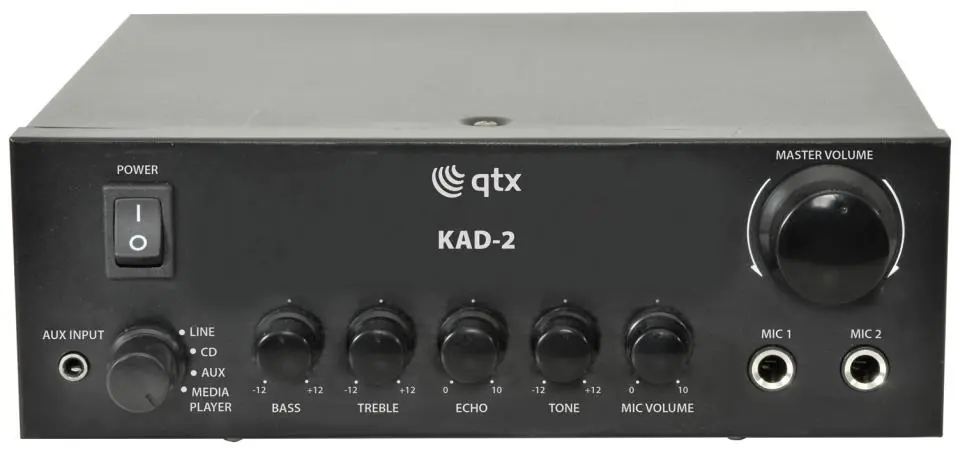
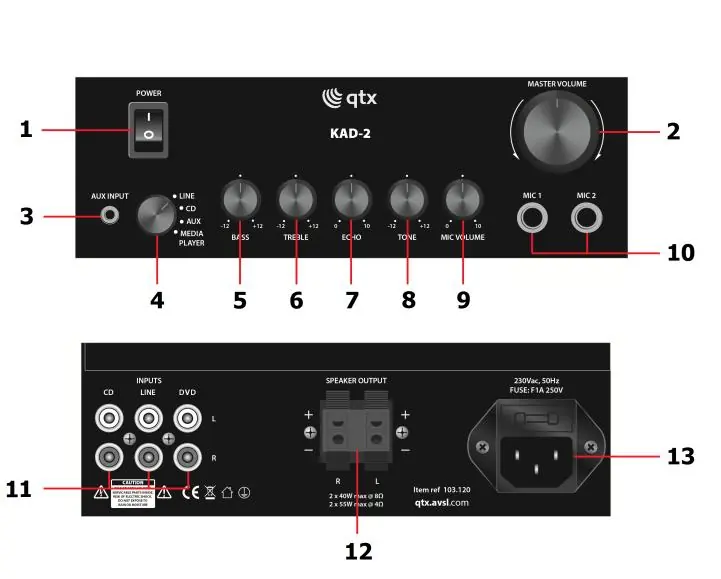
The front panel features the power switch, master volume control, input selection, and various sound adjustments including bass, treble, echo, and microphone volume. The rear panel contains the RCA stereo line inputs, spring clip speaker outputs, and the IEC mains input.
Installation
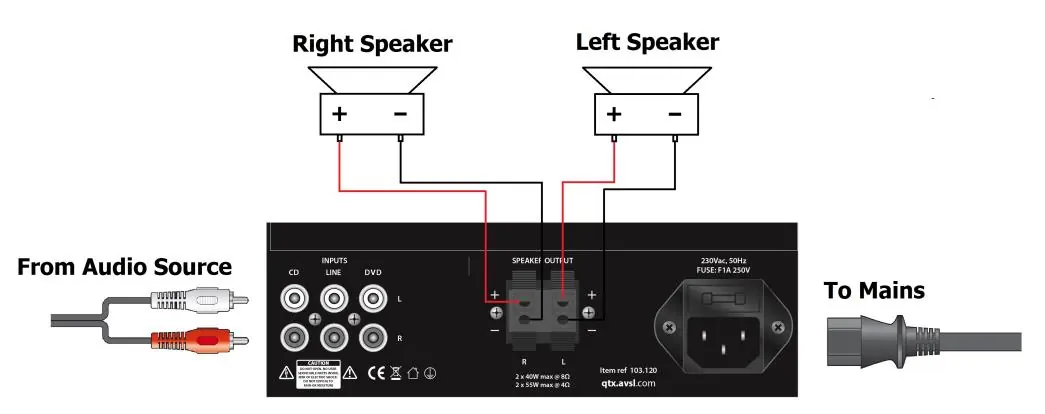
To install the amplifier, wire your speakers to the spring clip terminals on the rear panel. Ensure that the positive and negative terminals are wired correctly. Connect your audio sources to the RCA connectors on the back, ensuring left and right signals are matched for proper stereo output. Once connections are secure, insert the IEC plug and connect to the mains power.
Impedance Matching
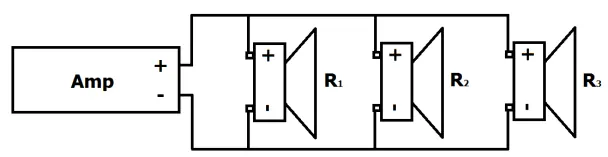
The KAD-2 amplifier supports an impedance output of 4-16 Ohms if multiple speakers are connected per channel. Ensure the total impedance of your speakers remains within this range. Speakers can be wired in parallel or series configurations. The total impedance can be calculated using standard formulas for parallel (1/Rtotal = 1/R1 + 1/R2 + 1/R3...) or series (Rtotal = R1 + R2 + R3...) connections.
Troubleshooting
If you encounter issues, check the following:
- No Power: Verify the mains is on, the power lead is in good condition, the IEC plug is fully inserted, and the power switch is on. Check the fuse if necessary.
- No Music Output: Ensure the input lead is fully inserted, the correct input is selected, the audio source is playing, and the volume is turned up on both the amplifier and the source. Check speaker cables for damage or loose strands causing short circuits.
- No Mic Output: Check if the microphone is switched on, the mic volume is turned up, and the microphone is working on other devices. Verify if the microphone requires phantom power.
- Disrupted Output: Ensure volume levels are not too high, check for damaged cables, and ensure the amplifier is not placed near large inductive appliances like fridges or mains power cables.
Specifications
- Power Supply: 230Vac, 50Hz (IEC)
- Output Impedance: 4 - 8 Ohms
- Output Power (8 Ohm): 2 x 25W rms / 2 x 40W max.
- Output Power (4 Ohm): 2 x 35W rms / 2 x 55W max.
- Input Sensitivity (Line): 380mV
- Input Sensitivity (Mic): 15mV
- Dimensions: 200 x 200 x 65mm
- Weight: 1.6kg
Practical help
Common problems
No Power
Check mains connection, IEC plug, power switch, and internal fuse.
No Music Output
Verify input selection, ensure source is playing, check volume levels, and inspect speaker cables for damage or short circuits.
No Mic Output
Check if the mic is on, mic volume is up, and verify if the mic requires phantom power.
Disrupted Output
Reduce volume, check for damaged cables, and move the amplifier away from large inductive appliances or mains power cables.
Before use
- Ensure power is switched off before installation.
- Set master volume to the lowest point before switching on.
- Verify speaker impedance is within the 4-16 Ohm range.
- Ensure positive and negative terminals are wired correctly.
- Check that the IEC power plug is fully inserted.
Specs in practice
- Output Power (8 Ohm)
- 2 x 25W rms / 2 x 40W max. (EIAJ Standard @ 1kHz 10% THD)
- Output Power (4 Ohm)
- 2 x 35W rms / 2 x 55W max. (EIAJ Standard @ 1kHz 10% THD)
- Input Sensitivity (Line)
- 380mV
- Input Sensitivity (Mic)
- 15mV
Images and diagrams
- Front panel controls include power, volume, input selection, bass, treble, echo, and mic volume.
- Rear panel includes RCA inputs, speaker spring clips, and IEC power input.
- Wiring diagrams illustrate how to connect speakers in parallel or series configurations.
Model compatibility
- Supports 4-16 Ohm impedance output.
- Requires 230Vac, 50Hz power supply.

Manual page author
Michael Turner
Technical manual editor
Reviews PDF manuals for structure, safety notes, and practical product details so readers can find the right information quickly.