Electronics / Speakers & Soundbars
User Manual for QTX GOBO Beam 100W LED Moving Head
Quick guide for the QTX GOBO Beam 100W LED Moving Head. Learn how to set up, configure DMX modes, navigate the control menu, and troubleshoot common issues.
Table of contents
Quick guide from the manual
The QTX GOBO Beam 100W LED Moving Head is a professional lighting fixture designed for stages, bars, and nightclubs. This manual provides essential instructions for safe installation, DMX configuration, and operation. Always ensure the unit is kept away from damp or dusty environments and that there is adequate ventilation around the housing to prevent overheating.
Placement and Installation
Proper placement is critical for safety and performance:
- Use the included mounting brackets to fix the unit to a stand or lighting truss.
- Always use secondary safety fixings if mounting the unit overhead.
- Ensure there is adequate airflow around the fixture housings.
- Ensure adequate access to controls and connections.
- Do not aim the LED output directly into the line of sight to avoid eye injury.
Rear Panel and Controls
The rear panel contains the interface for controlling the unit and connecting signals:
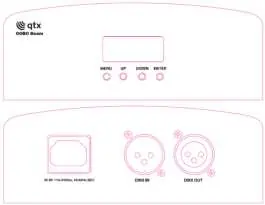
- LCD Display: Shows current settings and DMX status.
- Menu Button: Enters the settings menu.
- Up/Down Buttons: Navigate through functions.
- Enter Button: Confirms the desired setting.
- Power Input (IEC): Connects the mains power.
- DMX Input/Output: 3-pin XLR ports for DMX signal control.
Menu Settings
Press the MENU button to enter the settings menu, use UP/DOWN to navigate, and ENTER to confirm. Key functions include:
- Addr: Set DMX address (1-512).
- CHnd: Select DMX mode (9CH or 13CH).
- Angl: Adjust Pan (p540/p270/p180/p90) and Tilt (t200/t180/t90) angles.
- SLnd: Set operating mode (Slave, Auto, or Sound control).
- SHnd: Select built-in show (Sh 0 to Sh 3).
- SEnS: Adjust sound sensitivity (10-100).
- LEd: Toggle screen saver (ON/OFF).
- disp: Toggle screen reverse (ON/OFF).
- rPAn/rtiL: Reverse Pan or Tilt movement.
- rEst: Reset the unit.
- tenp: Temperature detection.
DMX Operation
To control the unit via DMX, connect the signal source to the DMX input using a balanced XLR lead. You can daisy-chain extra fixtures by looping through the DMX out. Select A001 from the menu to enter DMX mode. The 'A' on the LED display will flash once it receives a valid DMX signal from the controller.
Cleaning and Maintenance
- Use a soft cloth with a neutral detergent to clean the casing as required.
- Use a vacuum cleaner to clear ventilation grilles of any dust or debris build-ups.
- Do not use strong solvents for cleaning the unit.
Troubleshooting
If you encounter issues, check the following:
- No power: Verify mains voltage, check the outlet, and inspect the IEC lead and fuse.
- No light output: Check control panel mode settings and ensure the DMX controller is not set to blackout.
- Unresponsive to DMX: Ensure the unit is in DMX mode, the 'A' on the display is flashing, the controller is on the correct fixture/page, and the DMX address is set correctly.
- Overheating: Ensure adequate ventilation and that the unit is not too close to a heat source.
Specifications
- Power supply: 110-240Vac, 50/60Hz (IEC)
- Power consumption: 100W
- LED power: 100W COB LED
- DMX channels: 9 or 13CH
- PAN range: 540 degrees
- Tilt range: 200 degrees
- Beam angle: 2 degrees
- Weight: 3.6kg
Practical help
Common problems
No power
Check mains voltage, ensure outlet is switched on, and inspect the IEC lead and fuse.
No light output
Check control panel mode settings and verify DMX controller settings (dimmer levels, blackout).
Unresponsive to DMX
Ensure unit is in DMX mode, 'A' on display is flashing, DMX address is correct, and controller is on the correct fixture/page.
Overheating/Cutting out
Ensure adequate ventilation and that the unit is not placed too close to a heat source.
Before use
- Inspect the unit for damage upon arrival.
- Verify the package contains the main unit, brackets, and IEC mains lead.
- Ensure the mounting location is stable and allows for adequate ventilation.
- If mounting overhead, attach secondary safety fixings.
- Check that the power supply matches the 110-240Vac requirement.
Specs in practice
- Power consumption
- 100W
- DMX channels
- 9 or 13 channels
Images and diagrams
- The rear panel features an LCD display, navigation buttons (Menu, Up, Down, Enter), power input (IEC), and DMX input/output ports.
Model compatibility
- Compatible with standard DMX512 controllers.
- Requires balanced XLR leads for DMX connection.

Manual page author
Michael Turner
Technical manual editor
Reviews PDF manuals for structure, safety notes, and practical product details so readers can find the right information quickly.