Furniture / Storage Cabinets
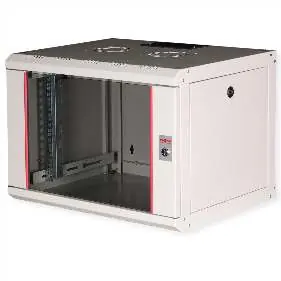
Roline 19-inch Wall Cabinet Pro 7U
Quick guide for the Roline 19-inch Wall Cabinet Pro 7U. Includes installation steps, technical specifications, and key features for this 7U network enclosure.
Table of contents
Quick Guide
This document provides installation and technical details for the Roline 19-inch Wall Cabinet Pro 7U (Article 26.21.0000). Key highlights include a 100kg load capacity, modular design with removable side panels, and a two-step wall mounting process.
Product Overview
The Roline Pro series wall cabinets are designed for flexible network cabling. The unit features a sliding cable entry in the roof with foam rubber sealing. The rear and bottom panels include punched cable entries with plastic covers. The interior contains a pair of galvanized profile rails with 19-inch mounting space, which are adjustable in depth.
Installation
The wall mounting process is performed in two simple steps:
- Screw the rear panel securely to the wall.
- Connect the cabinet housing to the mounted rear panel.
Optional leveling feet or casters can be used for freestanding applications.
Key Features
- Load Capacity: 100 kg
- Front Door: Lockable tempered glass with a 1-point locking mechanism.
- Accessibility: Side panels are lockable and removable.
- Cable Management: Cable entry points at the rear and bottom.
- Ventilation: Roof cutout for fan modules and passive ventilation slots.
- Included: Mounting material.
Technical Specifications
- Protection Class: IP20
- Height: 7U
- Dimensions: 600mm (W) x 450mm (D) x 418mm (H)
- Weight: 14.5 kg
- Color: RAL 7035 (Light Grey)
- Material: Steel construction with glass front door
- Rack Depth Support: 305mm to 370mm
Manufacturer information
ROLINE
Practical help
Common problems
Cabinet is unstable or needs to be freestanding
Use optional leveling feet or casters to support the cabinet on the floor.
Need to install active cooling
The roof chassis includes a pre-punched area specifically designed for mounting fan modules.
Difficulty accessing equipment inside the rack
The side panels and front door are modular, lockable, and removable to improve accessibility.
Before use
- Verify the wall structure can support the 100kg load capacity.
- Ensure the installation area allows for the 600x450mm footprint.
- Check that all included parts (screws, cage nuts, washers, keys) are present.
- Confirm cable routing requirements for rear and bottom entry points.
- Ensure the rack depth of your equipment is between 305mm and 370mm.
Images and diagrams
- The cabinet features a sliding cable entry in the roof with foam rubber sealing.
- The rear and bottom panels are equipped with punched cable entries and plastic covers.
Model compatibility
- Compatible with standard 19-inch rack-mount equipment.
- Supports rack depths between 305mm and 370mm.

Manual page author
David Miller
Documentation analyst
Organizes user manual content into clear summaries, with attention to model details, product context, and everyday usability.