Furniture / Storage Cabinets
User Manual for ROLINE Wireless Extender Set 14.01.3418
Quick guide for the ROLINE Wireless Extender Set (14.01.3418). Learn how to pair the transmitter and receiver, set up dual dongles, and manage screen mirroring.
Table of contents
Manual images
Click an image to enlargeQuick guide from the manual
The ROLINE Wireless Extender Set (14.01.3418) enables wireless screen mirroring from USB-C devices (PCs, tablets) to an HDMI-equipped monitor or TV. The system consists of a Transmitter (TX) and a Receiver (RX). Ensure your source device supports USB-C with DisplayPort (DP) Alt mode for proper functionality.
Device Overview
Transmitter (TX): Features a USB-C connector for the source device, a Reset Key, and a Pair/Screen On/Off button.
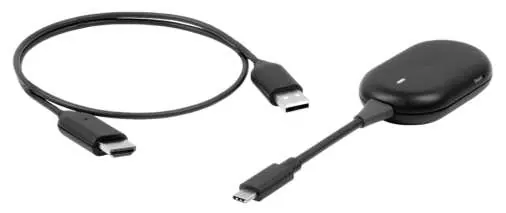
Receiver (RX): Features an HDMI connector for the display, a Reset button, and a USB-A connector for 5V power supply.
Pairing Process
1. Initiate the RX Dongle:
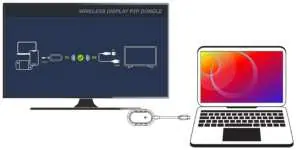
- Connect the USB-A cable to a 5V power source.
- Connect the HDMI cable to your monitor or TV.
- After booting, press and hold the button on the RX to display the pairing prompt on the screen.
- Confirm the version number and SSID are displayed.
2. Pair the TX Dongle:
- Connect the TX dongle to your source device (PC/tablet).
- Press and hold the Pair/Screen On/Off button on the TX for about 5 seconds until the light stops flashing.
- Release the button. The light will flash faster, and the screen will display "Pairing OK" once connected.
Operating with Dual TX Dongles
You can use two TX dongles with one RX unit to switch between devices.
- Connect the second TX dongle to a new device.
- Press and hold the button on the RX to display the pairing prompt and confirm "Ready to Pair".
- Press and hold the Pair/Screen On/Off button on the second TX for 5 seconds to pair.
- To switch between paired devices, press the Pair/Screen On/Off button on the currently connected device to display the prompt, then press the button on the device you wish to connect to.
Mirroring Control
To temporarily stop mirroring, press the Pair/Screen On/Off button on the connected device. The monitor will display the pairing prompt. Press the button again to restore the connection.
Manufacturer information
ROLINE
Practical help
Common problems
Mirroring does not start
Ensure the RX is powered via USB-A and the TX is properly connected to a USB-C port supporting DP Alt mode.
Pairing fails
Ensure the RX is in 'Ready to Pair' mode before holding the button on the TX for 5 seconds.
Before use
- Verify the source device supports USB-C with DP Alt mode.
- Connect the RX USB-A connector to a 5V power source.
- Connect the RX HDMI connector to the display.
- Ensure the TX is connected to the source device.
Images and diagrams
- The RX requires an external 5V power source via USB-A.
- Pairing requires holding the TX button for 5 seconds until the light pattern changes.
Model compatibility
- Compatible with Windows, macOS, and ChromeOS.

Manual page author
Michael Turner
Technical manual editor
Reviews PDF manuals for structure, safety notes, and practical product details so readers can find the right information quickly.