General / Other Manuals
Shopify 1224H Digital Alarm Clock User Guide
Quick guide for the Shopify 1224H digital alarm clock. Learn how to set dual alarms, adjust brightness, configure night mode, toggle 12/24H display, and use voice-activated wake-up features.
Table of contents
Quick guide from the manual
This guide provides essential instructions for operating the Shopify 1224H digital alarm clock. Key features include dual alarm settings, voice-activated wake-up, five-level brightness adjustment, and a dedicated night mode. Please note that when powered by batteries, the screen turns off after 15 seconds to save power; use voice control or press any button to wake it up.
Device Overview and Key Functions
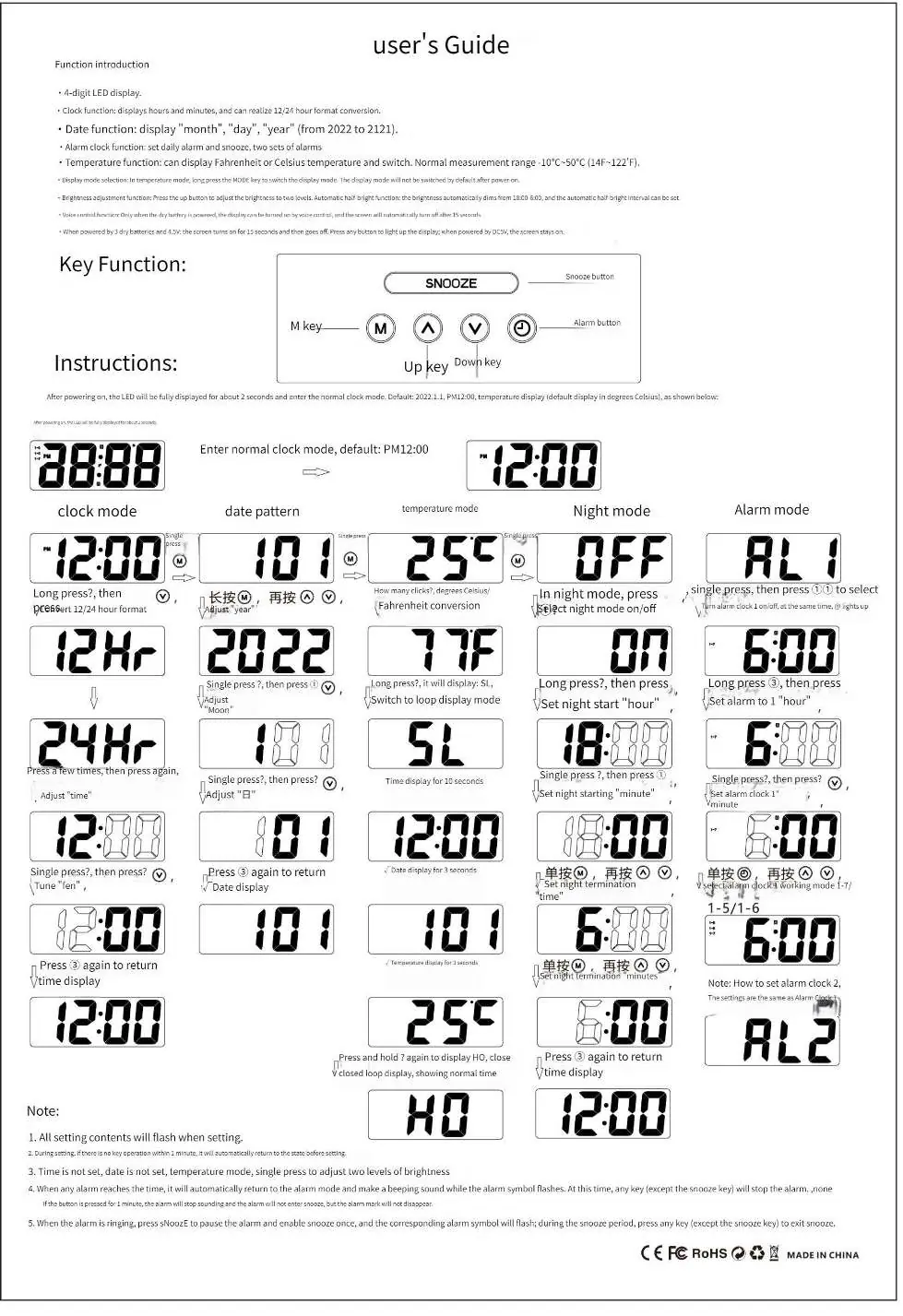
The device features four main buttons: M (Mode), Up, Down, and Alarm, plus a large SNOOZE button on top. The LED display shows time, date, and temperature. Settings are adjusted by pressing the M key to cycle through modes and using the Up/Down keys to change values.
Alarm Settings
- Setting Alarms: Press the Alarm key to select Alarm 1 or Alarm 2. Use the +/- keys to toggle the alarm ON/OFF. Press the S key to enter the specific alarm time setting.
- Alarm Patterns: You can configure alarms for Monday-Sunday, Monday-Saturday, or Monday-Friday.
- Snooze: When the alarm rings, press any key to start the snooze function. Press and hold the SNOOZE button for 3 seconds to turn off the current alarm.
Display and Brightness Settings
- Brightness: In time mode, short press the SNOOZE button to cycle through 5 brightness levels.
- Night Mode: Automatically dims the display between 22:00 and 6:00.
- Display Modes: Press and hold the + button for 3 seconds to toggle between displaying only the time or cycling through time, date, and temperature.
- 12/24H Toggle: Long press the S key, then use the +/- keys to switch between 12H and 24H formats.
- Temperature Units: In time mode, press and hold the - key for 3 seconds to switch between Celsius and Fahrenheit.
Anti-Disturb Mode
To enter 'Do Not Disturb' mode, press and hold the SNOOZE button for 3 seconds. This turns off the display and disables voice-activated wake-up. You must manually press a button to wake the screen in this mode.
Troubleshooting and Notes
- If no operation occurs for 1 minute, the device automatically returns to the time display.
- Settings will flash while being modified.
- If the alarm is not set, the date/time/temperature mode will allow you to adjust brightness levels.
- When the alarm rings, it will sound for 1 minute if not stopped.
Practical help
Common problems
Screen turns off automatically
This is normal when using battery power to save energy. Clap your hands or knock on the table to wake it up.
Alarm is not turning off
Press any key to snooze, or press and hold the SNOOZE button for 3 seconds to turn off the alarm completely.
Cannot see the date or temperature
Press and hold the + button for 3 seconds to switch the display mode to cycle through time, date, and temperature.
Before use
- Ensure 3 AAA batteries are installed or the DC power cable is connected.
- Check if the display is in 12H or 24H mode based on your preference.
- Set the current date and year (2022-2121 range).
- Verify if you want the temperature in Celsius or Fahrenheit.
Specs in practice
- Temperature Range
- -10°C to 50°C (14°F to 122°F).
Images and diagrams
- M key: Used to cycle through clock, date, temperature, and alarm modes.
- Up/Down keys: Used to adjust values during setup.
- SNOOZE button: Used for brightness adjustment and silencing alarms.
Model compatibility
- Supports two independent alarm sets.
- Supports 12/24 hour time format conversion.
- Supports date display from year 2022 to 2121.

Manual page author
Emily Carter
User documentation editor
Prepares concise manual descriptions and highlights the most useful setup, operation, and maintenance information for readers.