General / Mounts Stands
SIIG 04-1368B Full HD Wireless HDMI Extender User Guide
Quick start guide for the SIIG 04-1368B Full HD Wireless HDMI Extender. Includes pairing instructions, connection diagrams, and technical specifications for wireless transmission.
Table of contents
Manual images
Jump to the sectionQuick guide from the manual
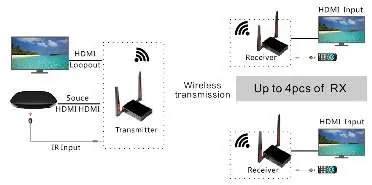
This document provides essential setup and pairing instructions for the SIIG 04-1368B Wireless HDMI Extender. The device supports wireless transmission up to 656ft (200m) in open environments and allows for one-to-many configurations (up to 4 receivers).
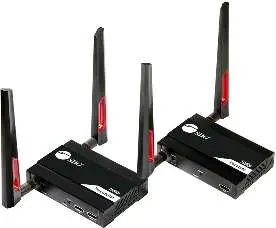
Package contents
- Wireless HDMI Transmitter
- Wireless HDMI Receiver
- 2x Power adapters (12V/1A)
- 4x 5G WiFi antennas
- IR Emitter Cable (for TX)
- IR Receiver Cable (for RX)
- Quick start guide
Device layout
Transmitter: Features a DC power jack, power LED, reset button (hold 5s for factory reset), HDMI input, loop-out port for local display, and an IR output port.
Receiver: Features a DC power jack, power LED, reset button, HDMI output, and an IR input port.
Pairing instruction
- Power on both the Transmitter (TX) and Receiver (RX).
- Wait for 30 seconds.
- Connect the TX input to the RX output using an HDMI cable.
- Wait for 10 seconds.
- Disconnect the HDMI cable and power off both units.
- Connect the RX output to your display and the TX to your video source.
- Power on both units to complete the setup.
Technical specifications
- Wireless connectivity: 5G
- Resolution: Up to 1080p@60Hz
- HDCP support: 1.3
- Audio support: PCM 2ch
- Transmission distance: Up to 656ft/200m (open environment)
- IR support: One-way IR extension
Support
For further technical assistance, visit the official support page at http://www.siig.com/support.
Official resources from the manual
Manufacturer information
SIIG, Inc.
Practical help
Common problems
Device not connecting or signal lost
Perform a factory reset by holding the RESET button for 5 seconds, then follow the pairing instructions again.
Before use
- Ensure both antennas are attached to the units.
- Verify that both the transmitter and receiver are powered using the provided 12V/1A adapters.
- Ensure the environment is free of significant Wi-Fi interference for optimal range.
- Confirm the HDMI source is set to a resolution of 1080p or lower.
Images and diagrams
- The transmitter connects to the video source via HDMI and can output to a local monitor via Loop Out.
- The receiver connects to the remote display via HDMI.
- Up to 4 receivers can be paired to a single transmitter.
Model compatibility
- Supports up to 4 receivers per transmitter.
- Requires 5G wireless connectivity.
- Supports PCM 2ch audio only.

Manual page author
Michael Turner
Technical manual editor
Reviews PDF manuals for structure, safety notes, and practical product details so readers can find the right information quickly.