General / Mounts Stands
SIIG 04-1403A USB-C to HDMI with LAN Hub and PD Charging Adapter User Guide
Quick start guide for the SIIG 04-1403A USB-C to HDMI adapter. Includes connection instructions, system requirements, technical specifications, and troubleshooting for PD charging and video output.
Table of contents
Quick guide from the manual
This document provides essential setup and operational information for the SIIG 04-1403A USB-C to HDMI with LAN Hub and PD Charging Adapter. To ensure proper functionality, your host device (laptop or tablet) must support DisplayPort Alternate (DP Alt) mode and Power Delivery via its USB-C port.
Device layout and connections
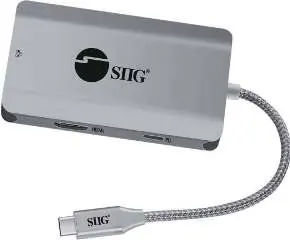
- RJ-45 Gigabit Ethernet: Network connectivity port.
- USB-C host port: Connects to your computer; must support DP Alt Mode and Power Delivery.
- HDMI output: Supports resolutions up to 4K at 30Hz.
- PD charging input: Connect your PD charger here. Supports up to 100W input, providing 85W to the host device (15W is reserved for the adapter).
- USB-A 5Gbps ports: Two ports for data transfer (5V/900mA each).
System requirements
The adapter is compatible with Windows, Mac, Chrome, and Android systems. The host device must feature a USB-C port that is Thunderbolt 3 compatible or supports DP Alt Mode and Power Delivery.
Troubleshooting
- No HDMI signal: Verify that your computer's USB-C host port supports DP Alt Mode.
- Charging issues: Ensure your laptop supports 85W charging. If using a 100W charger, note that 15W is consumed by the adapter itself. Additionally, ensure your USB-C cable is E-Mark certified to support charging over 60W.
Support
For further information or technical assistance, visit the official support website at http://www.siig.com/support
Official resources from the manual
Manufacturer information
SIIG, Inc.
Practical help
Common problems
No video signal on HDMI display
Ensure your laptop's USB-C port supports DisplayPort Alternate (DP Alt) mode.
Laptop not charging at 85W
Verify that your laptop supports 85W charging and that your USB-C cable is E-Mark certified for power delivery over 60W.
Before use
- Verify host device supports DP Alt Mode
- Verify host device supports Power Delivery
- Ensure use of a PD-compatible charger
- Check that the USB-C cable supports high-wattage charging (E-Mark)
Images and diagrams
- Port 1: RJ-45 Gigabit Ethernet
- Port 2: USB-C host connector
- Port 3: HDMI video output
- Port 4: USB-C PD charging input
- Port 5: Dual USB-A 5Gbps data ports
Model compatibility
- Requires USB-C host with DP Alt Mode and Power Delivery
- Compatible with Windows, Mac, Chrome, and Android
- Thunderbolt 3 compatible

Manual page author
David Miller
Documentation analyst
Organizes user manual content into clear summaries, with attention to model details, product context, and everyday usability.