Power / Batteries & Chargers
User Manual for SkyRC PC1500 Dual Channel Intelligent Battery Charger
A comprehensive user guide for the SkyRC PC1500 dual-channel battery charger. This manual covers setup, operation, battery maintenance, safety precautions, and troubleshooting for 12S/14S LiPo and 12S LiHV batteries.
Table of contents
Manual images
Click an image to enlargeQuick Guide from the Manual
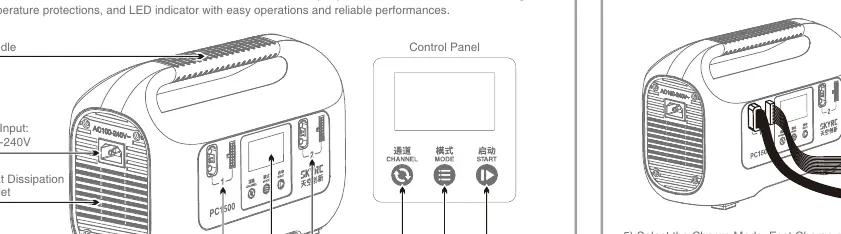
The SkyRC PC1500 is a dual-channel intelligent charger designed for 12S/14S LiPo and 12S LiHV batteries. It features a maximum output power of 1500W and supports CAN communication. Before use, ensure the AC power is well-grounded and the charger is placed on a heat-resistant, non-inflammable surface.
Operation Procedure
- Power On: Connect AC power. The charger will beep once, and the fan will start for a self-check.
- Select Language: For initial use, short-press the MODE button to select the language, then press START to confirm. For routine use, long-press the MODE button for 10 seconds to enter the language selection menu.
- Select Battery Type: Press and hold both the MODE and START buttons simultaneously for three seconds to toggle between LiPo and LiHV.
- Connect Battery: Connect the battery to the charging channel. The charger will automatically detect the cell count.
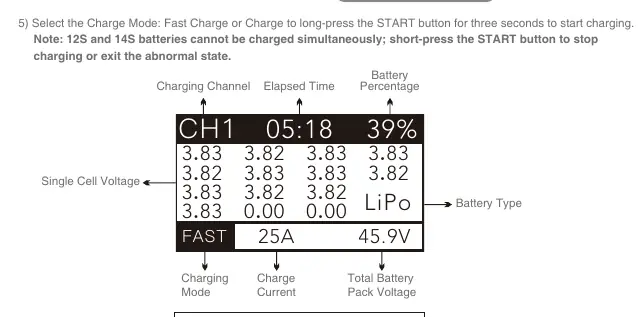
- Select Charge Mode: Choose between Fast Charge, Charge, or Storage. Long-press the START button for three seconds to begin the process.
Battery Maintenance
To extend battery life, use the STORAGE mode if the battery will not be used for a long time. The charger will automatically charge or discharge the battery to 3.8V±0.05V per cell. Select the STORAGE mode and long-press the START button for three seconds to initiate maintenance.
Troubleshooting
- MAIN PORT BROKEN: Check the connection between the battery and the charger.
- COMM BROKEN: Communication error; check connections.
- CELL VOLT DIFF: Voltage difference >300mV; check connections or balance cable.
- BAL PORT ERROR: Reconnect or change the balance cable.
- HI POWER TEMP: Charger overloaded; wait for the temperature to drop.
- AC INPUT ERROR: Input voltage is too high or too low.
- REV POLARITY: Battery cable polarity is reversed.
Specifications
- Input: 100-240V AC
- Supported Cells: LiPo 12S/14S, LiHV 12S
- Working Modes: Fast Charge, Charge, Storage
- Storage Discharge Power: 60W
- Storage Cut-off Voltage: 3.8V/Cell
- Output Power (AC220V): 1500W
- Output Power (AC120V): 600W
Safety Precautions
- Never leave the charger unattended while connected to power.
- Keep away from dust, moisture, rain, heat, and vibration.
- Use only on a heat-resistant, non-inflammable, and non-conductive surface.
- Do not charge non-rechargeable batteries or batteries with integral protection circuits.
- Ensure the AC power source provides stable voltage; use a voltage regulator if necessary.
Practical help
Common problems
MAIN PORT BROKEN
Check if the connection between the battery and the charger is correct.
CELL VOLT DIFF
Voltage difference is higher than 300mV; check connections or replace the balance cable.
HI POWER TEMP
Charger is overloaded; wait until the charger temperature drops.
REV POLARITY
Check if the battery cable polarity is connected reversely.
Before use
- Ensure AC power is well-grounded.
- Verify battery type (LiPo or LiHV) and cell count (12S/14S).
- Check that all connections are firm and secure.
- Place the charger on a heat-resistant, non-inflammable surface.
- Ensure the AC input voltage is stable (100-240V).
Specs in practice
- Storage Cut-off Voltage
- 3.8V/Cell is the optimal voltage for long-term battery storage to prevent degradation.
- Output Power
- 1500W maximum output at 220V AC; 600W maximum output at 120V AC.
- Working Modes
- Fast Charge, Charge, and Storage modes for different battery needs.
Images and diagrams
- The control panel features Channel, Mode, and Start buttons for navigation and operation.
- The LCD display provides real-time data on charging status, elapsed time, battery percentage, and cell voltage.
Model compatibility
- Supports 12S or 14S LiPo batteries.
- Supports 12S LiHV batteries.
- 12S and 14S batteries cannot be charged simultaneously.

Manual page author
Michael Turner
Technical manual editor
Reviews PDF manuals for structure, safety notes, and practical product details so readers can find the right information quickly.