Smart Home / Smart Doorbells
User Manual for Solight 1D23WIFI Smart WiFi Wireless Motion Detector-Gong
Comprehensive user guide for the Solight 1D23WIFI Smart WiFi Wireless Motion Detector-Gong. Includes instructions for pairing sensors, installing the device, configuring the Tuya mobile app, and troubleshooting connectivity issues.
Quick answers from the manual
Quick answer
- The Solight 1D23WIFI is a smart wireless motion detector and gong system. It pairs via 433.92 MHz radio frequency and connects to the Tuya app for remote notifications and settings management. p. 1
Key actions
- Pairing the sensor with the chime p. 1
- Replacing the battery p. 2
First start
- Plug in the receiver and pair the sensor p. 1
Problems and fixes
Receiver does not ring repeatedly
Check distance between transmitter and receiver, and check for signal interference from metal objects or walls.
p. 2Maintenance and reset
- Deleting paired sensors from memory p. 2
Technical specifications
| Parameter | Value | Meaning | Pages |
|---|---|---|---|
| Signal range | 180 m | In open space | p. 1 |
| Transmission frequency | 433.92 MHz | Operating frequency | p. 1 |
| Sensor power supply | 1 x 3V (CR2032) battery | Battery type | p. 1 |
Where to find it in the PDF
- Product Overview and Specs p. 1
- Operation and Maintenance p. 2
- Mobile App Setup p. 3, 4
Table of contents
Manual images
Click an image to enlargeImportant Information
The Solight 1D23WIFI is a smart wireless motion detector and gong system designed for indoor use. It operates on a 433.92 MHz radio frequency with a maximum range of 180 meters in open space. The system supports up to 6 sensors per gong and up to 15 gongs per sensor. It features WiFi connectivity via the Tuya app for remote notifications and settings management.
Product Description
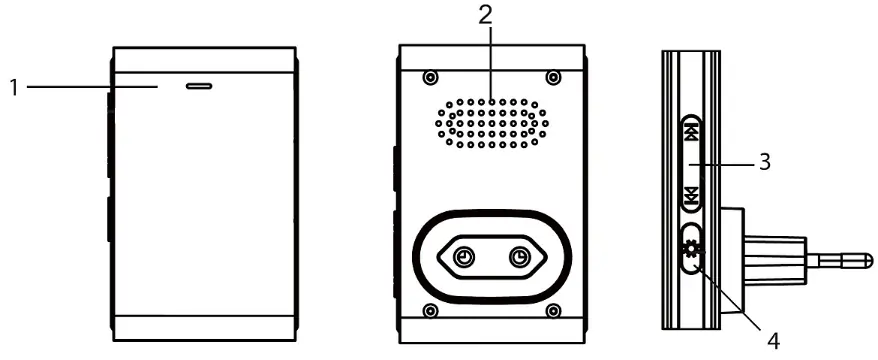
The system consists of a receiver (gong) and a transmitter (magnetic sensor). The receiver is designed for permanent connection to a 230V mains supply. The transmitter is weather-resistant (IP44) and powered by a CR2032 battery. The device includes 64 selectable melodies and 5 volume levels (0-100 dB).
Pairing Sensors
To pair a sensor with the chime:
- Plug the receiver into a 230V AC socket.
- Press and hold the pairing button on the chime for approximately 5 seconds.
- Release the button when the indicator light on the chime turns on.
- The chime enters pairing mode for 25 seconds. During this time, separate the magnetic sensor parts.
- The sensor is paired when the melody sounds.
To delete paired sensors, press and hold the pairing button, plug the chime into the outlet, continue holding for 5 seconds until the LED flashes, then release.
Sensor Placement
Before permanent installation, test the range and reliability of the connection. Install both parts of the sensor opposite each other, using the marked arrows to indicate the centers of the magnets. Attach the bottom covers using double-sided adhesive tape or screws. Note that metallic materials, such as steel posts or metal door frames, can reduce the signal range.
Battery Replacement
To replace the battery in the transmitter:
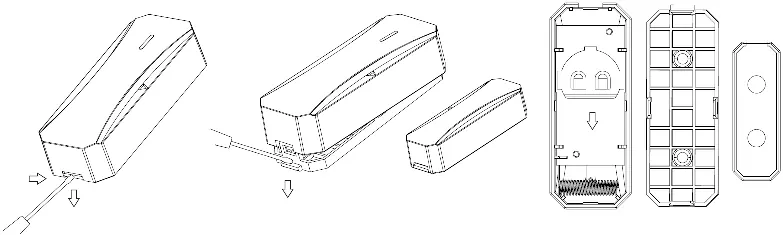
- Insert a flat screwdriver into the gap on the sensor cover and carefully turn it.
- Lift off the cover and remove the old battery.
- Insert a new CR2032 battery, ensuring correct polarity.
- Close the cover and snap it firmly into place.
Tuya Mobile App Setup
The device can be controlled via the Tuya app:
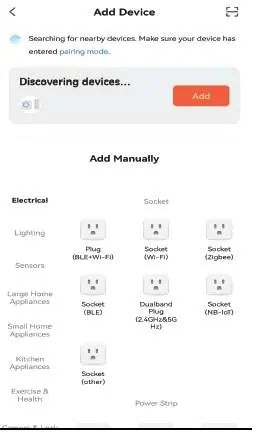
- Install the Tuya app and register an account.
- Switch the device to pairing mode by holding the button for 5 seconds until it beeps and flashes.
- In the app, click the '+' icon and select 'Add device'.
- The app should detect 'Solight Smart WiFi gong'. Follow the on-screen instructions to complete the connection.
Troubleshooting
If the receiver does not ring, check the following:
- Ensure the distance between the transmitter and receiver is not too great.
- Check for sources of signal interference, such as radio/wireless networks, large metal objects, or reinforced concrete walls.
- If the device fails to pair, reset it by holding the button for 5 seconds.
Practical help
Common problems
Receiver does not ring
Check the distance between the transmitter and receiver. Ensure there are no strong sources of interference like metal objects or reinforced concrete walls between them.
Device not found in Tuya app
Ensure the device is in pairing mode (flashing LED). If not found automatically, use the 'Add manually' section in the app and select 'Other products (WiFi)'.
Before use
- Check that the CR2032 battery is installed in the sensor.
- Plug the receiver into a 230V AC socket.
- Test the signal range and reliability in the desired location before permanent installation.
- Ensure the Tuya app is installed on your smartphone.
Specs in practice
- Signal range
- Maximum 180 meters in open space without interference.
- Ringing volume
- Adjustable in 5 levels: 0, 25, 50, 75, 100 dB(A).
Images and diagrams
- Receiver: Features an LED indicator, speaker, ringtone selection buttons, and a volume/pairing button.
- Transmitter: Features magnetic surfaces with center arrows, an LED indicator, and mounting holes.
Model compatibility
- Up to 6 sensors can be paired with one gong.
- Up to 15 gongs can be paired with one sensor.
- The device requires a 2.4GHz WiFi network for app connectivity.

Manual page author
Michael Turner
Technical manual editor
Reviews PDF manuals for structure, safety notes, and practical product details so readers can find the right information quickly.