Health / Assistive Technology
User Manual for Starkey Mini Turbo Charger
Quick guide for the Starkey Mini Turbo Charger. Learn how to charge your hearing aids, use the turbo charge feature, interpret LED indicators, and troubleshoot common issues.
Table of contents
Manual images
Click an image to enlargeQuick Guide from the Manual
The Starkey Mini Turbo Charger is a portable charging solution for lithium-ion rechargeable RIC (Receiver-In-The-Canal) or BTE (Behind-The-Ear) hearing aids. It functions when plugged into a wall outlet or on-the-go using its internal battery, which can recharge a pair of hearing aids up to four times. Ensure the device is fully charged before initial use.
Features and Controls
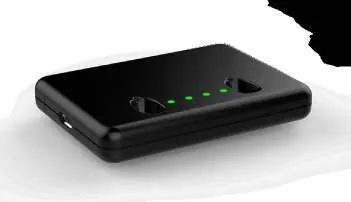
- MicroUSB Port: Located on the side of the charger, used for charging the internal battery.
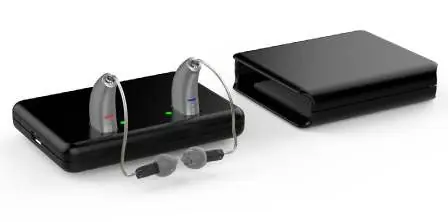
- Charging Ports: Two slots for hearing aids; there is no designated left or right port.
- Hearing Aid Charging LEDs: Indicates the charging status of both the hearing aids and the internal battery.
Charging Your Hearing Aids
To charge your hearing aids, place them into the charging ports with the earbud or earmold pointed outward over the edge of the charger. The hearing aids will turn off automatically and begin charging.
- Glowing Green: Charging.
- Solid Green: Fully charged.
- Blinking Red: Error state.
- All four LEDs glowing in series: Turbo charge mode.
Charging status can be checked by tapping the top surface of the charger twice; the LEDs will illuminate for 10 seconds.
Turbo Charging
Turbo charging is activated when the battery life in the hearing aid or charger is nearly depleted. It provides a 20% charge in a maximum of 7 minutes, which is equivalent to 3.5 hours of hearing aid use. During this process, all four LEDs will blink in series.
Charging the On-Board Battery
The internal battery is charged via the MicroUSB port and reaches a full charge in under three hours. To maintain optimal capacity, charge the device at least once every three weeks.
To check the battery level of the charger (when no hearing aids are inserted), tap the top surface twice:
- 4 Solid: > 75%
- 3 Solid:< 75%
- 2 Solid:< 50%
- 1 Solid:< 25%
- 1 Blinking: Charge Low
Maintenance and Care
- Keep the charger clean and free of debris. Wipe with a dry, clean cloth.
- Do not use water, solvents, or cleaning fluids on the charging ports.
- Store in a clean, dry location, avoiding bathrooms or kitchens.
- Do not expose to excess heat (e.g., window sills or hot cars).
- Keep the charger in its sleeve when not in use or during transport.
Troubleshooting
- No LED indicator: Tap the top surface twice to refresh the display. If still off, check the orientation of the hearing aids or connect the charger to a power source to charge the internal battery.
- Red blinking LED: A fault has occurred. Remove the hearing aid, wait for the LED to turn off, and reinsert it.
- Hearing aid whistling: Reposition the hearing aid in the port. If the battery is dead, plug in the charger or manually power off the hearing aid by holding the rocker switch for three seconds.
Safety Information
- Do not disassemble the charger; there are no user-serviceable parts inside.
- Do not use the charger during an MRI procedure or in a hyperbaric chamber.
- If the charger becomes hot, do not touch it until it has cooled down.
- Use only approved cords and AC adapters.
Practical help
Common problems
No LED indicator when hearing aid is inserted
Tap the top surface twice to refresh LEDs, ensure correct orientation (earmold pointed out), or connect the charger to a power source.
Red blinking LED by charging port
A fault occurred. Remove the hearing aid, wait for the LED to turn off, and reinsert.
Hearing aid whistling in the charger
Reposition the hearing aid in the port. If the battery is dead, plug in the charger or manually turn off the hearing aid.
Before use
- Fully charge the Mini Turbo Charger before first use.
- Ensure the charger is stored in a clean, dry location.
- Verify hearing aids are RIC or BTE models compatible with the charger.
- Ensure the charging environment is between 0°C and 40°C.
Specs in practice
- Turbo Charge
- Provides 20% charge in max 7 minutes, equivalent to 3.5 hours of use.
- On-board Battery Capacity
- Can fully charge a pair of hearing aids up to four times.
- Charging Time
- Fully charges the on-board battery in under three hours.
Images and diagrams
- 1. MicroUSB Port: Used for charging the device.
- 2. Charging Ports: Insert hearing aids here; no specific left/right side.
- 3. Hearing Aid Charging LEDs: Indicates status for both hearing aids and the on-board battery.
Model compatibility
- Designed for lithium-ion rechargeable RIC (Receiver-In-The-Canal) or BTE (Behind-The-Ear) hearing aids.

Manual page author
David Miller
Documentation analyst
Organizes user manual content into clear summaries, with attention to model details, product context, and everyday usability.