Automotive / Car Audio
User Manual for Stetsom Infinite Black Power Supply & Charger
Quick guide for the Stetsom Infinite Black Power Supply & Charger. Learn about installation, charging modes, technical specifications, and safety protections for 70A, 120A, 150A, and 200A models.
Table of contents
Manual images
Click an image to enlargeQuick guide from the manual
The Stetsom Infinite Black series is a range of high-performance power supplies and battery chargers designed for intelligent battery management. These units feature automatic bivolt (127/220Vac) compatibility and multiple charging modes to optimize battery life and performance.
Product Overview
The unit features a front panel with the following controls and indicators:
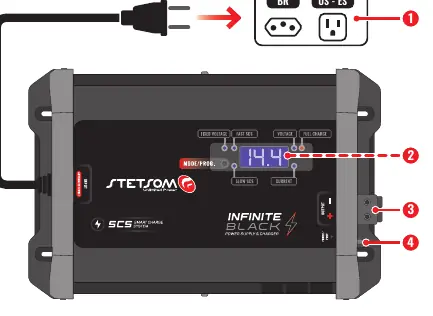
- AC Power Connector: Connect to a compatible AC outlet. Avoid using adapters.
- LED Display: Shows real-time voltage and current information and allows configuration of programming modes.
- DC Output Connector: Connect to battery terminals using appropriate cable gauges. Observe correct polarity.
- ON/OFF Key (POWER/PROT): Turns the unit on/off. The internal LED indicates standby mode or active protection (PROT).
Charging Modes
The power supply offers three distinct charging modes:
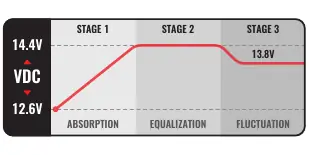
- Fixed Voltage Mode: Allows selection of output voltage from 12.6Vdc to 14.4Vdc. Ideal for powering amplifiers directly without batteries or with batteries while playing sound.
- Smart Slow Charge (Slow SCS): Intelligently regulates voltage and current (5% to 20% of programmed current) to prevent overcharging and heating. Once 14.4V is reached, it maintains this for ~8 hours before entering float mode (13.8V).
- Smart Fast Charge (Fast SCS): Similar to Slow SCS but provides higher current (20% to 35% of programmed current). Ideal for quickly charging discharged batteries.
Installation
Installation must be performed by a qualified professional with the product turned OFF.
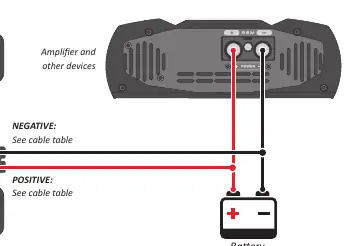
Simple Installation
Used to charge a battery bank and power sound equipment. Connect the positive and negative terminals of the power supply to the battery terminals using the recommended cable gauges.
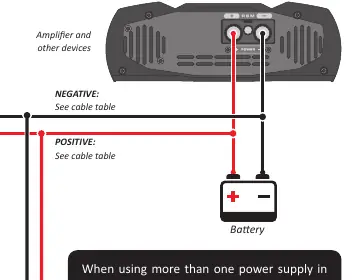
Parallel Installation
When using two or more power supplies in parallel, use only the Fixed Voltage mode. All units must be configured to the same output voltage. Smart charge modes should only be used with a single power supply connected.
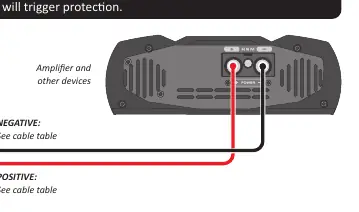
Installation as Power Supply Only
Used to power sound equipment without batteries. Ensure the total consumption of the equipment does not exceed the rated current of the power supply to avoid triggering protection.
Protections
If a protection is triggered, the unit will turn off and the POWER/PROT button LED will light up. Protections include:
- Internal AC input fuse: Protects against internal short circuits.
- DC output short circuit: Protects against short circuits and output overload.
- Low Voltage (Undervoltage): Protects if output voltage drops below 7.5Vdc.
- Temperature: Intelligent monitoring regulates operation based on temperature.
Technical Specifications
The Infinite Black series is available in 70A, 120A, 150A, and 200A models. All models feature automatic bivolt (127Vac/220Vac) input, 12.6V-14.4V DC output, and 90-95% efficiency depending on the model.
Warranty
Stetsom provides a 1-year warranty against manufacturing defects from the date of sale to the final consumer. Proof of purchase (sale note or warranty certificate) is required for service.
Practical help
Common problems
Power supply turns off and POWER/PROT LED lights up
Check for short circuits, low voltage (<7.5Vdc), or overheating. Verify installation and load requirements.
Voltage display varies rapidly
This is normal behavior due to the pulsed smart charging process analyzing battery values.
Fan speed varies
This is normal behavior as the unit adjusts to the smart charging process.
Before use
- Ensure all connections are made with the product OFF.
- Use cable sizes recommended in the manual for your specific model (70A, 120A, 150A, or 200A).
- Ensure the AC outlet is compatible with the power supply.
- Verify the installation location is firm, ventilated, and dry.
- Installation must be performed by a qualified professional.
Specs in practice
- Fixed Voltage Mode
- Allows selection of output voltage from 12.6Vdc to 14.4Vdc.
- SCS (Smart Charge System)
- Intelligently regulates voltage to prevent overcharging and heating.
- Automatic Bivolt
- Compatible with 127Vac and 220Vac power sources.
Images and diagrams
- Simple Installation: Connects the power supply directly to the battery and sound equipment.
- Parallel Installation: Connects two or more power supplies to the same battery bank (use Fixed Voltage mode only).
Model compatibility
- Parallel operation requires all units to be configured to the same output voltage.
- Smart charge modes should only be used with a single power supply connected.

Manual page author
David Miller
Documentation analyst
Organizes user manual content into clear summaries, with attention to model details, product context, and everyday usability.