Electronics / USB Hubs & Docking
User Manual for Techly DSK10 LED Desk Lamp with Wireless Charger
A comprehensive guide for the Techly DSK10 LED Desk Lamp. This manual covers setup, touch-sensitive controls, color temperature adjustment, the 40-minute timer function, and instructions for using the integrated 15W wireless charger.
Table of contents
Quick Guide
The Techly DSK10 is a multifunctional LED desk lamp featuring stepless dimming, adjustable color temperatures, and a built-in 15W wireless charger. To begin, connect the provided DC12V/2A power adapter to the base and a wall outlet. Use the touch-sensitive buttons on the base to control power, lighting modes, and the timer function.
Product Overview
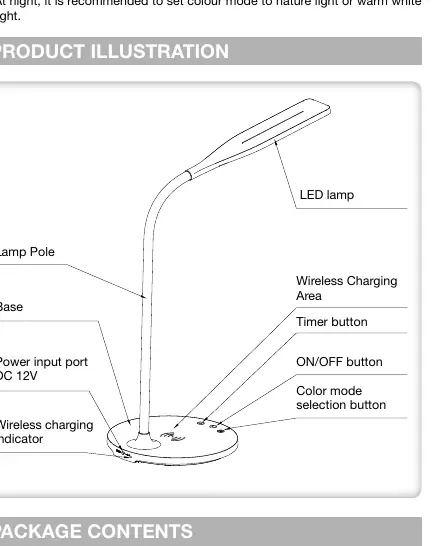
The lamp consists of a flexible pole and a base containing the control interface. The base includes the wireless charging area, power button, timer button, color mode selection button, and a wireless charging indicator.
Operating Instructions
Power and Dimming: Touch the power button to turn the lamp on or off. The default light mode is natural. Press and hold the power button to adjust the brightness level steplessly.
Color Modes: Short touch the "M" button to cycle through the three available color temperatures: Natural light, Cool light, and Warm light.
Timer Function: Press and hold the timer button. The light will flash twice to confirm the timer is active. The lamp will automatically turn off after 40 minutes. To reset or cancel, press and hold the timer button again.
Wireless Charging
To use the wireless charging feature, ensure the lamp is plugged in. Align your mobile phone (or device with a wireless charging module) with the charging zone on the base.
- Green Indicator: The phone is charging.
- Red Indicator (Solid or Flashing): The wireless charging is not working properly; check alignment.
- Red and Green Indicator: The phone is fully charged (supported on some devices).
For optimal efficiency, ensure the phone is correctly aligned with the charging zone. The wireless charging power is approximately 10W when the lamp is turned on.
Safety and Maintenance
- Use only the specified DC12V/2A power adapter.
- This product is for indoor use only.
- Do not look directly into the light source when the lamp is on.
- Do not bend the lamp pole continuously or quickly to avoid damage.
- Place the lamp on a stable surface; avoid tilting the lamp more than 6 degrees to prevent toppling.
- The light source is irreplaceable; the entire lamp must be replaced at the end of its life.
Technical Specifications
- Power Supply: Input AC200-240V 50/60Hz, Output DC12V/2A
- Rated Power (Product): 21W
- Rated Power (Lamp): 5.5W
- Wireless Charging Output: 15W (MAX)
- Color Temperature: 3000K / 4000K / 5700K
- Luminous Flux: 320LM
- Color Rendering Index: Ra≥90
Practical help
Common problems
Wireless charging indicator is red or flashing
The wireless charging is not working properly. Ensure your phone is correctly aligned with the charging zone on the base.
Lamp turns off automatically
The 40-minute timer function may have been activated. Press and hold the timer button to reset or deactivate it.
Lamp is unstable or toppling
Ensure the lamp is placed on a flat, stable surface. Do not tilt the lamp more than 6 degrees.
Before use
- Verify you have the DC12V/2A power adapter.
- Place the lamp on a flat, stable surface.
- Ensure the power outlet provides AC200-240V.
- Check that your mobile device supports wireless charging.
Specs in practice
- Wireless Charging Output
- Provides up to 15W of power to compatible devices when aligned correctly.
- Color Temperature
- Adjustable between 3000K (Warm), 4000K (Natural), and 5700K (Cool) for different lighting needs.
Images and diagrams
- The base features touch-sensitive controls for power, color mode selection, and the timer.
- The wireless charging area is located on the top surface of the base.
Model compatibility
- Wireless charging requires a phone with built-in wireless charging capabilities or a compatible receiving module.

Manual page author
David Miller
Documentation analyst
Organizes user manual content into clear summaries, with attention to model details, product context, and everyday usability.