Electronics / USB Hubs & Docking
User Manual for Techly 100W Fast Charging Power Bank 30000mAh
Quick guide for the Techly 100W Fast Charging Power Bank (30000mAh). Learn how to charge your devices, check battery levels, and understand port specifications.
Table of contents
Quick guide from the manual
This power bank is designed for high-speed charging. Before using it for the first time, it is recommended to fully charge the unit. Charging your devices is automatic once connected to the USB-A or PD ports. Always unplug cables once charging is complete.
Safety precautions
- This product is not a toy and contains small parts; keep away from children.
- Remove all packaging materials before use to avoid choking hazards.
- Avoid exposing the device to high temperatures, humidity, or water.
- Do not modify or alter the product or its accessories.
- Do not use damaged parts.
- Only charge devices compatible with this power bank to prevent failure or fire.
Product overview
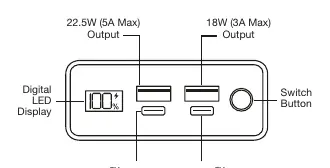
The power bank features a digital LED display, a switch button, and multiple output ports including USB-A and USB-C PD ports. Refer to the device diagram to identify the specific output capabilities of each port.
Operation
Charging your device
- Connect your device to the power bank using the appropriate USB-A or PD port.
- Charging will start automatically.
- Unplug the charging cable when charging is complete.
Checking the battery level
Press the Power Button to view the current battery level on the digital LED display.
Charging the power bank
- Connect the power bank to a power source via the PD port.
- The LED indicators will light up progressively to show charging status.
- Unplug the charging cable when charging is complete.
Specifications
- Battery Capacity: 30000 mAh / 111Wh
- Battery Type: A grade li-polymer battery
- Case Material: Aluminum alloy + PC
- Type-C In&Output 1: 100W
- Type-C Output 2: 30W
- USB Output 1: 22.5W (5A Max)
- USB Output 2: 18W (3A Max)
- Dimensions: 179 x 78 x 25 mm
Practical help
Common problems
Device not charging
Ensure the device is compatible with the power bank and the cable is properly connected to the correct port.
Power bank not charging
Ensure you are using the PD port for input charging.
Before use
- Fully charge the unit before first use.
- Remove all packaging materials.
- Verify device compatibility with the power bank.
- Check the battery level using the Power Button.
Specs in practice
- Type-C PD 100W
- High-speed input and output port capable of delivering up to 100W of power.
- USB Output 1 (22.5W)
- Fast charging port for compatible devices.
Images and diagrams
- The diagram illustrates the Digital LED Display, Switch Button, and the specific locations of the Type-C PD 100W input/output, Type-C PD 30W output, and USB-A output ports.
Model compatibility
- Do not charge devices that are not compatible with the power bank to avoid potential failure or fire.

Manual page author
David Miller
Documentation analyst
Organizes user manual content into clear summaries, with attention to model details, product context, and everyday usability.