Power / Batteries & Chargers
Techly USB-C 12-in-1 Docking Station User Manual
Quick guide for the Techly USB-C 12-in-1 Docking Station. Learn how to connect your devices, use the MST function for multiple monitors, and understand port specifications and safety requirements.
Table of contents
Manual images
Click an image to enlargeQuick guide from the manual
The Techly USB-C 12-in-1 Docking Station is a multifunctional hub designed to expand connectivity for computers, tablets, and mobile phones. Key requirements for full functionality include:
- Charging: Your device must support Power Delivery (PD) or Thunderbolt 3/4.
- Video Output: Your laptop must support DP ALT mode on the USB-C port.
- MST (Multi-Stream Transport): Functionality depends on your graphics card, operating system, and monitor. Use only passive VGA/HDMI cables (without chipset/signal converter).
- Simultaneous Use: SD and TF cards cannot be used at the same time.
Product Introduction
This hub supports HDCP video and is compatible with USB 3.2 Type-C interfaces. It allows for video transmission to up to 3 monitors in either Extended or Mirror mode, while also providing data transfer, network connectivity, and audio output.
Working Modes
The device supports two primary display configurations:
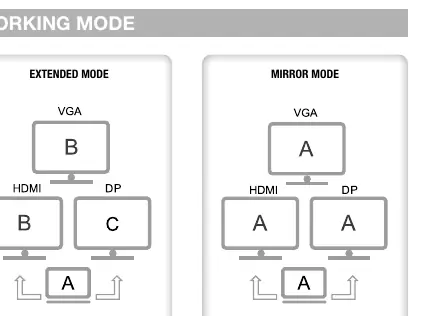
- Extended Mode: Allows different content on connected monitors.
- Mirror Mode: Displays the same content across connected monitors.
Product Ports
The docking station features the following interfaces:
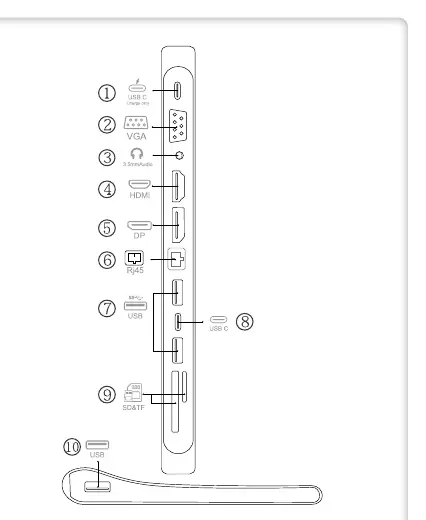
- USB-C Female (PD): Supports max 100W power delivery.
- VGA: Supports 1080p@60Hz (downward compatible).
- DC 3.5 Audio: 3.5mm audio output for headsets.
- HDMI 1.4: Supports 4K*2K@30Hz.
- DisplayPort 1.2: Supports 4K*2K@30Hz.
- RJ45: 10/100/1000 Gigabit Ethernet.
- USB 3.0 (x2): High-speed data transfer up to 5 Gbps.
- USB-C Female: High-speed data transfer up to 5 Gbps.
- SD/TF Card Reader: Supports multiple card types (cannot be used simultaneously).
- USB 2.0: Data transmission up to 480 Mbps.
Operation
- Switch on the computer.
- Connect the docking station to the computer's USB-C port; it will be automatically recognized (Plug-and-Play).
- Connect your peripherals to the docking station ports one by one.
- For stable operation, especially when reading large capacity hard disks, connect a charger to the PD port.
- Note: If the charger is disconnected during use, connected devices may temporarily disconnect.
- When using HDMI and VGA simultaneously, the resolution for both is limited to 1080p.
Safety Indications
To ensure safe operation, please observe the following:
- Keep the device away from children as it contains small parts.
- Avoid environments with high temperatures, humidity, water, dust, or smoke.
- Do not install near air conditioner openings or in areas subject to vibration.
- Do not modify the product or use damaged parts.
- Ensure sufficient space around the device for ventilation.
Practical help
Common problems
SD and TF cards not working together
The device does not support simultaneous use of SD and TF cards; use them one at a time.
Video output not working
Ensure your laptop's USB-C port supports DP ALT mode.
Device disconnects during use
Ensure the power charger is connected to the PD port, especially when using high-power peripherals or hard disks.
Resolution is lower than expected when using multiple monitors
When connecting two video output interfaces simultaneously, the resolution is capped at 1080p for both.
Before use
- Verify your laptop supports DP ALT mode on the USB-C port.
- Ensure your device supports Power Delivery (PD) or Thunderbolt 3/4 for charging.
- Use passive VGA/HDMI cables without chipsets for MST functionality.
- Connect the power charger to the PD port for optimal performance.
- Check that your graphics card and OS support MST for multi-monitor setups.
Images and diagrams
- The port layout diagram identifies all 10 connection points, including the PD port, video outputs, audio jack, network port, and USB/card slots.
- The working mode diagrams illustrate the signal flow for Extended and Mirror modes.
Model compatibility
- MST function is dependent on the specific graphics card, operating system, and monitor used.
- HDMI and VGA output resolution is limited to 1080p when both are connected simultaneously.

Manual page author
Emily Carter
User documentation editor
Prepares concise manual descriptions and highlights the most useful setup, operation, and maintenance information for readers.