Mobile / Smartphones
User Manual for Ulefone RugKing 5 Pro Smartphone
Quick guide for the Ulefone RugKing 5 Pro smartphone. Learn how to insert SIM/TF cards, charge the device, use basic phone functions, and follow essential safety guidelines.
Table of contents
Manual images
Click an image to enlargeQuick Start Guide
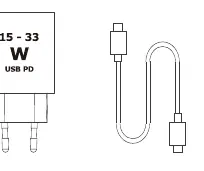
To begin using your Ulefone RugKing 5 Pro, ensure the device is charged using a compatible USB PD power adapter (15-33W). The device features an internal, non-replaceable battery. You can monitor the battery status via the icon on the top right of the screen. To install your SIM or TF card, locate the card slot on the side of the device and insert the cards according to the provided slot specifications.

Device Layout
The device is equipped with several physical keys and sensors:
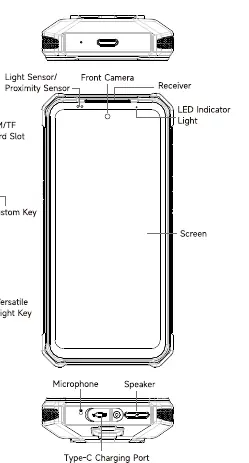
- Front: Light/Proximity sensor, front camera, receiver, and LED indicator light.
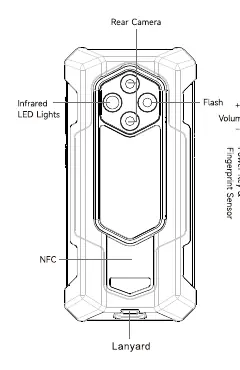
- Sides: SIM/TF card slot, Custom Key, Versatile Light Key, Volume keys, and Power Key with integrated Fingerprint Sensor.
- Bottom: Microphone, Speaker, and Type-C Charging Port.
- Back: Rear camera, Infrared LED lights, Flash, and NFC area.
Basic Operations
Language Settings: Navigate to Settings, scroll to "Language and Input," and select your preferred language.
Dialing: Open the Phone app or Contacts app. You can select a contact, use the recents list, or input a number directly using the dial pad.
Messaging: Open the Message app, tap the new message icon, add recipients, type your message, attach files if needed, and press send.
Photography: Open the Camera app, frame your subject, and tap the shutter button to capture a photo.
Safety and Maintenance
Please adhere to the following safety guidelines to ensure proper device function and user safety:
- Battery Safety: Use only Ulefone-approved batteries and chargers. Do not expose the battery to temperatures below 0°C or above 45°C. Never attempt to dismantle the phone or replace the battery yourself.
- Environment: Keep the phone away from heat sources, liquids, and magnetic objects. Do not use the phone in areas with medical devices or near petrol stations.
- Usage: Avoid prolonged listening at high volumes to protect your hearing. Turn off the device when flying or in hospitals.
- Maintenance: Clean the handset with a dry cloth. Do not use solvents like benzene or alcohol.
Regulatory Information
This equipment complies with FCC Part 15 limits for Class B digital devices. It is designed to provide protection against harmful interference in residential installations. The device also meets applicable limits for radio frequency (RF) exposure. For regulatory labels, navigate to Settings > About phone > Regulatory labels.
Manufacturer information
Ulefone
Practical help
Common problems
Device not charging
Ensure you are using a compatible USB PD charger (15-33W) and the provided USB cable. Check the Type-C port for debris.
Interference with medical devices
Keep the phone on the opposite side of your body from any electronic implants or pacemakers.
Battery performance issues
Avoid exposing the phone to temperatures below 0°C or above 45°C, as extreme temperatures reduce battery life.
Before use
- Insert SIM and TF cards into the side slot.
- Charge the device using a compatible USB PD power adapter (15-33W).
- Set your preferred language in Settings > Language and Input.
- Familiarize yourself with the location of the Custom Key and Versatile Light Key.
Specs in practice
- Charging Voltage Limit
- 4.45V (Li-Polymer Battery).
- Charging Power
- Supports 15-33W USB PD charging.
Images and diagrams
- The SIM/TF card slot is located on the side of the device.
- The Power Key doubles as a fingerprint sensor.
- The bottom of the device houses the Type-C charging port, microphone, and speaker.
Model compatibility
- Use only Ulefone-approved batteries and accessories.
- Battery is not user-replaceable.

Manual page author
David Miller
Documentation analyst
Organizes user manual content into clear summaries, with attention to model details, product context, and everyday usability.