Mobile / Smartphones
Ulefone RugKing 2 Series Desk Charging Dock
Quick guide for the Ulefone RugKing 2 Series Desk Charging Dock. Learn how to use the charging dock, understand LED indicators, and view connection specifications.
Table of contents
Manual images
Click an image to enlargeQuick guide from the manual
The Ulefone Desk Charging Dock is designed for the RugKing 2 Series. To charge your device, simply rest it into the dock. Ensure the device is properly aligned to initiate charging. The dock features LED indicators to show the current charging status.
Using the charging dock
To begin charging, place your RugKing 2 Series device into the dock. The device will be fixed in place once it is properly positioned. Ensure the connection is secure to allow for efficient power transfer.
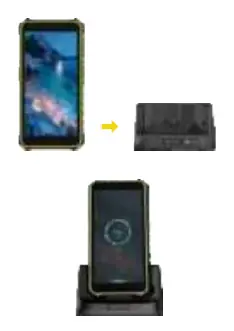
Charging indicators
The dock provides visual feedback regarding the charging status:
- Red Light On: The device is currently charging.
- Green Light On: The charging process is complete.
Connectors and specifications
The dock is equipped with the following connection options:
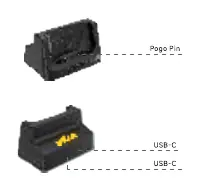
- USB-C Port (Input): Supports power input up to 5V/2A.
- USB-C Port (Output): Supports power output up to 5V/2A.
- Pogo Pin: Provides contact charging output with a maximum of 5V/2A.
The dual output capability of the Pogo Pin and USB-C port enables a total maximum power output of 10W.
Safety warnings
To ensure safe operation and longevity of the device, please adhere to the following guidelines:
- Always use a certified cable and charger.
- Operate the device within an ambient temperature range of 0°C to 45°C.
- Use the dock in a dry environment to reduce the risk of short circuits.
Manufacturer information
Ulefone
Practical help
Common problems
Device is not charging
Ensure the device is properly rested in the dock and aligned with the Pogo Pin contacts.
Charging indicator does not change
Verify that the device is fully seated in the dock. Red indicates charging, Green indicates complete.
Before use
- Use a certified cable and charger
- Ensure the environment is dry
- Verify ambient temperature is between 0°C and 45°C
Specs in practice
- USB-C Output
- Maximum power output of 5V/2A
Model compatibility
- Designed specifically for the Ulefone RugKing 2 Series

Manual page author
David Miller
Documentation analyst
Organizes user manual content into clear summaries, with attention to model details, product context, and everyday usability.