Electronics / Monitors
Vention VWS-J08 10000mAh 45W Power Bank User Manual
Quick guide for the Vention VWS-J08 10000mAh 45W Power Bank. Learn how to use the wireless charging feature, built-in stand, and USB-C charging, along with essential safety and maintenance tips.
Table of contents
Quick guide from the manual
This manual provides essential instructions for operating the Vention VWS-J08 10000mAh 45W Power Bank. It covers device overview, charging procedures, and critical safety guidelines to ensure optimal performance and longevity of the battery.
Product Overview
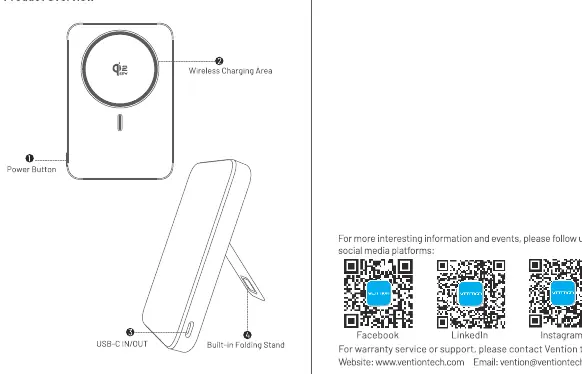
The device features a wireless charging area on the top surface, a power button on the side, a USB-C IN/OUT port, and a built-in folding stand for convenient viewing.
Instructions for Use
- Charging the Power Bank: Use a USB-C charger with the included cable to plug the power bank into a power outlet.
- Charging Devices: The built-in USB-C cable allows for charging other devices. You can also use the wireless charging area by aligning your device with the charging zone.
- Simultaneous Charging: You can connect an additional cable to the USB-C port to charge two devices at the same time.
- Completion: Disconnect the power bank once your device is fully charged.
Maintenance and Cleaning
Clean the power bank with a dry, soft cloth to avoid internal short circuits. Do not use corrosive cleaners.
Important Safety Tips
- Do not store the power bank in temperatures above 45°C or in direct sunlight.
- Do not disassemble, repair, or modify the device.
- Keep the device away from water, moisture, and fire.
- Do not drop or hit the power bank with a hammer.
- Avoid overcharging the battery and try not to let it fully deplete to extend battery life.
- Keep the power bank away from metal objects like keys or coins to prevent short circuits.
- If the device becomes unusually hot, smells, or emits smoke, stop using it immediately.
Technical Specifications
- Model: FKU
- Battery Capacity: 5000mAh (7.74V/38.7Wh) (5000*2)
- Input (USB-C): 5V=3A; 9V=3A; 12V=2.5A; 15V=2A; 20V=1.5A (30W Max)
- Output (USB-C): 5V=3A; 9V=3A; 12V=3A; 15V=3A; 20V=2.25A (45W Max)
- Output (Wireless): 25W/15W/10W/7.5W/5W
- Total Output: 5V=3A (15W Max)
Manufacturer information
Vention
Practical help
Common problems
Device becomes unusually hot, smells, or emits smoke
Stop using the power bank immediately and keep it away from fire.
Potential for short circuits
Keep the power bank away from metal objects like keys or coins and clean only with a dry, soft cloth.
Before use
- Ensure the power bank is not stored in temperatures above 45°C.
- Check that the charging port is free of moisture.
- Use a compatible USB-C charger for input.
- Align your device correctly with the wireless charging area.
Specs in practice
- 45W Max Output
- Maximum power delivery via the USB-C port for fast charging compatible devices.
- Wireless Charging
- Supports various power levels up to 25W depending on the device.
- Battery Capacity
- 5000mAh at 7.74V (total 38.7Wh), providing the energy storage for the unit.
Images and diagrams
- 1: Power Button
- 2: Wireless Charging Area
- 3: USB-C IN/OUT Port
- 4: Built-in Folding Stand
Model compatibility
- Supports 45W PD fast charging.
- Compatible with iPhone 16 series and later models for 25W wireless charging.

Manual page author
David Miller
Documentation analyst
Organizes user manual content into clear summaries, with attention to model details, product context, and everyday usability.