Electronics / Display Modules
User Manual for Waveshare 1.9inch Segment e-Paper V1.1
Quick guide for the Waveshare 1.9inch Segment e-Paper V1.1. Includes pin assignments, electrical characteristics, mechanical specifications, and handling instructions.
Table of contents
Quick guide from the manual
The Waveshare 1.9inch Segment e-Paper V1.1 is a Segment Electrophoretic Display Module designed for applications such as thermometers. It features an I2C interface, ultra-low power consumption, and a bi-stable display. This document provides the necessary technical specifications and handling requirements for integration.
Mechanical Specifications
The module has the following physical characteristics:
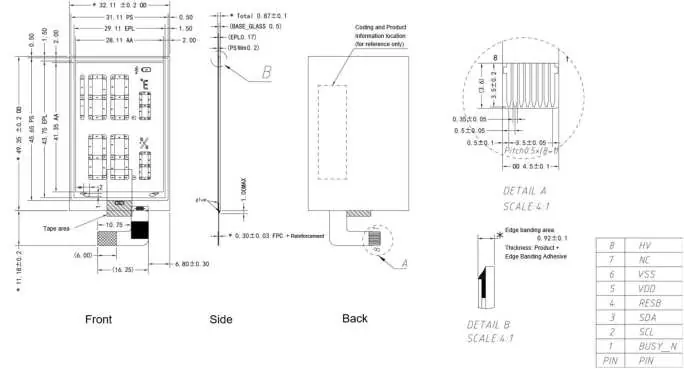
- Display Resolution: 91 segments + 1 Vcom + 1 BG.
- Active Area: 28.11 x 41.35 mm.
- Overall Dimensions: 32.11 x 49.35 x 0.87 mm (±0.1 mm).
- Interface: 8-pin FPC connector with 0.5mm pitch.
Pin Assignment
The module uses an 8-pin interface for communication and power:
- 1 (BUSY_N): Output pin. Low indicates busy, High indicates ready for commands.
- 2 (SCL): Input pin. Serial clock for IIC interface.
- 3 (SDA): Bi-directional pin. Serial data for IIC interface.
- 4 (RESB): Input pin. Hardware reset; initialization occurs when set to Low.
- 5 (VDD): Power pin. Core logic power.
- 6 (VSS): Power pin. Ground.
- 7 (NC): Do not connect.
- 8 (HV): Capacitor pin. Connect to 1uF/25V capacitor.
Electrical Characteristics
Ensure the module operates within the following parameters:
- Logic Voltage (VDD): 1.9V to 3.6V (Typical 3.0V).
- Gate Positive Supply (VPP): 1.4V to 30V (Typical 15V).
- Operating Temperature: 0°C to 50°C.
- Storage Conditions: 15°C to 35°C, 30%RH to 60%RH.
Handling and Safety Requirements
To prevent damage to the fragile e-Paper panel, observe the following precautions:
- Do not bend, twist, or apply pressure to the panel.
- Avoid exposure to harmful gases (acid/alkali) which can corrode components.
- Do not connect or disconnect the interface while the module is powered.
- Clean only with a soft, dry cloth; do not press hard on the surface.
- Protect from moisture, frost, and dew, as these can penetrate the panel and cause permanent damage.
- Store in the original packaging to prevent scratches and maintain performance.
Practical help
Common problems
Display not updating or responding
Check the BUSY_N pin status. If Low, the interface is busy. Ensure the I2C clock (SCL) and data (SDA) lines are connected correctly.
Panel damage or cracks
The panel is made of glass and plastic. Do not bend, twist, or apply pressure. Handle with extreme care.
Moisture or frost on display
Ensure the operating environment is free of condensation. Moisture penetration can cause permanent damage to the EPD panel.
Before use
- Verify power supply voltage (VDD 1.9V-3.6V).
- Ensure I2C interface connections are secure.
- Confirm the environment is within 0°C to 50°C.
- Check that the BUSY_N pin is monitored for command readiness.
- Ensure no condensation or frost is present on the panel surface.
Specs in practice
- I2C Interface
- Communication protocol used to send commands and data to the display driver.
- Bi-stable display
- The display retains the image even when power is removed, contributing to low power consumption.
Images and diagrams
- Mechanical Drawing: Provides detailed dimensions for the front, side, and back of the module, including the FPC connector layout.
- Block Diagram: Shows the signal flow from the 8-pin input to the driver and finally to the display panel.
Model compatibility
- Designed for use in thermometer applications.
- Requires I2C interface for operation.
- Materials conform to RoHS standards.

Manual page author
Michael Turner
Technical manual editor
Reviews PDF manuals for structure, safety notes, and practical product details so readers can find the right information quickly.