Home Appliances / Washing Machines
User Manual for Whirlpool MXWM 07G Washing Machine
Quick guide and user manual for the Whirlpool MXWM 07G washing machine. Includes installation steps, program settings, maintenance, and troubleshooting.
Table of contents
Manual images
Click an image to enlargeQuick guide from the manual
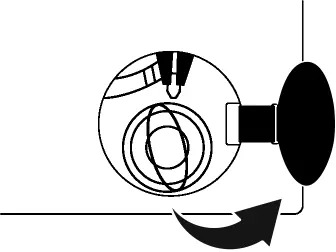
Before using your Whirlpool MXWM 07G washing machine, ensure all transport safety bolts are removed. The machine must be leveled on a solid, flat surface. Perform the 'Drum Cleaning' program before the first wash to ensure the machine is ready for use. Always sort laundry by type, color, and soil level.
Safety instructions
Keep children away from the machine. Do not use extension cords or multiple adapters. Ensure the machine is properly grounded. Do not wash fabrics treated with solvents or flammable liquids. Always disconnect the power and water supply before maintenance.
Installation
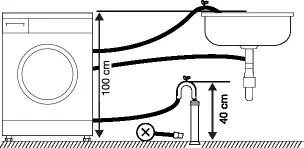
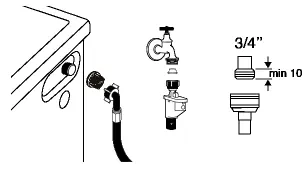
The machine requires two people for installation. Remove all transport safety bolts before use. Ensure the machine is leveled using the adjustable feet. Connect the water inlet hose to a cold water tap (unless the model supports hot water) and secure the drain hose at a height between 40 cm and 100 cm. Do not install on carpets or high-pile rugs.
Preparation and detergent usage
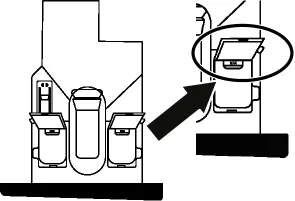
Sort laundry by fabric type and color. Use the detergent drawer with three compartments: liquid detergent, powder detergent, and fabric softener. Do not exceed the 'Max' level. The machine features automatic dosing; if the detergent symbol flashes, refill the reservoir.
Operation and programs
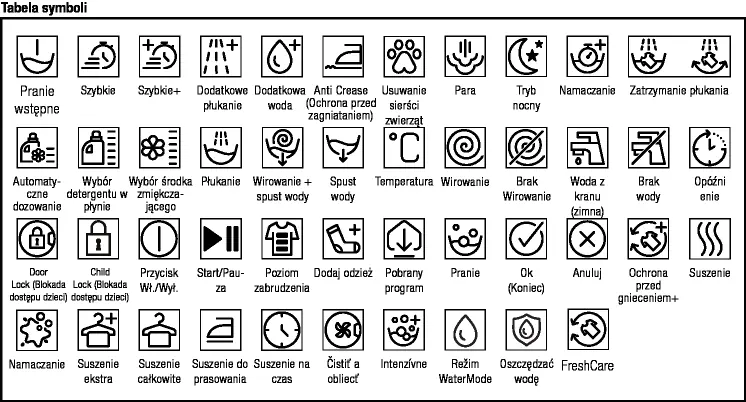
Use the control panel to select programs, adjust temperature, and set spin speed. The machine features HomeWhiz connectivity for remote control and monitoring. To start a program, select it, adjust settings if needed, and press Start/Pause. The door locks automatically during operation.
HomeWhiz and remote control
Download the HomeWhiz app to connect your machine to Wi-Fi. This allows for remote monitoring, status notifications, and program customization. Ensure your smartphone is connected to the same 2.4 GHz network as the machine during configuration.
Maintenance and cleaning
Regularly clean the detergent drawer to prevent clogs. Clean the pump filter every 3 months or when the machine fails to drain. Wipe the door seal and drum after each wash to prevent odors and mold. Use a descaling agent for the drum cleaning program.
Troubleshooting
If the machine does not start, check if the door is closed and the power is on. If it does not drain, check the drain hose for kinks and clean the pump filter. If the machine vibrates, ensure it is leveled and transport bolts are removed. For door issues, ensure the water level is not too high.
Manufacturer information
Whirlpool Corporation
Practical help
Common problems
Machine does not start
Check if the door is properly closed and the Start/Pause button has been pressed.
Machine does not drain
Check the drain hose for kinks or clogs and clean the pump filter.
Excessive vibration or noise
Ensure the machine is leveled on a solid floor and that all transport safety bolts have been removed.
Door will not open
The door is locked due to high water level or active program. Wait for the program to finish or use the emergency release if power is lost.
Before use
- Remove all transport safety bolts.
- Ensure the machine is leveled on a solid, flat floor.
- Connect water inlet and drain hoses securely.
- Run the 'Drum Cleaning' program before the first wash.
- Check that the power supply is grounded and protected by a 16A fuse.
Specs in practice
- Max Spin Speed
- 1400 rpm for efficient water extraction.
- Water Pressure
- Must be between 0.1 and 1 MPa for proper operation.
Images and diagrams
- Control Panel: Allows selection of programs, temperature, spin speed, and activation of HomeWhiz features.
- Detergent Drawer: Contains three compartments for liquid detergent, powder detergent, and fabric softener.
Model compatibility
- HomeWhiz app requires a 2.4 GHz Wi-Fi connection.
- Requires a 16A fuse for electrical safety.

Manual page author
David Miller
Documentation analyst
Organizes user manual content into clear summaries, with attention to model details, product context, and everyday usability.