Furniture / Chairs & Seating
User Manual for Williams Sonoma Open Kitchen 12-Cup Programmable Coffee Maker
Quick guide for the Williams Sonoma Open Kitchen 12-Cup Programmable Coffee Maker. Includes setup, brewing instructions, programming, cleaning, and maintenance tips.
Table of contents
Quick guide from the manual
This guide covers the operation of the Williams Sonoma Open Kitchen 12-Cup Programmable Coffee Maker. Key features include a programmable timer, a "Bold" brewing setting, a "1-4 Cup" setting for smaller batches, and a "Pause and Serve" function.
Getting to know your coffee maker
The unit features a control panel with buttons for ON/OFF, HOUR, MINUTE, and PROGRAM. The LCD display shows the current time, program status, and "Time Since Brew". The water reservoir is located at the back, and the filter basket is removable.
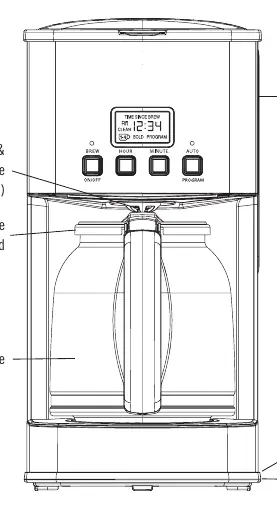
Before using for the first time
Before brewing your first pot of coffee, perform an initial cleaning cycle:
- Remove all packaging and labels.
- Wash the glass carafe, lid, filter holder, and gold-tone filter in hot, sudsy water.
- Run two full carafes of tap water through the machine without coffee grounds.
- Allow the unit to cool for 15 minutes between cycles.
Brewing coffee
- Lift the lid and fill the reservoir with cold tap water (do not exceed the 12-cup line).
- Place the empty carafe on the warming plate.
- Place the filter in the holder and add coffee grounds (1 level tablespoon or 1 scoop per cup).
- Close the lid and press the ON/OFF button. The blue light will illuminate.
- The machine will beep 3 times when brewing is complete and enter "Keep Warm" mode for up to 2 hours.
Programming future brew
You can program the coffee maker to start automatically up to 24 hours in advance:
- Press the PROGRAM button.
- Use the HOUR and MINUTE buttons to set the desired start time.
- Press the PROGRAM button again to confirm. The light above the button will turn red.
Special functions
Bold Function: Press and hold the ON/OFF button until "BOLD" appears on the screen for a stronger brew.
1-4 Cup Function: Press and hold the PROGRAM button until "1-4 cup" appears to optimize flavor for smaller batches.
Cleaning and maintenance
Clean the machine monthly or when the "CLEAN" indicator appears after 250 cycles:
- Mix 6 cups of white vinegar and 4 cups of cold water in the carafe.
- Pour into the reservoir.
- Press and hold the HOUR and MINUTE buttons simultaneously until "CLEAN" appears.
- Press ON/OFF to start the cycle.
- After the cycle, run 2-3 cycles with fresh water.
Practical help
Common problems
Coffee maker won't start
Ensure the unit is plugged into a 120V AC outlet and the ON/OFF button has been pressed.
Coffee tastes weak
Use a finer grind of coffee or increase the amount of coffee grounds used per cup.
Overflow during brewing
Do not exceed the 12-cup line in the reservoir and ensure the carafe is properly placed on the warming plate.
CLEAN light is on
The machine has reached 250 cycles. Run the descaling procedure using a vinegar and water solution.
Before use
- Remove all packaging and labels.
- Wash carafe, lid, filter holder, and filter in hot, sudsy water.
- Run 2 full carafes of water through the machine without coffee grounds.
- Allow 15 minutes to cool between cycles.
Specs in practice
- 12-Cup Capacity
- Based on the American industry standard of 5-oz cups.
- Pause and Serve
- Allows you to remove the carafe to pour a cup mid-brew for up to 30 seconds.
Images and diagrams
- Figure 1 shows the control panel, carafe, filter basket, and water reservoir location.
Model compatibility
- Use only with 120V AC outlet.
- Do not use extension cords.
- Use only the provided glass carafe.

Manual page author
David Miller
Documentation analyst
Organizes user manual content into clear summaries, with attention to model details, product context, and everyday usability.