Power / Batteries & Chargers
User Manual for Xiaomi 10000mAh Mi Power Bank 3 Ultra Compact
Quick guide for the Xiaomi 10000mAh Mi Power Bank 3 Ultra Compact (PB1022ZM). Learn how to charge devices, use low-current mode, and maintain your power bank safely.
Table of contents
Manual images
Click an image to enlargeQuick guide from the manual
Before using your power bank for the first time, ensure it is fully charged. Use a qualified charger and USB cable for optimal performance. The device features automatic detection for charging and discharging, so the battery level check button is not a power switch.
Device Overview
The power bank includes a battery level check button, a USB-C port (input/output), and USB-A ports (output). The battery level indicator provides visual feedback on the current charge status.

Charging the Power Bank
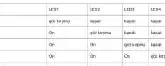
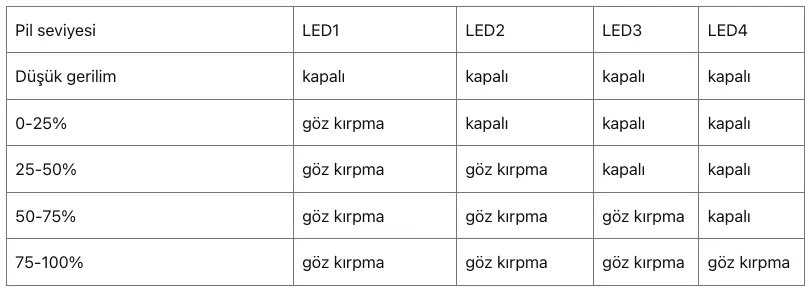
Connect a compatible power charger and USB cable to the USB-C or Micro-USB port. The LED indicators will show the charging progress. It is recommended to use Mi brand products for charging.
Charging Devices
Connect your device to the power bank using a USB cable via the USB-A or USB-C port. The power bank automatically detects the connection and begins charging.
Low Current Mode
To charge low-current devices like Bluetooth headsets or smart bands, double-press the battery level check button. The indicator lights will cycle one by one to confirm the mode is active. Press the button again to exit this mode, or it will automatically exit after two hours.
Safety and Maintenance
- Do not leave the power bank unattended while charging.
- Keep away from heat sources, liquids, and fire.
- Do not disassemble, puncture, or crush the device.
- Store in a cool, dry place with 25-50% charge if not used for a long time.
- If the device overheats, it may automatically slow down or shut off to protect itself.
Manufacturer information
Xiaomi Corporation
Practical help
Common problems
Indicator light does not turn on after pressing the button
The power bank might be in protection mode. Connect an external charger to the power bank to restore it.
Device not charging
Ensure the cable is connected properly and the power bank has sufficient charge. Try a different cable or charger.
Before use
- Charge the power bank fully before first use.
- Use a qualified charger and USB cable (Mi brand recommended).
- Ensure the environment is dry and within operating temperature (5°C to 35°C).
- Remove the power bank from the charger once fully charged.
Specs in practice
- Operating Temperature
- 5°C to 35°C
Images and diagrams
- The power bank features a battery level check button, a USB-C input/output port, and USB-A output ports.
- LED indicators show the current battery level and charging status.
Model compatibility
- Compatible with most smartphones and tablets.
- Supports low-current charging for devices like Bluetooth headsets and smart bands.

Manual page author
David Miller
Documentation analyst
Organizes user manual content into clear summaries, with attention to model details, product context, and everyday usability.