Mobile / Smartphones
User Manual for Xiaomi 11T Smartphone
Quick start guide and safety instructions for the Xiaomi 11T smartphone. Learn how to set up your device, insert SIM cards, and follow important safety precautions.
Table of contents
Quick Start Guide
To turn on your Xiaomi 11T, long press the power button. Follow the on-screen instructions to configure the device for the first time.
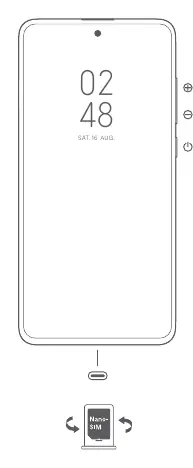
Dual SIM Information
- Supports Dual SIM cards with no carrier restrictions.
- Supports Dual Nano-SIM card slots; either card can be set as the primary card.
- Supports Dual SIM 5G/4G/3G/2G and VoLTE.
- Do not insert non-standard SIM cards into the SIM card slot, as this may cause damage.
- Do not disassemble this device.
Safety Precautions
- Operating Temperature: Use the device within the 0°C to 40°C range. Using it outside this range may damage the device.
- Battery Safety: Do not attempt to replace the battery yourself. Do not disassemble, hit, crush, or burn the battery. If the battery appears deformed or damaged, stop using it immediately.
- Charging: Use only the included or authorized cable and power adapter. Disconnect the adapter after charging is complete. Do not charge for more than 12 hours.
- Environment: Do not use the phone in explosive atmospheres, near petrol stations, or in high-humidity areas like bathrooms.
- Medical Devices: Maintain a minimum distance of 15 cm from pacemakers. Consult your doctor if you use medical devices.
Legal Information
This device is restricted to indoor use only when operating in the 5150 to 5350 MHz frequency range in all EU member states. Ensure the power adapter meets the requirements of Clause 6.4.5 in IEC/EN 62368-1.
Manufacturer information
Xiaomi Corporation
Practical help
Common problems
Device will not turn on
Ensure the device is charged and long-press the power button.
SIM card not recognized
Ensure you are using a standard Nano-SIM card and that it is inserted correctly into the slot.
Device overheating
Avoid using the device in high-temperature environments or while it is charging.
Before use
- Charge the device using the included or authorized cable and adapter.
- Insert Nano-SIM cards into the slots.
- Ensure the device is kept dry.
- Verify the operating environment is between 0°C and 40°C.
Specs in practice
- Operating Temperature
- 0°C to 40°C
Images and diagrams
- The diagram shows the power button and volume buttons on the right side of the device.
- The diagram illustrates the Nano-SIM card insertion process.
Model compatibility
- Supports Dual 5G connectivity.
- Restricted to indoor use in the 5150-5350 MHz frequency range in EU countries.

Manual page author
Michael Turner
Technical manual editor
Reviews PDF manuals for structure, safety notes, and practical product details so readers can find the right information quickly.