Mobile / Smartphones
Quick Start Guide for Xiaomi 12X Smartphone
A quick start guide for the Xiaomi 12X smartphone, covering initial setup, dual SIM configuration, safety precautions, and regulatory information.
Table of contents
Quick guide from the manual
This document provides essential information for setting up and safely using your Xiaomi 12X smartphone. It covers initial power-on, SIM card configuration, and critical safety guidelines.
Getting started
To turn on your device, press and hold the power button. Follow the on-screen instructions to complete the initial configuration of your smartphone.
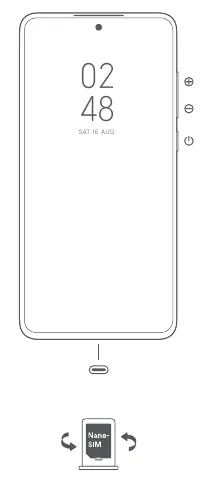
Dual SIM configuration
The Xiaomi 12X supports dual SIM cards with no carrier restrictions. Both slots support Nano-SIM cards, and either can be set as the primary card. The device supports 5G/4G/3G/2G on the primary card and 4G/3G/2G on the secondary card, along with Dual SIM VoLTE functionality.
Safety information
Important: Do not disassemble the device. Use only authorized accessories, cables, and power adapters to avoid fire, explosion, or other risks. The operating temperature range is 0°C to 40°C. Keep the device dry and do not attempt to replace the built-in battery yourself.
Battery and charging
Charge the device only with the included or authorized cable and adapter. Do not charge for more than 12 hours. If the battery appears deformed or damaged, stop using it immediately. Batteries must be recycled or disposed of separately from household waste according to local regulations.
Safety precautions
- Do not use the phone in explosive environments like petrol stations.
- Maintain a minimum distance of 15 cm from medical devices like pacemakers.
- Avoid using the phone in high-humidity areas like bathrooms to prevent electric shock.
- Turn off the phone on aircraft when required.
Regulatory information
This device is restricted to indoor use only when operating in the 5150 to 5350 MHz frequency range in EU member states. Always keep your operating system updated via the built-in software update feature to ensure security.
Manufacturer information
Xiaomi Corporation
Practical help
Common problems
Device not working properly
Contact Mi customer support or visit an authorized repair center. Do not attempt to repair the device yourself.
Battery appears deformed or damaged
Stop using the device immediately and contact an authorized repair center.
Potential interference with medical devices
Maintain a minimum distance of 15 cm between the phone and pacemakers. Consult your doctor if you have a medical device.
Before use
- Ensure you are using authorized cables and power adapters.
- Check that the SIM card is a standard Nano-SIM.
- Verify the operating environment is within 0°C to 40°C.
- Ensure the power adapter is easily accessible.
Specs in practice
- Operating Temperature
- 0°C to 40°C; usage outside this range may damage the device.
Images and diagrams
- The diagram shows the power button and volume buttons on the side of the device.
- The diagram illustrates the Nano-SIM card slot orientation.
Model compatibility
- Supports Dual Nano-SIM cards.
- Restricted to indoor use in the 5150-5350 MHz frequency range within the EU.

Manual page author
Emily Carter
User documentation editor
Prepares concise manual descriptions and highlights the most useful setup, operation, and maintenance information for readers.