General / Other Manuals
Xiaomi 15T Pro Repair Manual
Official repair and disassembly guide for the Xiaomi 15T Pro, covering safety precautions, tool requirements, step-by-step disassembly and assembly procedures, and quality inspection.
Table of contents
Product Overview and Safety
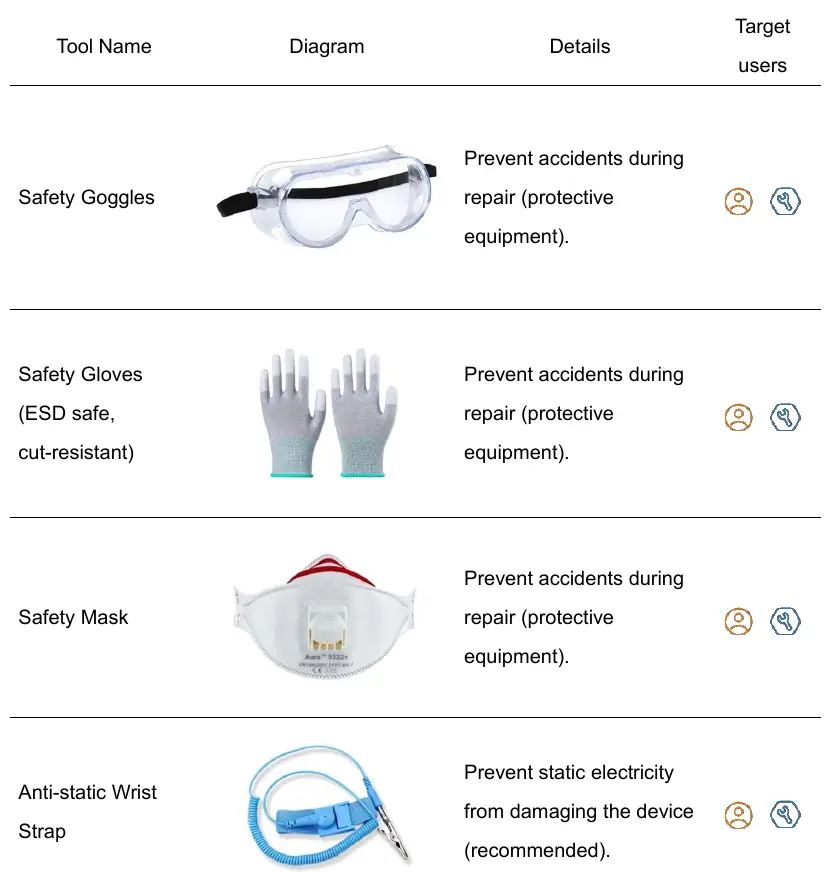
This manual provides detailed instructions for the repair and maintenance of the Xiaomi 15T Pro. Users are advised to prioritize safety by wearing appropriate protective equipment, including safety goggles, gloves, and masks. Repairs should be conducted in a safe, static-free environment. Always back up important data before starting any repair to prevent loss. Note that unauthorized repairs may void the warranty and compromise the device's water and dust resistance.
Repair Precautions
- Use only high-quality tools to avoid damaging screw heads or internal components.
- Electronic components are sensitive to electrostatic discharge (ESD); use antistatic equipment such as wrist straps and mats.
- Use only OEM replacement parts to ensure safety and proper functionality.
- Certain components, such as sensors and cameras, may require professional calibration after replacement.
- If the device emits smoke or burning smells, stop immediately and contact support.
Tool Preparation
Essential tools for disassembly include an ejection pin, Phillips screwdriver, plastic pry bar, suction cup, and ESD-safe tweezers. Heating the device is necessary to soften adhesives; use a dedicated heating bag or platform at 55-65 degrees Celsius. Do not use a microwave to heat the device directly, as this poses an explosion risk.
Disassembly and Assembly
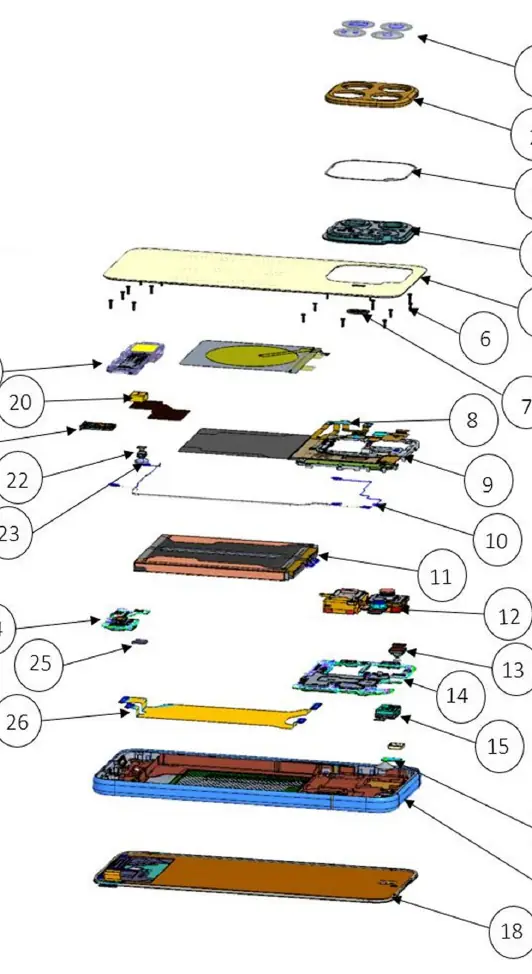
The process involves removing the SIM tray, heating the back cover to soften the adhesive, and carefully separating the battery cover. Internal components such as the mainboard, camera assembly, battery, and sub-board are removed by disconnecting cables and unscrewing fasteners. During reassembly, ensure all cables are securely connected until a click is felt, and verify that all screws are accounted for. Use new adhesives when reattaching the battery and back cover to maintain structural integrity.
Testing and Quality Inspection
After reassembly, perform an air tightness test to ensure the device remains sealed. Verify basic functions, including power-on, Wi-Fi, Bluetooth, sound, and camera performance. If issues persist, consult a Xiaomi Authorized Service Center for professional calibration and diagnosis.
Related manuals
Related manuals from the same brand or category.
Documents / Warranty Safety
Xiaomi 15T & 15T Pro Exclusive Services Terms & Conditions
XiaomiDocuments / Warranty Safety
Xiaomi 15T Safety Information
XiaomiMobile / Smartphones
Xiaomi 15T Safety Information
XiaomiMobile / Smartphones
Xiaomi 15T: Quick Start Guide
XiaomiGeneral / Other Manuals
Xiaomi 15T Pro Quick Start Guide
XiaomiMobile / Smartphones
Xiaomi 15T Smartphone
XiaomiElectronics / Televisions
Xiaomi 15T Quick Start Guide
XiaomiDocuments / Warranty Safety
Xiaomi 15T Quick Start Guide
XiaomiGeneral / Other Manuals
Xiaomi 15T Pro User Manual
Xiaomi
Manual page author
Michael Turner
Technical manual editor
Reviews PDF manuals for structure, safety notes, and practical product details so readers can find the right information quickly.