Mobile / Smartphones
User Manual for Xiaomi Mi 10T
Quick start guide and safety information for the Xiaomi Mi 10T smartphone. Learn how to insert SIM cards, power on the device, and follow important safety guidelines.
Table of contents
Manual images
Click an image to enlargeQuick Start Guide
Thank you for choosing the Mi 10T. To turn on the device, long press the power button. Follow the on-screen instructions to configure the device. For more information, visit the official website at www.mi.com/global/service/userguide.
Device Overview
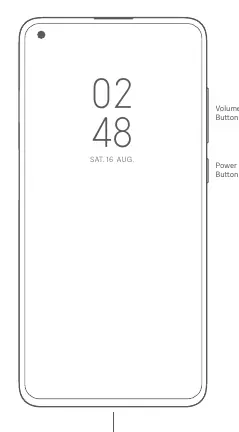
The Mi 10T features a power button and volume buttons on the side of the device. A USB Type-C port is located at the bottom for charging and data transfer.
SIM Card Installation
The device supports Dual Nano-SIM cards. To install, use the SIM card tray. You can set either card as the primary card. Please do not insert non-standard SIM cards into the slot, as this may cause damage.

Dual SIM Information
- Supports Dual SIM cards with no carrier restrictions.
- Supports single 5G or dual 4G connectivity.
- Supports Dual SIM VoLTE HD calling.
- Note: 5G support depends on the local telecom operator's network. If the primary card 5G is enabled, the secondary card will not be available.
Safety Information
Read all safety information before using your device:
- Unauthorized Accessories: Use of unauthorized cables, power adapters, or batteries can cause fire, explosion, or other risks. Use only authorized accessories.
- Temperature: The operating temperature range is 0°C to 40°C. Using the device outside this range may cause damage.
- Battery Safety: Do not attempt to replace the built-in battery yourself. Do not disassemble, hit, crush, or burn the battery. If the battery appears deformed or damaged, stop using it immediately.
- Charging: Charge the device only with the included or authorized cable and power adapter. Do not charge for more than 12 hours. Disconnect the adapter after charging.
- General Safety: Keep the device dry. Do not attempt to repair the device yourself. Contact Mi customer support for repairs.
Regulatory Information
This device complies with SAR (Specific Absorption Rate) limits for general population/uncontrolled exposure. The device is designed to meet government requirements for exposure to radio waves. For body-worn operation, maintain a minimum distance of 5 mm (or 1.5 cm depending on specific regional testing) between the device and the body. Avoid using accessories containing metal components when carrying the device near the body.
Official resources from the manual
Manufacturer information
Xiaomi Corporation
Practical help
Common problems
Device will not turn on
Ensure the device is charged using the included adapter. Long press the power button to turn it on.
SIM card not recognized
Ensure you are using a standard Nano-SIM card and that it is inserted correctly into the SIM tray.
Device overheating
Ensure the device is used within the operating temperature range of 0°C to 40°C.
Before use
- Charge the device using the included cable and adapter.
- Ensure you have a Nano-SIM card.
- Read all safety information provided in the manual.
- Check for software updates via the built-in update feature.
Specs in practice
- SAR (Specific Absorption Rate)
- Measures the rate at which energy is absorbed by the human body when exposed to a radio frequency electromagnetic field.
- Operating Temperature
- The safe range for device usage is 0°C to 40°C.
Images and diagrams
- The device features a power button and volume buttons on the right side.
- The USB Type-C port is located at the bottom of the device.
- The SIM card tray is designed for Nano-SIM cards.
Model compatibility
- Supports 5G/4G+/4G/3G/2G connectivity.
- 5G support depends on local operator network.
- VoLTE service availability depends on local operator network.

Manual page author
David Miller
Documentation analyst
Organizes user manual content into clear summaries, with attention to model details, product context, and everyday usability.