Mobile / Smartphones
Xiaomi Mi 10T Lite Smartphone User Manual
Official user manual for the Xiaomi Mi 10T Lite. Includes setup instructions, SIM card management, safety guidelines, and technical specifications.
Table of contents
Manual images
Click an image to enlargeQuick Guide
To turn on your Mi 10T Lite, long-press the power button. Follow the on-screen instructions to configure your device. Ensure your device is updated using the built-in software update feature to maintain security and performance.
Device Overview
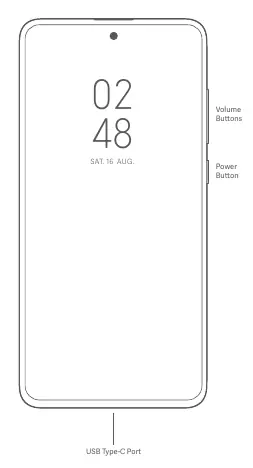
The device features a power button and volume buttons on the side, and a USB Type-C port at the bottom for charging and data transfer.
SIM Card Setup
The device supports a dual SIM tray. You can insert a Nano-SIM card and a MicroSD card. The device supports dual SIM cards with no carrier restrictions, including single 5G or dual 4G connectivity. Please do not insert non-standard SIM cards, as this may damage the slot.

Safety and Handling
Battery Safety: Do not attempt to replace the built-in battery yourself. Only use authorized cables and power adapters. Do not charge the device for more than 12 hours. If the battery appears deformed or damaged, stop using it immediately.
Operating Environment: The device's operating temperature range is 0°C to 40°C. Using the device outside this range may cause damage. Keep the device dry and do not use it in high-humidity areas like bathrooms.
Medical Interference: Maintain a minimum distance of 15 cm between the phone and pacemakers. Do not use the phone in hospital operating rooms or near medical equipment without consulting a doctor.
Regulatory Information
The device complies with EU regulations and FCC rules. It features an electronic label for certification information, which can be accessed via Settings > About phone > Certification.
Manufacturer information
Xiaomi Corporation
Practical help
Common problems
Battery replacement
Do not attempt to replace the battery yourself. Contact an authorized repair center.
Medical device interference
Maintain a minimum distance of 15 cm from pacemakers and consult a doctor before use.
Overheating
Avoid using the device in high-temperature environments or charging for more than 12 hours.
SIM card damage
Do not insert non-standard SIM cards into the tray.
Before use
- Charge the device using the included or authorized adapter.
- Insert the Nano-SIM card into the tray.
- Follow on-screen instructions for initial configuration.
- Update the operating system via the built-in software update feature.
Specs in practice
- Operating Temperature
- 0°C to 40°C; usage outside this range may damage the device.
- SAR Limit (EU)
- 2.0 W/kg (10g) for head and trunk.
- SAR Limit (FCC)
- 1.6 W/kg for body-worn operation.
Images and diagrams
- The power button and volume buttons are located on the side of the device.
- The USB Type-C port is located at the bottom center of the device.
- The SIM tray accommodates one Nano-SIM and one MicroSD card.
Model compatibility
- Supports single 5G or dual 4G connectivity.
- 5G support depends on the local telecom operator's network.
- VoLTE service availability depends on the local telecom operator.

Manual page author
Emily Carter
User documentation editor
Prepares concise manual descriptions and highlights the most useful setup, operation, and maintenance information for readers.