Electronics / Monitors
Xiaomi Pad 8 Quick Start Guide
Quick start guide for the Xiaomi Pad 8, covering device layout, power-on instructions, safety precautions, battery handling, and regulatory information.
Table of contents
Quick guide from the manual
This document provides essential instructions for setting up and safely operating your Xiaomi Pad 8. To turn on the device, long-press the power button and follow the on-screen configuration instructions. For further details, visit the official website at www.mi.com/global/service/userguide.
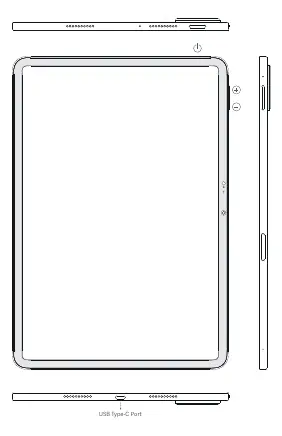
Device layout
The device features a power button and volume controls (+/-) on the side. The USB Type-C port is located at the bottom for charging and data transfer.
Important safety information
- Use only authorized cables, power adapters, and accessories to prevent fire, electric shock, or damage.
- The operating temperature range is 0°C to 40°C.
- Do not attempt to replace the built-in battery yourself.
- Do not charge the device for more than 12 hours.
- Keep the device dry and do not disassemble or repair it yourself.
- If the battery appears deformed or damaged, stop using it immediately.
- Maintain a minimum distance of 15 cm from medical devices like pacemakers to avoid interference.
- Do not use the tablet in high-humidity environments such as bathrooms.
Battery and disposal
The battery must be recycled or disposed of separately from household waste. Mishandling the battery may cause fire or explosion. Do not burn, crush, or short-circuit the battery.
Regulatory information
This device complies with EU and FCC regulations regarding RF exposure and radio frequency emissions. It features an electronic label for certification information, which can be accessed via Settings > About tablet > Certification.
Official resources from the manual
Manufacturer information
Xiaomi Corporation
Practical help
Common problems
Device does not work properly
Do not attempt to repair it yourself; contact Mi customer support or an authorized repair center.
Interference with radio or TV reception
Reorient the receiving antenna, increase separation between equipment, or connect to a different circuit outlet.
Battery appears deformed or damaged
Stop using the device immediately and contact an authorized service center.
Before use
- Ensure you are using authorized cables and power adapters.
- Check that the environment is within the 0°C to 40°C temperature range.
- Verify that the device is kept dry.
- Ensure the device is at least 15 cm away from medical devices like pacemakers.
Specs in practice
- Operating Temperature
- 0°C to 40°C; usage outside this range may damage the device.
- Charging Limit
- Do not charge the device for more than 12 hours.
- SAR Limit (FCC)
- 1.6 W/kg; the device is tested to ensure it does not exceed this emission limit.
Images and diagrams
- The device features a power button on the top edge.
- Volume buttons (+/-) are located on the right side.
- The USB Type-C port is located on the bottom edge.
Model compatibility
- Use only authorized accessories compatible with your device.
- Connect other devices only according to their specific instruction manuals.

Manual page author
Emily Carter
User documentation editor
Prepares concise manual descriptions and highlights the most useful setup, operation, and maintenance information for readers.