Mobile / Smartphones
Redmi 12C Quick Start Guide
Quick start guide for the Redmi 12C smartphone, covering device setup, SIM card installation, safety precautions, and regulatory information.
Table of contents
Quick guide from the manual
This document provides essential information for setting up and safely using your Redmi 12C smartphone. To turn on the device, long-press the power button and follow the on-screen configuration instructions.
Device Overview
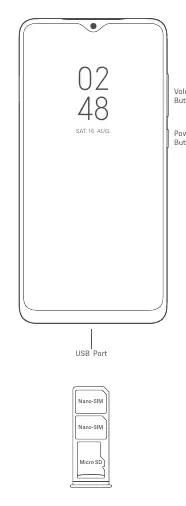
The device features volume buttons and a power button on the side, with a USB port at the bottom. The SIM tray supports two Nano-SIM cards and one Micro SD card.
Important Safety Information
- Operating Temperature: Use the device within the 0°C to 40°C range.
- Battery Safety: Do not attempt to replace the built-in battery yourself. Use only authorized chargers and cables. Do not charge for more than 12 hours.
- Disassembly: Do not disassemble, hit, crush, or burn the battery or the device.
- Hearing Protection: To prevent hearing damage, avoid listening at high volume levels for long periods.
- Repairs: Do not attempt to repair the device yourself. Contact authorized service centers for any issues.
Safety Precautions
- Do not use the phone in explosive atmospheres, such as petrol stations.
- Keep the phone at least 15 cm away from medical devices like pacemakers.
- Do not use the phone while driving or in high-humidity environments like bathrooms.
- Turn off the phone on board aircraft when required.
Regulatory and Compliance
The device complies with EU and FCC regulations regarding RF exposure (SAR). For body-worn operation, maintain a minimum distance of 5 mm (EU) or 1.5 cm (FCC) from the body. Use accessories that do not contain metal components.
Software and Updates
The device comes with MIUI pre-installed. Keep your operating system updated using the built-in software update feature to ensure security and performance.
Manufacturer information
Xiaomi Corporation
Practical help
Common problems
Device not working properly
Do not attempt self-repair. Contact Mi customer support or visit an authorized repair center.
Battery or device damage
Use only authorized cables, power adapters, and accessories. Avoid non-standard SIM cards.
Interference with medical devices
Maintain a minimum distance of 15 cm from pacemakers and avoid carrying the phone in a breast pocket.
Before use
- Ensure the power adapter meets IEC/EN 62368-1 standards.
- Insert Nano-SIM cards and Micro SD card correctly into the tray.
- Charge the device using the included or authorized cable.
- Update the operating system via the built-in update feature.
Specs in practice
- Operating Temperature
- 0°C to 40°C; usage outside this range may damage the device.
- Charging Time
- Do not charge the device for more than 12 hours.
Images and diagrams
- The diagram shows the location of the volume buttons and power button on the right side of the device.
- The USB port is located at the bottom center.
- The SIM tray layout indicates slots for two Nano-SIM cards and one Micro SD card.
Model compatibility
- Use only authorized accessories compatible with the device.
- Body-worn accessories should not contain metal and must maintain the specified separation distance (5 mm for EU, 1.5 cm for FCC).

Manual page author
David Miller
Documentation analyst
Organizes user manual content into clear summaries, with attention to model details, product context, and everyday usability.