Mobile / Smartphones
Quick Start Guide for Redmi 12C Smartphone
A quick start guide for the Redmi 12C smartphone, covering device setup, SIM card installation, safety precautions, and important usage information.
Table of contents
Quick guide from the manual
This document provides essential information for setting up and safely using your Redmi 12C smartphone. To turn on the device, press and hold the power button. Follow the on-screen instructions to complete the initial configuration.
Device Overview
The device features a power button, volume buttons, and a USB-C port. The SIM card tray supports two Nano-SIM cards and one Micro SD card.
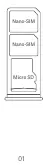
SIM Card Installation
Insert your SIM cards into the designated slots. Do not use non-standard SIM cards, as they may damage the SIM card slot.
Important Safety Information
- Operating Temperature: Use the device within the range of 0°C to 40°C.
- Battery Safety: Do not attempt to replace the built-in battery yourself. Use only authorized cables and power adapters. Do not charge for more than 12 hours.
- Disposal: Do not dispose of the battery or device with household waste. Follow local regulations for recycling.
- Handling: Do not disassemble, crush, or burn the battery. Stop using the device immediately if the battery appears deformed or damaged.
- Hearing Protection: Avoid listening at high volume levels for long periods to prevent hearing damage.
- General Safety: Keep the device dry. Do not attempt to repair the device yourself; contact authorized customer support.
Safety Precautions
Observe all laws restricting mobile phone use in specific environments, such as petrol stations, explosive atmospheres, or hospitals. Maintain a minimum distance of 15 cm from medical devices like pacemakers. Turn off the device on aircraft when required.
Legal and Regulatory Information
This device is intended for use in EU member states. Indoor use is restricted in the 5250 to 5350 MHz frequency range. Ensure the power adapter meets the requirements of Clause 6.4.5 in IEC/EN 62368-1.
Manufacturer information
Xiaomi Corporation
Practical help
Common problems
Device does not work properly
Do not attempt to repair it yourself. Contact Mi customer support or bring it to an authorized repair center.
Battery appears deformed or damaged
Stop using the device immediately and contact an authorized repair center.
Potential interference with medical devices
Maintain a minimum distance of 15 cm between the phone and pacemakers or other medical equipment.
Before use
- Ensure you are using authorized cables and power adapters.
- Check that the SIM card is a standard Nano-SIM.
- Verify the operating environment is between 0°C and 40°C.
- Ensure the power outlet is easily accessible for the AC/DC adapter.
Specs in practice
- Operating Temperature
- 0°C to 40°C; usage outside this range may damage the device.
- Charging Limit
- Do not charge the device for more than 12 hours.
- Frequency Restriction
- 5250-5350 MHz band is restricted to indoor use in the EU.
Images and diagrams
- The diagram shows the physical layout of the device, including the power button, volume buttons, and the USB-C charging port.
- The SIM tray diagram illustrates the correct placement for two Nano-SIM cards and one Micro SD card.
Model compatibility
- Use only authorized accessories compatible with the Redmi 12C.
- Power adapters must meet the requirements of Clause 6.4.5 in IEC/EN 62368-1.

Manual page author
Michael Turner
Technical manual editor
Reviews PDF manuals for structure, safety notes, and practical product details so readers can find the right information quickly.