Mobile / Smartphones
Xiaomi Redmi 15C Smartphone Instructions
Essential safety, operation, and regulatory information for the Xiaomi Redmi 15C smartphone, including charging guidelines and compliance details.
Table of contents
Product Overview
The Redmi 15C is a digital mobile phone supporting GSM, GPRS, EDGE, UMTS, and LTE networks, along with Bluetooth and Wi-Fi connectivity. The device features a SIM tray supporting two Nano-SIM cards and a Micro SD card.
Getting Started
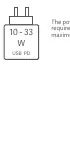
To set up your device, insert your SIM cards and Micro SD card into the tray. The device can be charged using a USB Type-C cable. For optimal performance, use a charger with an output between 10W and 33W, supporting USB PD fast charging.

Safety Precautions
- Medical Devices: Maintain a minimum distance of 15 cm from pacemakers. Consult your doctor before using the phone near medical equipment, hearing aids, or cochlear implants.
- Environment: Do not use the phone in explosive atmospheres, such as petrol stations, fuel storage areas, or blasting zones.
- Usage: Avoid using the phone outdoors during thunderstorms to prevent lightning strikes. Do not use the phone while it is charging.
- Humidity: Keep the device away from high-humidity areas like bathrooms to prevent electric shock, fire, or damage.
Charging and Maintenance
This package does not include a charger for environmental reasons. You may use any third-party charger that complies with USB 2.0 or higher protocol standards and meets international safety standards (IEC 60950 or IEC 62368-1). Using non-compliant chargers may damage the device or pose safety risks.
Factory Reset
To erase local data, navigate to Settings > About phone > Factory reset. This will remove accounts, contacts, photos, videos, apps, backups, and SD card data.
Regulatory Information
This device complies with EU and UK regulations regarding radio equipment (RED Directive 2014/53/EU). It is restricted to indoor use only when operating in the 5250 to 5350 MHz frequency range in most EU member states and the UK. The device features an electronic label accessible via Settings > About phone > Certification.
Related manuals
Related manuals from the same brand or category.
Mobile / Smartphones
Xiaomi 15T: Quick Start Guide
XiaomiMobile / Smartphones
Xiaomi 15T Smartphone
XiaomiMobile / Smartphones
Xiaomi 15T Pro User Manual
XiaomiMobile / Smartphones
Xiaomi 15T Pro Smartphone User Guide
XiaomiMobile / Smartphones
Xiaomi 15T Safety Information
XiaomiGeneral / Other Manuals
Xiaomi 15T / 15T Pro VIP Service Terms
XiaomiDocuments / Warranty Safety
Xiaomi 15T & 15T Pro Exclusive Services Terms & Conditions
XiaomiDocuments / Warranty Safety