Mobile / Smartphones
User Guide for Xiaomi Redmi A5 Smartphone
Quick start guide and safety information for the Xiaomi Redmi A5 smartphone, including SIM card installation, charging instructions, factory reset, and safety precautions.
Table of contents
Manual images
Jump to the sectionQuick guide from the manual
This document provides essential safety information, regulatory compliance details, and basic usage instructions for the Xiaomi Redmi A5 smartphone. It covers device setup, charging, and factory reset procedures.
Device Overview
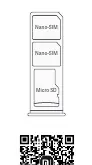
The Redmi A5 features a power button and volume keys on the side. The SIM card tray supports two Nano-SIM cards and one Micro SD card.
Charging
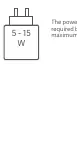
For environmental reasons, a charger is not included in the package. The device supports USB Type-C charging. Use a charger with a maximum output of 15W. The power delivered by the charger must be between 5W and 15W to achieve maximum charging speed. You can charge by connecting to a computer via a USB data cable or by using a compatible Mi brand or third-party charger that meets IEC 60950 or IEC 62368-1 standards.
Factory Reset
To erase all local data, go to Settings > System > Reset options > Erase all data (factory reset). This will remove accounts, contacts, photos, videos, apps, backups, and SD card data.
Safety Precautions
- Maintain a minimum distance of 15 cm from medical devices like pacemakers.
- Do not use the phone in explosive atmospheres, such as petrol stations.
- Avoid using the phone in high-humidity areas like bathrooms to prevent electric shock.
- Do not use the phone outdoors during thunderstorms to avoid lightning strikes.
- Do not make calls while the device is charging.
Regulatory Information
The device is compliant with EU and UK regulations regarding RF exposure (SAR). The highest SAR values are 0.988 W/kg for the head and 0.998 W/kg for the body (at 5 mm distance). The device is restricted to indoor use only when operating in the 5250 to 5350 MHz frequency range in most EU member states.
Manufacturer information
Xiaomi Corporation
Practical help
Common problems
Device not charging or charging slowly
Ensure you are using a charger with an output between 5W and 15W. Using incompatible chargers may damage the device or result in slow charging.
Potential interference with medical devices
Maintain a minimum distance of 15 cm between the phone and pacemakers. Avoid carrying the phone in a breast pocket.
Before use
- Ensure the power adapter is compliant with local and international safety standards.
- Use only compatible USB Type-C cables.
- Check that the SIM card is a standard Nano-SIM to avoid damaging the slot.
Specs in practice
- SAR Limit (10g)
- Specific Absorption Rate limit for head and trunk is 2.0 W/kg, ensuring safe RF exposure levels.
- Operating Temperature
- The device should be used within the 0°C to 40°C range to prevent damage.
- Charging Power
- The charger must provide between 5W and 15W for optimal and safe charging.
Images and diagrams
- The diagram shows the side buttons (power and volume) and the layout of the SIM/Micro SD card tray.
- The charging diagram indicates the required power range of 5-15W for the charger.
Model compatibility
- Compatible with USB 2.0 or higher protocol chargers.
- Chargers must meet IEC 60950 or IEC 62368-1 safety standards.
- Restricted to indoor use in the 5250-5350 MHz frequency range in EU/UK.

Manual page author
Michael Turner
Technical manual editor
Reviews PDF manuals for structure, safety notes, and practical product details so readers can find the right information quickly.