Mobile / Smartphones
Safety Information Guide for Xiaomi Redmi Note 13 Pro 5G
A quick guide covering safety precautions, regulatory compliance, SAR exposure limits, and factory reset instructions for the Xiaomi Redmi Note 13 Pro 5G smartphone.
Table of contents
Quick guide from the manual
This document provides essential safety information, regulatory compliance, and basic device management instructions for the Xiaomi Redmi Note 13 Pro 5G. It is intended to ensure safe operation and adherence to international standards.
Safety Precautions
To ensure safe use of your mobile phone, observe the following precautions:
- Follow all laws and regulations restricting mobile phone use in specific environments (e.g., petrol stations, explosive atmospheres, hospitals).
- Maintain a minimum distance of 15 cm from medical devices like pacemakers to avoid potential interference.
- Do not use the phone outdoors during thunderstorms to avoid lightning strikes.
- Do not make calls while the phone is charging.
- Avoid using the phone in high-humidity areas like bathrooms to prevent electric shock, injury, fire, or charger damage.
- Turn off the phone on aircraft when required.
Factory Reset
To quickly erase local data on your device, follow these steps:
- Go to Settings.
- Select About phone.
- Select Factory reset.
Note: This process will erase accounts, contacts, photos, videos, apps, backups, SD card data, and other items on the device.
Regulatory Information
The device complies with EU and FCC regulations regarding radio frequency (RF) exposure. The Specific Absorption Rate (SAR) limits are 2.0 W/kg (10g) for EU and 1.6 W/kg for FCC. For body-worn operation, maintain a minimum separation distance of 5 mm (EU) or 1.5 cm (FCC) from the body. Avoid using accessories containing metal components when carrying the device near the body.
Electronic Label
To access certification information, go to Settings > About phone > Certification, or type "Certification" into the search bar in Settings.
Manufacturer information
Xiaomi Corporation
Practical help
Common problems
Device interference with medical equipment
Maintain a minimum distance of 15 cm from pacemakers and consult your doctor/device manufacturer if you use other medical devices.
Radio frequency interference
If the device causes interference with radio or TV reception, try reorienting the antenna, increasing separation, or connecting to a different circuit.
High humidity damage
Do not use the phone in bathrooms or high-humidity environments to prevent electric shock, fire, or charger damage.
Before use
- Ensure the power adapter complies with local and international safety standards.
- Check for any posted signs requiring the phone to be turned off in specific areas.
- Verify that any body-worn accessories do not contain metal components.
- Ensure the device is kept at the required minimum distance from the body during operation.
Specs in practice
- SAR (Specific Absorption Rate)
- A measure of the rate at which energy is absorbed by the human body when exposed to a radio frequency electromagnetic field.
- 5G Connection
- Availability depends on the country, carrier, and user environment.
Images and diagrams
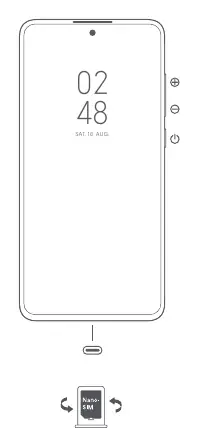
- The manual includes a diagram showing the physical buttons (volume up/down, power) and the location of the SIM card tray.
Model compatibility
- The device is restricted to indoor use only when operating in the 5250 to 5350 MHz frequency range in most EU countries.
- 5G connectivity depends on regional availability and local network support.

Manual page author
Emily Carter
User documentation editor
Prepares concise manual descriptions and highlights the most useful setup, operation, and maintenance information for readers.