Power / Car Chargers
User Manual for Mi Wireless Car Charger 20W
Quick guide for the Mi Wireless Car Charger 20W. Learn how to install, operate, and maintain your wireless car charger, including safety precautions and technical specifications.
Quick answers from the manual
Quick answer
- The Mi Wireless Car Charger 20W is an automatic clamping car mount that supports up to 20W wireless charging. It uses an inductive sensor to automatically secure your phone when placed near the charger. p. 4, 5
Key actions
- Install the charger to the air vent using the locking mechanism. p. 5
- Place the phone near the sensor to automatically secure it. p. 5
- Press the release button to remove the phone. p. 6
First start
- Connect the charger to the car cigarette lighter and plug the USB-A cable into the red USB port. p. 5
Show 3 more answers Show less
Problems and fixes
Indicator flashes
Check for metal objects on the phone or ensure the phone supports wireless charging.
p. 5, 6Technical specifications
| Parameter | Value | Meaning | Pages |
|---|---|---|---|
| Model | WCJ02ZM | Product model number | p. 8 |
| Output | 20W Max | Maximum wireless charging power | p. 8 |
Where to find it in the PDF
- Product Overview p. 4
- Usage Instructions p. 5, 6
- Precautions p. 7
- Technical Specifications p. 8
Table of contents
Manual images
Click an image to enlargeQuick Guide
The Mi Wireless Car Charger 20W is designed for convenient, one-handed operation in vehicles. It features an automatic clamping mechanism triggered by an inductive sensor, 20W fast wireless charging, and a USB-C input. Ensure your smartphone is compatible with Qi wireless charging before use.
Product Overview
The device consists of the following main components:
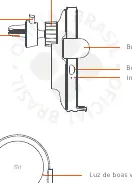
- Locking Mechanism: Secures the charger to the air vent.
- Inductive Sensor: Detects the phone to automatically open/close the arms.
- Release Button: Used to open the arms and remove the phone.
- Indicator Light: Shows the charging status.
- Welcome Light: Indicates the device is powered on.
Installation
Air Vent Mounting:
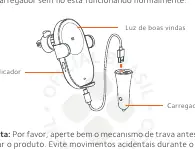
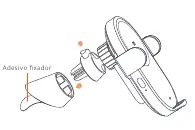
- Attach the charger to the air vent using the provided clip.
- Tighten the locking mechanism on the back to secure it firmly.
- Connect the car charger adapter to the cigarette lighter socket.
- Plug the USB-A cable into the red USB port on the charger.
- The indicator will flash blue three times, and the welcome light will turn on, indicating normal operation.
Adhesive Mounting: If the air vent clip is not suitable, use the provided adhesive to mount the charger on a flat surface.
Usage
Charging:
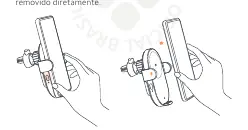
- Ensure there are no metal objects on the back of your phone or the charger surface.
- Place your phone near the inductive sensor. The arms will open and close automatically to secure the device.
- The indicator light will turn blue when charging is active.
Removing the Phone:
- Press the release button on the side of the charger. The arms will open, allowing you to remove the phone.
- If the car power is off, the phone can be removed directly.
Safety Precautions
- Do not disassemble or modify the product.
- Keep the inductive sensor glass surface clean.
- Do not place metal objects, bank cards with magnetic strips, or chips near the charger.
- Keep the device at least 20cm away from implanted medical devices (pacemakers, etc.).
- Do not submerge in water or expose to extreme heat/humidity.
- Keep out of reach of children.
Technical Specifications
- Model: WCJ02ZM
- Input: 5V/3A, 9V/2A, 12V/2A, 15V/1.8A, 20V/1.35A
- Output: 20W Max
- Inductive Distance: ≤ 4mm
- Operating Temperature: 0°C to 40°C
Practical help
Common problems
Indicator light is flashing
The charger is in protection mode. Check for metal objects on the back of the phone or ensure the phone is positioned correctly.
Charging not starting
Ensure the phone is compatible with wireless charging and is positioned close enough to the inductive sensor.
Before use
- Check that the phone is compatible with Qi wireless charging.
- Ensure no metal objects are on the back of the phone.
- Secure the locking mechanism tightly to the air vent.
- Connect the USB cable to the red USB port on the charger.
Show more Show less
Specs in practice
- 20W Max Output
- Provides fast wireless charging for compatible smartphones.
- Inductive Distance ≤ 4mm
- The phone must be within 4mm of the charger surface to charge.
Images and diagrams
- The charger uses an automatic clamping mechanism that opens and closes when the phone is placed near the sensor.
- The indicator light provides visual feedback on the charging status.
Model compatibility
- Compatible with smartphones supporting the Qi wireless charging standard.
- 20W charging speed requires a compatible smartphone.

Manual page author
David Miller
Documentation analyst